Who is this relevant to?

Designer dealing with distracting daylight

You work beside a bright window and want to reduce glare first, then check whether you can read the keys at your own workstation. Arboportaal recommends positioning your viewing direction parallel to the window.

Designer switching between shortcuts and a pointing device

You want to keep your modifier, function and navigation keys, while still leaving room for a mouse or trackpad. The shortcuts you need depend in part on your application and operating system.

Designer who prioritises hand position

You are comparing a conventional keyboard with two separately positionable halves and want to take your whole workstation setup into account. A keyboard is just one part of your workstation.

What should you consider when choosing?

Compact keyboard

Choose this if: you often switch between keyboard shortcuts and a mouse or trackpad, and want to keep space free beside the keyboard.

Trade-off: a compact model may not have an integrated numeric keypad; check that it includes the navigation and function keys you need.

Full-size keyboard

Choose this if: you need a numeric keypad and have enough room for both the keyboard and your pointing device.

Trade-off: its wider design takes up more space beside the keyboard; consider whether you will use the extra keys.

Compact, customisable mechanical keyboard

Choose this if: you want a compact layout with function keys and the option to customise key functions.

Trade-off: the K3 Max ISO versions mentioned are available with UK, German, Swiss or Nordic layouts; check the specific version and its symbols.

Split keyboard

Choose this if: the position of your hands in relation to each other is your main priority.

Trade-off: two separately positionable halves need space and may take some getting used to; also check whether you want the wired or wireless version.

Mac-specific keyboard

Choose this if: you use a Mac with Apple silicon and macOS 15.1 or later, and want Touch ID.

Trade-off: these system requirements apply to the Apple version mentioned; Apple does not specify backlighting for it.

What to consider What to look for Who is this important to?
Light and legibility Reduce screen glare by adjusting your workstation setup; check the key legends in similar lighting. If I work beside a bright window, I want to know whether I can read the legends from my seat. Around 33% of consumers prioritise legibility in daylight.
Shortcuts and space for a pointing device Check the modifier, function and navigation keys you need for your application and operating system. If I switch between a keyboard and a mouse or trackpad while designing, I want to keep the shortcuts I need and leave enough room. Around 27% of consumers give shortcuts and space for a pointing device top priority.
Hand position Compare a compact width with separately positionable halves, and consider how much desk space you have. If hand position is my priority, I also want to check that my whole workstation is set up well. Around 20% of consumers prioritise hand position.
Layout and compatibility Check the exact keyboard layout and, for Mac-specific features, the system requirements. If I need specific key legends or a feature such as Touch ID, I want to be sure the version is compatible with my computer. Around 20% of consumers give layout and device compatibility top priority.

Common buying mistakes

  • Assuming backlighting guarantees legibility in bright sunlight

    Keyboard backlighting and screen glare are two different things. Lighting specifications alone do not show how easy the legends are to read in direct sunlight.

    Reduce screen glare by adjusting your workstation setup, then check the key legends separately in similar lighting.

  • Assuming all ISO or QWERTY versions have the same layout

    The Keychron K3 Max ISO range mentioned here includes several national layouts. Symbols and key positions may therefore differ from what you expect.

    Before buying, check the layout, key legends and keys for your operating system.

    Choosing the wrong version may mean you need different keycaps.

  • Choosing Touch ID without checking the Mac requirements

    The Apple version mentioned requires a Mac with Apple silicon and macOS 15.1 or later.

    Check the system requirements for the version before making Touch ID your deciding reason for choosing this keyboard.

  • Confusing an extended warranty with your statutory rights

    ACM ConsuWijzer states that your statutory warranty applies alongside any seller's or manufacturer's warranty. An additional warranty product does not replace those rights.

    Compare what an additional warranty actually offers on top of your existing rights.

Brands to consider

Logitech

The MX Keys Mini is compact, while the MX Keys S has an integrated numeric keypad.

  • Logitech specifies backlighting for both models mentioned. On the MX Keys S, you can adjust the brightness and lighting duration.
  • The MX Keys Mini has no integrated numeric keypad. Its backlighting is no proof of improved legibility in bright daylight.

Keychron

The K3 Max ISO is a compact mechanical keyboard with customisable key functions.

  • Keychron specifies a 75% layout and software-based key remapping.
  • The ISO versions mentioned have UK, German, Swiss or Nordic layouts; check which version you are choosing.

R-Go Tools

The Split Break v.2 is designed for anyone who wants to position the two keyboard halves separately.

  • The manual describes two positionable halves, as well as wired and wireless versions.
  • Health benefits are manufacturer claims, not independent measurements of the effects of choosing this keyboard.

Apple

The Dutch-language Magic Keyboard with Touch ID is intended for users with a compatible Mac who want this feature.

  • Apple specifies Bluetooth, USB-C and Touch ID for the version mentioned.
  • Apple lists a Mac with Apple silicon and macOS 15.1 or later as system requirements. Backlighting is not specified for this version.

CHERRY

The KC 6000 SLIM is a full-size keyboard with a USB-A connection for Windows.

  • CHERRY specifies a scissor mechanism and key legends described as durable.
  • Backlighting is not mentioned for this model. Check the item number and national keyboard layout.

Keyboards at Joybuy

This selection includes compact backlit keyboards and a full-size keyboard with a numeric keypad. Compare the layout and connection type with the way you work, and check legibility at your own workstation.
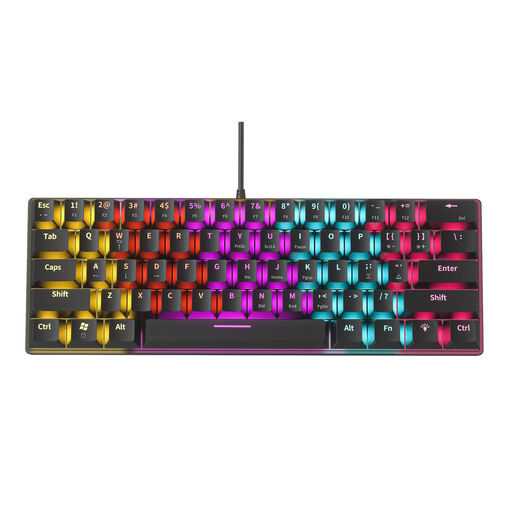
NAXSIR Mini Mechanical Keyboard with 61 keys and RGB lighting

NAXSIR Mini Mechanical Keyboard, 61 keys

The compact layout may suit you if you are looking for a small keyboard; check that it has the keys you need for your design work.

61 keys; 12 RGB lighting effects; USB connection.

Joybuy

Wired QWERTY keyboard with numeric keypad and backlit keys

Wired QWERTY keyboard with numeric keypad

A full-size keyboard with a numeric keypad may suit you if you use those keys and have room for a wider keyboard.

Full-size; numeric keypad, navigation cluster and function keys; backlit keys; wired plug-and-play connection.

Joybuy

AJAZZ AK980 V2 mechanical keyboard with 98% layout and RGB lighting

AJAZZ AK980 V2, 98% QWERTY

The 98% layout may suit you if you are considering a mechanical keyboard with a compact layout; check that the key layout works for the way you use it.

Mechanical; hot-swappable; RGB lighting; QWERTY; wired, Bluetooth and 2.4 GHz.

Joybuy

AJAZZ AK820 MAX 75% wireless mechanical keyboard with US QWERTY layout

AJAZZ AK820 MAX 75%, US QWERTY

The 75% layout is an option if you are looking for a compact mechanical keyboard; check that the US QWERTY layout matches the key positions you are used to.

Wireless; three connection modes; hot-swappable; RGB lighting; arrow keys and function row.

Joybuy

AJAZZ AK820 75% wired mechanical keyboard with US QWERTY layout and white backlighting

AJAZZ AK820 75%, wired, US QWERTY

This compact version may suit you if you are considering a wired mechanical keyboard with backlighting; check the layout and connection for your computer.

75% layout; 83 keys; hot-swappable; linear switches; white backlighting; wired.

Joybuy

Frequently asked questions

Does keyboard backlighting help with bright sunlight at your workstation?

The product specifications mentioned do not show that it does. Logitech describes the backlighting, but does not provide measurements of legibility in direct sunlight. If screen glare is an issue, first adjust your workstation setup to reduce the light coming in, then check the key legends separately.

How can you check whether your design shortcuts will work on a compact layout?

Check the shortcuts for your application and operating system, then compare them with the modifier, function and navigation keys on the exact version. Figma documents different keyboard shortcuts for Mac and Windows.

What should you look for in a mechanical keyboard layout?

Check the national layout and key legends of the version you choose, rather than relying only on the model name or the ISO or QWERTY label. The Keychron K3 Max ISO versions mentioned include UK, German, Swiss and Nordic layouts.

Which Mac do you need for the Magic Keyboard with Touch ID mentioned here?

The Apple version mentioned requires a Mac with Apple silicon and macOS 15.1 or later. Check these system requirements before choosing the keyboard for Touch ID.

Do employees in the Netherlands always have to use a separate keyboard?

Not in every situation. Arboportaal states that if you work at a screen for more than two hours a day, the screen and keyboard must not be attached to each other; when using a laptop, the employee must therefore be able to use a separate screen or keyboard. This is a conditional workstation requirement, not a general buying requirement for every reader.
