Who is this guide for?

Writers who write long journal entries

If you regularly type longer passages, look for a key feel and hand position that suit your workspace. A keyboard is no substitute for taking breaks or setting up your workspace appropriately. Arboportaal explains that screen work can involve repetitive hand movements and static strain.

Writers who rearrange sections

When editing headings and sections, the editing keys and your writing application matter. In Word for Windows, headings appear in the Navigation pane when you apply heading styles.

Writers with a shared or small desk

A smaller keyboard can free up space beside it; in a shared space, typing noise may also be a factor. Compare the physical layout and key design, as descriptions such as ‘quiet’ are not independent noise measurements.

What should you look for when choosing?

What to consider What should you check? Who is this important for?
Key feel and hand position If possible, try the keyboard and check whether its shape and any wrist rest suit your desk. If I write for long periods, I want a key design and hand position that suit my workspace. Around 33% of consumers choosing a keyboard for this writing project prioritise key feel and hand position.
Editing headings and sections Check the arrow, navigation and function keys on the model, and test heading styles in your writing application. If I often move headings, I want the editing keys I need close at hand and an application that recognises my headings as a structure. Around 27% of consumers in this buying context prioritise editing sections and headings.
Typing noise Check the switch type on the exact model and, if possible, assess the noise yourself in a similar space. If others work or rest nearby, I want to take the noise of my typing into account. Around 20% of consumers in this buying context prioritise keeping things quiet for those around them.
Space and connectivity Check the dimensions, layout, available ports and any Bluetooth or receiver connection. If I use a small desk or a specific computer, I want the keyboard to fit and connect to my device. Around 20% of consumers in this buying context prioritise space and connectivity.

Things to watch out for when buying

  • Looking for a special key to create sections

    A keyboard model won’t create a section outline by itself. In Word for Windows, headings appear in the Navigation pane when you apply heading styles to them.

    Choose your keyboard for typing and editing. Try out heading styles and the Navigation pane in the writing application you use.

  • Assuming similarly named models are identical

    The S-board 840 and S-board 840 No Hub differ in their USB ports. Hot-swap support on the Keychron K3 Max depends on the model; a Trust Primo keyboard and mouse set is also a different product from the standalone wired Primo keyboard.

    Before buying, compare the full model name, physical key layout, connectivity and included accessories.

  • Assuming a split keyboard is guaranteed to solve discomfort

    The ERGO K860 has a curved, split frame, but that product specification doesn’t prove what effect the shape will have for you personally.

    Consider your workspace too, and vary your tasks. If discomfort persists, seek appropriate professional advice rather than relying on a product claim.

Relevant brands to compare

Trust

The Primo is a full-size wired option for anyone who mainly wants to type text.

  • Trust describes the Primo as having low-profile, quiet keys, a USB-C cable and an included USB-A adapter.
  • A full-size keyboard takes up space. ‘Quiet’ is the manufacturer’s description, not an independent noise measurement.

BakkerElkhuizen

The S-board 840 is designed for a compact, permanent writing space without a separate number pad.

  • According to BakkerElkhuizen, the S-board 840 has scissor-switch keys, a wired connection and two USB ports.
  • Make sure you choose the model with a hub: the S-board 840 No Hub does not have those two ports.

Logitech

The MX Keys S and ERGO K860 offer different key designs and features; these specifications apply to the respective models.

  • Logitech describes the MX Keys S as having backlighting and customisable features, and the ERGO K860 as having a curved, split frame.
  • A split design doesn’t prove a personal ergonomic benefit. Check the layout and features you want for each model.

Keychron

The K3 Max is a compact mechanical option if customisable keys and multiple connection options would work well with your setup.

  • Keychron lists a 75% layout, wired and wireless connections, and customisable keys for the K3 Max.
  • According to Keychron, hot-swap is available on a specific RGB model. Also check the physical layout and switches on the version available.

Keyboards at Joybuy

These keyboards are options for long-form writing, editing sections and different layout and connectivity preferences.

Logitech MX Keys for Business, QWERTY US

Logitech MX Keys for Business, QWERTY US

An option for long-form writing if you’re looking for a full-size keyboard with a US layout.

The title describes a wireless QWERTY US model. According to the product description, the backlighting adjusts automatically; check that the layout suits the way you use it.

View at Joybuy

HP 725 Multi-Device Rechargeable Wireless Keyboard

HP 725 Multi-Device Rechargeable Wireless Keyboard

An option for a permanent writing space if you’re looking for a full-size keyboard that connects to multiple devices.

The product description lists a wireless model with low-profile keys, programmable keys and connections to up to three devices via Bluetooth and a USB dongle. Check which connection works with your computer.

View at Joybuy
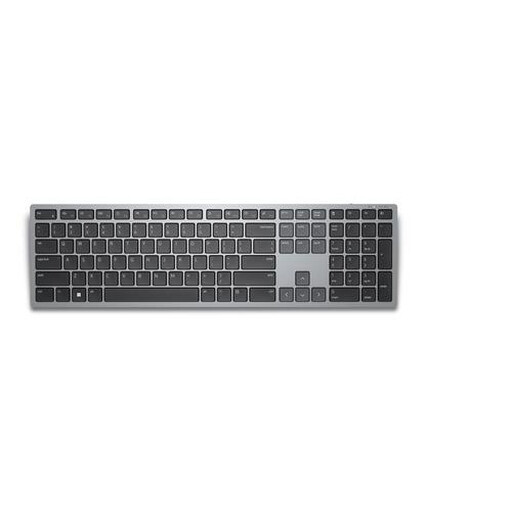
DELL Wireless Keyboard KB700, AZERTY BE

DELL Wireless Keyboard KB700, AZERTY BE

An option if you’re looking for programmable keys for editing text and use a Belgian AZERTY layout.

The product description lists a wireless keyboard with a number pad and pairing with up to three devices. Check that the AZERTY BE layout suits your typing habits.

View at Joybuy

Logitech K120 Wired Keyboard, black

Logitech K120 Wired Keyboard, black

A full-size wired option for a permanent writing space.

The product description lists a 1.5-metre USB cable, a number pad and low-profile keys described as quiet. That’s a product description, not an independent noise measurement.

View at Joybuy

Trust Vaiya wireless keyboard, full-size, QWERTY US

Trust Vaiya, full-size, QWERTY US

An option for writing in a shared space if you’re looking for a full-size wireless keyboard.

The product description lists low-profile scissor-switch keys, a number pad and connections via USB receiver and Bluetooth. The keys are described as quiet; check that the QWERTY US layout suits you.

View at Joybuy

Frequently asked questions

Do I need a programmable keyboard to divide my journal entry into sections?

No, you don’t need a programmable keyboard for that. In Word for Windows, headings appear in the Navigation pane when you apply heading styles to headings in the main text. If you use Word for Mac, Word on the web or another writing application, check how it works separately.

How do I connect a wireless keyboard?

It depends on the model and your device. Logitech describes connecting wireless keyboards using a USB receiver plugged into a suitable port or directly via Bluetooth; check which method applies to the model you choose.

How do I look after a keyboard I use every day?

Follow the cleaning instructions for the exact model and check them before using any cleaning product. The cleaning tests Logitech published for selected education products don’t show that the same method is suitable for every keyboard.

What warranty and cancellation rights apply when buying online in the Netherlands?

When you buy as a consumer from a business, you’re entitled to a product that works as it should; if there’s a problem, contact the seller. The Dutch government states that there is no fixed statutory warranty period for all products. For eligible online consumer purchases, you generally have a 14-day cooling-off period. Check that the sale meets the relevant conditions.

Do Dutch workplace health and safety rules for screen work automatically apply to my personal journal?

No, the obligations described by Arboportaal are aimed at employers and employees’ workplaces. Writing privately doesn’t automatically bring those rules into effect. Paying attention to posture and varying your activities can still be useful, but it doesn’t predict an individual health outcome.
