Start by considering your writing software, operating system and the keys you use when editing. You don’t need a programmable keyboard if the existing shortcuts do the job. Then compare the physical layout with the space on your desk: more compact keyboards save space, but may omit keys, while a split design takes time to get used to and doesn’t replace breaks or a suitable workspace.
Who is this buying guide for?
Writer who edits frequently
You often move, select and edit text, and want to know whether standard shortcuts are enough or programmable keys could help. Microsoft Support explains customisable keyboard shortcuts in Word; Logitech describes programmable keys and Smart Actions for certain keyboards.
Writer who works in long sessions
You’re looking for a keyboard that suits your desk and preferred hand position, without taking manufacturers’ ergonomic claims as a guarantee against discomfort. Arboportaal describes repetitive movements and static strain when working at a screen; Logitech describes the split design of the ERGO K860.
Writer at a shared or small desk
You’re thinking about space, noise and how easy it is to reach punctuation keys. A compact layout can save space, but may leave out keys you’re used to. Keychron and R-Go Tools describe compact keyboards; Microsoft Support notes that the Alt codes mentioned require a numeric keypad.
What should you look for when choosing?
First, try the tasks you perform most often in your own writing software. Then check that the keyboard has the physical keys and layout you need.
| What to consider |
What should you check? |
Who is this important for? |
| Keyboard shortcuts and editing |
Try the tasks in your writing software. Then check that your preferred key assignments and any required software are compatible with your system. |
If I often rearrange lines and passages, I want to edit text quickly using the keyboard. Around 36% of consumers prioritise shortcuts and editing. |
| Hand position during long sessions |
Compare the shape and width with your desk, and see whether the layout remains comfortable while you edit. |
During long writing sessions, I want a hand position that suits my workspace, without expecting a keyboard to replace breaks. Around 29% of consumers prioritise comfort during long sessions. |
| Noise and key layout |
Check the exact physical version and try the punctuation you use often; don’t rely on the layout name alone. |
At a shared desk, I want to type punctuation without having to search for the keys each time. Around 21% of consumers prioritise noise and physical layout. |
| Writing space and devices |
Compare the connection you need and the system requirements with the specifications of the exact version you’re considering. |
If I write in different places or on different devices, I want to know in advance how to connect the keyboard. Around 14% of consumers prioritise switching between writing spaces and devices. |
Common pitfalls
-
Assuming a different layout is just a different label
ISO and ANSI versions can differ in the physical positioning of keys. As a result, a differently arranged version may feel less intuitive for punctuation and navigation.
Check the exact version and see where Enter, the symbols and the navigation keys are before you choose.
-
Assuming macro software will solve every editing task
When you reassign a key combination, it may lose its original function until you restore it.
Make a note of the tasks you repeat and check the existing shortcuts in your writing software before creating new assignments.
-
Seeing an ergonomic design as a substitute for breaks
Arboportaal describes repetitive movements and static strain when working at a screen. A keyboard’s shape won’t automatically remove these working conditions.
Consider the keyboard alongside your workstation setup, and break up long periods of screen work.
Relevant brands
Logitech
The MX Keys S is worth considering if you’re looking for programmable keys; the ERGO K860, by contrast, has a curved, split design.
- Logitech says the MX Keys S can automate recurring tasks with Logi Options+.
- Claims about posture and shape for the ERGO K860 come from the manufacturer and don’t prove that every Logitech keyboard prevents discomfort.
Keychron
According to Keychron, the K3 Max combines a compact 75% layout with customisable keys. Check whether you’re looking at the specific ISO or ANSI version you need.
- Keychron lists QMK/Launcher, several connection options and different ISO layouts.
- Don’t assume an ANSI model has the same physical layout as an ISO version.
R-Go Tools
The Compact Break is designed for a compact writing space and, according to the manufacturer, has a break indicator that works with software.
- The indicator can remind you to take a break when you use the associated software.
- Comfort and health claims come from the manufacturer; also check the layout and connection options available.
Apple
The Magic Keyboard (USB-C) with Dutch layout is a compact option for the compatible devices listed by Apple.
- Apple lists Bluetooth, USB-C charging and system requirements.
- The standard version is not the same product as a Magic Keyboard with Touch ID or an iPad keyboard case.
Keyboards at Joybuy
This selection includes compact keyboards, models with programmable keys, and keyboards with a larger layout or wrist rest. Check that the layout, connection and features of each version suit your writing space.
 No image available
Royalaxe E75 Custom 75% Hall Effect Mechanical Keyboard
A good fit for a compact writing space if you’re looking for a 75% layout and prefer typing with a wired connection.
The product name lists TTC Magnetic HE switches, hot-swappable keys and a wired mode.
View at Joybuy
 No image available
REDRAGON 94-key mechanical keyboard with phone holder and wrist rest
Worth considering if you’re looking for a keyboard with a wrist rest and phone holder.
The product name lists a wired connection, metal casing and 94 keys.
View at Joybuy
 No image available
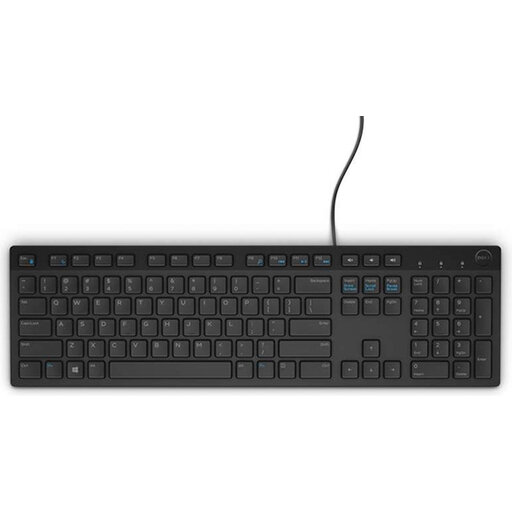
Dell KB216 USB keyboard, Belgian AZERTY layout, black
A good fit if you’re looking for a wired keyboard with a numeric keypad and the Belgian AZERTY layout suits the way you type.
The product name lists USB and a Belgian AZERTY layout. Compare the physical layout with your selected input layout.
View at Joybuy
 No image available
HP 450 programmable wireless keyboard
Worth considering if you want to handle recurring tasks with programmable keys.
The product name lists a wireless keyboard. Check that the available features and software are compatible with your system and writing software.
View at Joybuy
 No image available
AJAZZ AK820 MAX 75% keyboard with magnetic switches, 82 keys
A good fit for a compact writing space if you’re considering a wired keyboard with a 75% layout.
The product name lists magnetic switches and 82 keys. Check the exact layout before deciding whether the punctuation and navigation keys you need are easy to reach.
View at Joybuy
Frequently asked questions
Do you need programmable keys for writing shortcuts?
Not necessarily. Microsoft Support explains how to assign keyboard shortcuts to commands or symbols in Word for Windows; Microsoft Learn explains how to remap keys and combinations with PowerToys. First, check what your own writing software supports.
How can you avoid punctuation appearing on different keys from the ones you expect?
Compare the physical keyboard version with your selected input layout. Windows lets you change this layout in Settings; after connecting the keyboard, try the punctuation you use most often.
Can you use Windows Alt codes on a compact keyboard?
The Alt codes described by Microsoft require a numeric keypad; the row of numbers at the top of the keyboard won’t work for this. Microsoft also mentions the symbols panel, which you can open by pressing the Windows key and the full stop key.
Does an ergonomic keyboard prevent discomfort during long writing sessions?
You can’t tell from the shape alone. Arboportaal describes repetitive movements and static strain when working at a screen, so consider your workstation setup too and break up long periods of screen work.


