What should you consider when choosing?
First, count the computers and other devices you actually use. Then decide which connection and key layout will work best for your teaching setup.
| What to consider |
What should you check? |
Who is this important for? |
| Editing slides comfortably and quietly |
Check the key mechanism, layout and position of frequently used keys. Also consider how your keyboard and mouse are set up. |
If I edit lots of slides in one sitting, I want keys that feel and sound right for my workspace. Around 36% of consumers prioritise comfortable, quiet typing. |
| Control during lessons |
Check that the connection is compatible with your teaching computer and test the presentation controls before the lesson. |
When presenting, I want to move through my slides without interruption. Around 29% of consumers give predictable controls during lessons top priority. |
| Workspace and key layout |
Check the size and physical layout, and make sure the keys you use often are where you want them. |
At a limited workspace, I want to keep enough room while having familiar keys close to hand. Around 21% of consumers prioritise workspace and key layout. |
| Switching between devices |
Count the computers and tablets you want to use, and check the connection and compatibility for each device. |
If I really do switch between separate devices, I want to be able to select the active one easily. Around 14% of consumers give switching between devices top priority. |
Keyboards at Joybuy
This selection includes wired and wireless keyboards for a regular teaching computer, as well as options for use with multiple devices. Above all, check that the connection and physical key layout are compatible with your teaching computer.
 No image available
Wired keyboard with numeric keypad, QWERTY
Suitable for a regular workspace where you want a wired connection and a numeric keypad.
Full-size, QWERTY layout and plug-and-play connection.
View at Joybuy
 No image available
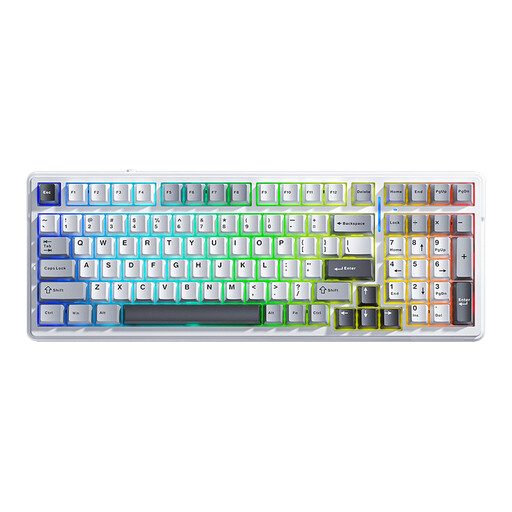
AULA F99 wireless mechanical keyboard
An option if you want a mechanical keyboard with multiple connection modes and a numeric keypad.
99 keys, tri-mode, hot-swappable switches and RGB backlighting. The listed layout is US QWERTY; check that the key positions are familiar to you.
View at Joybuy
 No image available
Trust Vaiya wireless keyboard
Suitable if you’re looking for a full-size keyboard with a numeric keypad and wireless connectivity.
Full-size, with scissor keys and multi-device functionality. The listed layout is US QWERTY; check the physical key layout.
View at Joybuy
 No image available
Ajazz AK820 Pro 75% mechanical keyboard
A compact option if you want to use less desk space.
75% size, tri-mode and a US QWERTY layout. Connection options include wired, Bluetooth and 2.4 GHz.
View at Joybuy
 No image available
Apple Magic Keyboard with Touch ID and numeric keypad
An option if you’re looking for a keyboard with a numeric keypad and Dutch layout for a compatible Mac.
The product title lists Touch ID and compatibility with Mac models featuring Apple silicon. Check that your Mac matches this description.
View at Joybuy
Frequently asked questions
Do I need a multi-device keyboard for two PowerPoint screens?
No, not if both screens are connected to the same computer. Microsoft Support explains how to use Presenter View on your own screen while showing the slides on a second screen. Check that your computer supports multiple screens and that the display is set to Extend. Switching between devices is for separate computers or other devices.
Can you control slides with a regular keyboard?
Yes. In the PowerPoint slide show described by Microsoft, press the right arrow to go to the next slide and the left arrow to go to the previous one. To go to a specific slide, type its number and press Enter. Test the controls in the programme you’ll be using during the lesson.
How should you set up your workspace if you spend a long time editing teaching materials on a laptop?
Consider your screen, keyboard and mouse together, and take breaks from screen work. For employees who work at a screen for more than two hours a day, Arboportaal outlines specific workplace requirements, including the option of using a separate screen or keyboard with a laptop. This isn’t a general buying requirement for every reader.
What if you don’t like your keyboard bought online, or it breaks too soon?
Many online consumer purchases usually come with a 14-day cooling-off period; check the applicable terms and exceptions. Dutch statutory rights also apply if a product doesn’t perform as you could reasonably expect under normal use. ACM ConsuWijzer explains that you’re entitled to an appropriate free solution from the seller in this situation; a manufacturer’s warranty period doesn’t automatically limit your statutory rights.


