
Programmers who use lots of symbols and navigation keys
If you write and edit code, you may want easy access to symbols, arrow keys and the function row. The physical layout and size are important factors to consider.


Start with a layout that puts the code and navigation keys you use most within easy reach. Then decide whether you need customisable shortcuts, an adjustable hand position or quiet typing, and check the physical layout, connection and software requirements for each version. A keyboard won’t run automated tests for you, but it can make entering your own test commands more practical.
If you write and edit code, you may want easy access to symbols, arrow keys and the function row. The physical layout and size are important factors to consider.
Some developers look for adjustable positioning for the keyboard halves; others want to customise keys for repetitive development tasks. These call for different features.
At a shared desk, quiet typing, the space available and the connection type may all matter, as long as the keys you need remain within easy reach.
Start with the keys you use most when programming and testing. Then compare the size, customisation options and connection type with your workspace.
| Factor | What to look for | Who is this important for? |
|---|---|---|
| Layout and reach | Check the physical layout and where your most-used symbols are placed. Also compare TKL with a full-size keyboard. | If I use code and navigation keys often, I want them within easy reach. Around 31% of consumers put easy access to these keys first. |
| Hand position | Check whether the keyboard halves can be adjusted and whether you have enough room for your preferred setup. | If I spend long hours at a computer, I want to be able to adjust my hand position to suit my workspace. Around 25% of consumers give hand position top priority. |
| Customisable keys | Check how key remapping or macros work on the version you’ve chosen. Make sure you’re allowed to use any required software on your computer. | When I repeat the same development or testing tasks, I want to customise keys and know what software I’ll need. Around 25% of consumers prioritise customisable keys for recurring tasks. |
| Quiet typing | Compare the specific version and connection type; a description of the mechanism isn’t a sound-level measurement. | At a shared desk, I want to type quietly without giving up the keys that are essential to my workflow. Around 19% of consumers put quiet typing first. |
ISO doesn’t refer to one fixed Dutch symbol layout. The Keychron K8 Pro is available in several ISO country variants; according to Keychron, the Keychron Q6 Ultra 8K uses ANSI.
Check the name and images of the version, and see where the characters you use most will appear on your computer.
A different country layout may take some getting used to; you may need different keycaps.
R-Go’s break indicator is linked to R-Go Break software. Logitech describes Smart Actions as a feature of Logi Options+.
Check which feature you need for the model you’ve chosen, and whether you’re allowed to use the relevant software on your computer.
On a managed computer, installation may require permission.
Kinesis warns that a keyboard can’t cure or prevent discomfort. Arboportaal also recommends varying your tasks, taking microbreaks and considering your whole workspace.
Assess the keyboard as part of your workstation setup. If you’re starting to experience discomfort, consider asking for advice on your workspace.
The K8 Pro ISO is an option if you’re looking for a TKL layout and key remapping; the Q6 Ultra 8K is a separate full-size ANSI model.
The MX Keys S is a good fit if you value a low-profile wireless keyboard and the ability to switch between devices.
The international Freestyle2 is designed for those who value an adjustable split layout more than mechanical switches.
The wired STREAM KEYBOARD TKL is an option if you’re looking for a compact keyboard with scissor-mechanism keys.
The Compact Break and Split Break are different options: one has a compact keyboard, while the other has two adjustable halves.
This selection of Joybuy products includes compact and full-size keyboards, with both customisable keys and versions designed for quiet typing. Check the connection and physical layout for each model.
 No image available
A wired TKL keyboard for anyone looking for a compact layout and quiet typing.
The product description lists membrane keys, 12-key rollover and key remapping via Corsair iCUE.
 No image available
A mechanical keyboard for anyone who wants to keep the arrow and function keys on a more compact board.
The product name lists tri-mode connectivity and hot-swap support. The product description mentions key remapping and macros via a web driver, with settings saved to the keyboard.
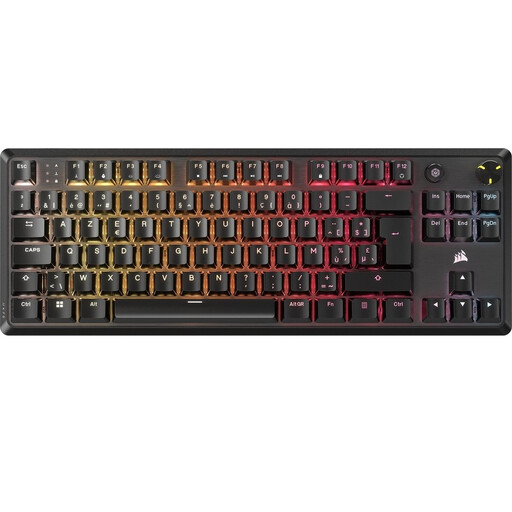 No image available
A mechanical TKL keyboard for anyone looking for a compact layout and programmable macros.
The product description lists a wired USB-C connection and up to five saved profiles. According to the description, setting up macros and managing profiles requires Corsair iCUE.
 No image available
A full-size layout with a number pad for anyone who enters lots of numbers and wants to switch between devices.
The product description lists quiet scissor-mechanism keys, a USB receiver, Bluetooth and connections to up to four devices.
 No image available
A TKL keyboard for anyone looking for programmable keys and the option to use a wired or wireless connection.
The product description lists optical switches, Bluetooth 5.0 and a detachable USB-C cable. For full functionality and key customisation, the description recommends Razer Synapse.
Not necessarily; think about how often you enter numbers in your planner. The CHERRY STREAM TKL doesn’t have a number pad, while according to Keychron, the Keychron Q6 Ultra 8K is a full-size model with a number pad.
It depends on the model and feature. Logitech describes Smart Actions as a feature of Logi Options+; for the K8 Pro, Keychron mentions firmware and the Launcher web app for remapping. Before you buy, check how the setting you want works on your version and whether you’re allowed to use the required software on your work computer.
With the Freestyle2, you can adjust the position of the two halves. Start with a setup that lets you type comfortably, then adjust the distance to suit your workspace. Remember to vary your screen-based work and take breaks; a different keyboard layout isn’t a guarantee that discomfort will go away.
For online purchases from a business, you usually have 14 days to change your mind, with some exceptions. You’re also entitled to a product that meets the terms of the agreement. The Netherlands doesn’t have a fixed statutory warranty period; if a product is faulty, contact the seller.
The rules for working with display screens don’t set a general product requirement for the keyboard of every individual buyer. For employees who work with display screens for more than two hours a day, Arboportaal states, among other things, that the screen and keyboard must not be attached to each other. The rules apply to the workplace subject to the relevant conditions.