Choose a keyboard based on what you enter most often: a numeric keypad can be useful for entering lots of dates, while a compact model leaves more room for your mouse. Check the key layout, connection and any software requirements too. Search criteria and wildcards are determined by the website you use, not by the keyboard.
Who is this relevant to?
Anyone transcribing names and inscriptions
When transcribing text from photos of gravestones, a familiar key layout can help you enter names and special characters accurately. Online Begraafplaatsen and Geneanet provide context for searching for graves and viewing gravestone photos.
Anyone entering lots of dates
If you’re entering birth and death dates, weigh the convenience of a built-in numeric keypad against the extra width. Kensington describes the KB620-RC as having a numeric keypad, while R-Go Tools lists a separate number pad for the Compact Break.
Anyone typing for long periods
For long data-entry sessions, the position of your keyboard and mouse also matters, as does being able to vary your work. Arboportaal recommends alternating screen work with other tasks or taking a break.
What should you look for when choosing?
| What to consider |
What should you check? |
Who is this important to? |
| Entering names and inscriptions |
Check the exact key layout and make sure it matches the layout on your computer. |
When I transcribe names and special characters, I want to recognise the keys quickly and check what I’ve entered. Careful text entry is the top purchase priority for around 33% of consumers. |
| Entering dates and numbers |
Check whether the model has a built-in numeric keypad and where it is positioned. |
When entering lots of dates, I want to input numbers easily without having to keep switching input methods. For around 25% of consumers, entering numbers comes first. |
| Posture during longer sessions |
Consider whether you can sit comfortably, keep your wrists straight and use the mouse without reaching too far. |
When entering data for long periods, I want to position my keyboard and mouse comfortably and vary my work. A suitable working posture is the main purchasing concern for around 25% of consumers. |
| Searching and repeated tasks |
Check that any configuration software works on your computer and that your application supports the shortcuts you want to use. |
When I switch frequently between entering information and searching, I want to know which tasks my programme supports via keyboard shortcuts. Around 17% of consumers prioritise repeated search and data-entry tasks. |
Common mistakes
-
Expecting programmable keys to add search features
The website determines which search criteria and wildcards are available; configurable keys don’t change those options.
First, check the search interface and available shortcuts in the application you use.
-
Choosing a compact keyboard without considering date entry
The R-Go Compact Break mentioned here doesn’t have a built-in number pad. Kensington describes the KB620-RC as having a numeric keypad.
Decide in advance whether you want to enter numbers using a built-in keypad or prefer a separate number pad.
-
Assuming an ergonomic label is all you need
The keyboard’s height and position, its distance from the mouse and varying your work are all relevant too.
Assess the shape as part of your own desk set-up. Arboportaal recommends taking breaks from intensive screen work by switching to other tasks.
Brands to consider
Kensington
According to Kensington, the KB620-RC combines a wave design with a numeric keypad. The manufacturer describes the K75401WW as having a split, adjustable design.
- Kensington lists configurable keys and support for multiple devices for the KB620-RC.
- Some customisation options may not be supported on ChromeOS. Kensington says the K75401WW is designed for medium to large hands; this is not an independent comfort assessment.
Logitech
According to Logitech, Wave Keys has a wave-shaped design with a wrist rest, while MX Keys S has backlit, configurable keys.
- Logitech says Wave Keys can connect via Bluetooth or the included Logi Bolt receiver. MX Keys S offers configurable keys and Smart Actions through Logi Options+.
- Check the key layout for each model and make sure the settings you want work with your computer and application. These features don’t prove that grave inscriptions can be transcribed more accurately.
R-Go Tools
The Compact Break mentioned here is a compact, wired model in black with a QWERTY-US layout.
- R-Go Tools describes a break indicator that works with R-Go Break Software.
- The manufacturer lists a separate number pad for numeric entry; it isn’t built in.
CHERRY
According to CHERRY, the STREAM KEYBOARD range includes a wired model and a wireless version with a 2.4GHz connection.
- The range gives you the choice of a cable or a wireless connection.
- CHERRY’s claims about the typing feel are manufacturer claims. Check the key layout of the model you’re considering.
Keyboards at Joybuy
These keyboards are suitable for entering text and numbers, with both full-size and compact layouts.
 Image unavailable
Wired keyboard with numeric keypad, QWERTY
An option to consider if you want a QWERTY layout and numeric keypad on the same keyboard.
Full-size layout; plug and play; for office and home use.
View at Joybuy
 Image unavailable
Apple Magic Keyboard with Touch ID and numeric keypad, Dutch
The Dutch version may suit you if you’re looking for a Dutch key layout and numeric keypad.
This model is designed for Mac models with Apple silicon.
View at Joybuy
 Image unavailable
Siukie CR108 mechanical wired keyboard
A wired mechanical model to consider if you’re looking for a keyboard with 108 keys.
108 keys; wired; detachable switches.
View at Joybuy
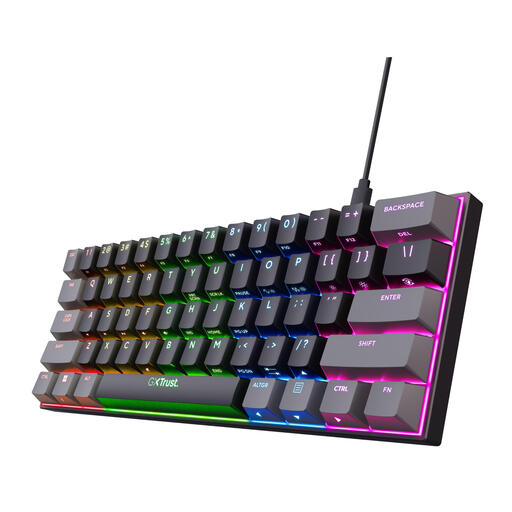 Image unavailable
GXTrust Acira mechanical keyboard, 60%, QWERTY US
A compact layout to consider if you want to use less desk space.
QWERTY US; 60% layout; no built-in numeric keypad. Arrow and navigation functions are accessed via the Fn layer.
View at Joybuy
 Image unavailable
MageGee TS91 wired keyboard, 61 keys, QWERTY US
A compact option to consider if a smaller layout suits the work you do.
61 keys; no built-in numeric keypad.
View at Joybuy
Frequently asked questions
Do you need a special keyboard for advanced searches?
No. Search criteria and wildcards are features of the website’s search interface. Choose your keyboard based on how you enter information, its key layout and how you use it, then check which search features your own website offers.
How can you set up your workspace for longer data-entry sessions?
Position your keyboard and mouse so you don’t have to reach too far or bend your wrists sharply, and break up intensive screen work. These are ergonomic guidelines, not a guarantee that a particular keyboard will prevent discomfort.
What rights do you have when buying a keyboard online?
For most online purchases from a business, you have a 14-day cooling-off period; terms and exceptions may apply. According to the Dutch government, there is no general fixed statutory warranty period in the Netherlands. If a product is faulty, the seller must provide a solution.


