
Practising in a shared space
You want to practise the tune without disturbing others with the speakers. Check whether the model has a headphone socket; for example, Korg lists a 3.5 mm stereo headphone socket for the EK-50.


A 61-key keyboard may be suitable if all the notes in your folk tune fall within its range and you have enough space for it. Measure the available space and check for a headphone socket; only choose teaching features or automatic accompaniment if you need them. For the specific item on offer, also check that it meets the applicable EU requirements and carries the CE marking, as required by the Dutch government for electronic devices.
You want to practise the tune without disturbing others with the speakers. Check whether the model has a headphone socket; for example, Korg lists a 3.5 mm stereo headphone socket for the EK-50.
You want to put the instrument away after practising, and are weighing up the space it needs against its key range and learning features. Remember to measure the space needed for you and a music rest, if you plan to use one.
You may want to play chords or add automatic accompaniment to the melody later, but you may not need all the features of a more advanced arranger keyboard. Korg describes the EK-50 as having automatic accompaniment styles.
First compare the melody’s range with the space you have available. Then consider whether you need a headphone socket or extra accompaniment for the way you plan to practise.
| What to consider | What should you check? | Who might this matter to? |
|---|---|---|
| Quiet practice | Check the type of headphone socket and whether the required headphones or adapter are included in the offer. | If I practise in a shared space, I want to play the melody without using the speakers. Around 31% of consumers prioritise quiet practice. |
| Fitting it in and putting it away | Measure the available width and depth, leaving room for yourself and a music rest, if needed. | When my practice space is small, I want to be able to set up the keyboard and put it away again afterwards. Around 31% of consumers prioritise the space available. |
| Learning the melody | Compare the highest and lowest notes with the keyboard’s range. Decide whether you want to practise with sheet music or a lesson feature, if available. | If I want to learn the notes of a folk tune, the keyboard’s range needs to suit the melody and the practice method needs to suit me. Around 23% of consumers prioritise their learning goals. |
| Adding accompaniment | Check which accompaniment styles the model offers and whether the controls suit the music you play. | If I want to play the melody with chords later, I look for accompaniment that suits the way I’ll use it. Around 15% of consumers prioritise accompaniment. |
A computer keyboard isn’t designed for playing music, so it won’t meet your practice needs.
Check that the product description clearly identifies it as an electronic musical instrument, with musical keys and sounds.
Depth and the space you need to play matter too. The dimensions listed for the Korg EK-50 don’t include the music rest.
Measure the whole playing area, allowing room for your hands and a music rest, if you plan to use one.
Built-in songs or exercises don’t necessarily include your particular folk tune.
Check the song list, or consider whether you can learn the melody from sheet music using the available practice features.
The features mentioned apply to the specific models and aren’t a general assessment of all products from these brands.
The Yamaha PSR-E383 is a 61-key model worth considering if you’re looking for touch sensitivity and lesson features.
The Casio CT-S300 is a compact 61-key model worth considering if you want to put your keyboard away after use.
The Korg EK-50 is designed for players who want to combine melodies with automatic accompaniment.
The Roland GO:KEYS 3 is worth considering if you want to work with chord patterns.
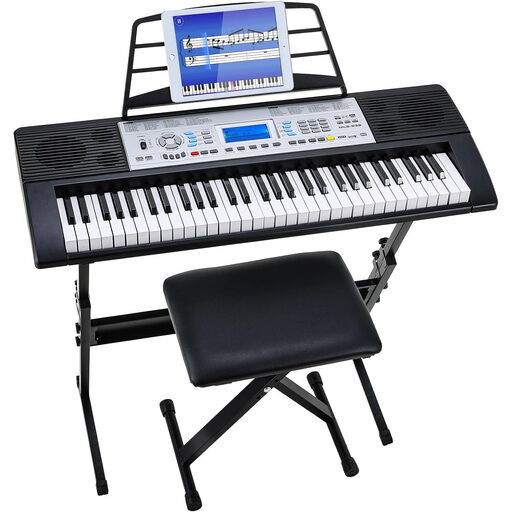
This Joybuy selection is aimed at practising step by step on an electronic keyboard.
 No image available
The 3-level learning mode is worth considering if you want to practise step by step; check first that the keyboard’s range suits your melody.
61 keys; 500 sounds; 3-level learning mode; dual speakers; LCD screen; stand and stool included.
Before buying, check that the specific item on offer meets the applicable EU requirements and carries the CE marking.
That depends on the highest and lowest notes. Compare the range of your sheet music with the keyboard’s range before you buy; 61 keys don’t guarantee that every piece you play in the future will fit.
Measure the available width and depth, and leave enough room to play and, if needed, set up a music rest. The dimensions Korg gives for the EK-50 don’t include the music rest; also check that the headphone socket is compatible with your headphones.
In the Netherlands, there’s no fixed statutory warranty period, but you are entitled to a product that meets reasonable expectations. The Dutch government advises contacting the seller if the product doesn’t meet the expectations you’re entitled to have of it.
According to the Dutch government, distance purchases generally come with a 14-day cooling-off period. Check the seller’s information and any applicable exceptions.
According to the Dutch government, electronic devices placed on the EU market must meet the applicable requirements and carry a CE marking. Check the marking and product information for the specific item on offer.