Start by checking the lowest and highest notes in your arrangement, and the key action you want to practise. A 61- or 76-key keyboard may be suitable if the parts stay within its range, while an 88-key digital piano gives you the full piano range to practise with. Built-in sounds and accompaniment are handy for experimenting on your own. Always check the audio, headphone and computer connections for the exact model and your studio set-up.
Who is this suitable for?
Pianist playing film themes
You practise parts for both hands and want to check whether the music needs a wider keyboard range or a piano-style key action. Yamaha describes the PSR-EW320 as having touch-sensitive keys; Roland specifies an 88-key PHA-4 Standard keyboard for the FP-10.
Sound and accompaniment explorer
You want to try out melodies with different instrument sounds or chord-based accompaniment without having to set up a computer first. Casio lists 61 sounds for the CT-S1-76BK, while Korg describes the EK-50's chord-based Styles.
Player connecting a keyboard to studio equipment
You switch between playing on your own and connecting to equipment in the rehearsal room. The connections Yamaha describes for the PSR-EW320 and Korg for the EK-50 show why it's worth checking the connections you need for each model.
What should you look for when choosing?
First compare the range and key action with your sheet music, then consider which sounds, studio connections and practical features you need.
Compact 61-key keyboard
Suitable if: your parts fit within 61 keys and you want to try out sounds or accompaniment. Korg describes the EK-50 as having chord-based Styles and separate audio outputs.
Keep in mind: parts with notes far apart may need a wider range. Styles don't guarantee that your particular film theme is available as an accompaniment.
Portable 76-key keyboard
Suitable if: you want a wider range than a 61-key model offers and are looking for a keyboard with built-in sounds. Yamaha describes the PSR-EW320 as having 76 touch-sensitive keys and lesson functions.
Keep in mind: the models described don't have a confirmed weighted piano keyboard. Also check that each model's connections will work with your studio set-up.
88-key digital piano
Suitable if: you need to practise piano technique across the full 88-key range. Roland specifies a PHA-4 Standard keyboard and built-in speakers for the FP-10.
Keep in mind: you'll need a suitable space and stand. Roland says Bluetooth availability depends on the country of purchase.
| What to consider |
What should you check? |
Who is this important for? |
| Key range and action |
Compare the lowest and highest notes in your sheet music with the keyboard's range; try the key action if you're mainly practising piano technique. |
If I'm playing parts for both hands with notes far apart, I want enough range and a key action that suits my practice goals. Around 33% of consumers prioritise key range and action. |
| Sounds and accompaniment |
See which sounds and accompaniment features you'll actually use, and whether you can work with your own practice material. |
If I want to try melodies with different sounds or accompaniment, I'm looking for features that suit this. Around 27% of consumers give sounds and accompaniment top priority. |
| Connecting to studio equipment |
Make a note of your equipment's inputs and check the audio output, headphone socket and USB audio or USB-MIDI separately. |
If I want to connect the keyboard to a mixing desk or computer, I need to know which connections my set-up requires. USB-MIDI isn't automatically an analogue audio output. Around 20% of consumers prioritise studio connections. |
| Moving it and practising quietly |
Measure the available space and check the headphone socket, as well as what's included with the offer in terms of power supply, stand and pedal. |
If I'm moving the instrument between rooms or practising with headphones, its size and connections need to suit my space. Around 20% of consumers prioritise portability or quiet practice. |
Common pitfalls
-
Assuming a long list of sounds means the keyboard has the right range
A large number of sounds doesn't tell you whether you can play both the left- and right-hand parts of your arrangement at the same time within the available range.
Start with the sheet music and the key action you want to practise. Then compare the sounds and accompaniment features.
-
Assuming USB-MIDI gives you every audio connection you need
MIDI and audio are different ways of transmitting information. Korg lists both USB-MIDI and separate audio outputs for the EK-50, so one connection doesn't automatically replace the other.
First check whether you want to transmit notes as MIDI or connect the instrument's audible sound. Then compare the connections at both ends.
Depending on your existing equipment, you may need a different cable or audio set-up.
-
Assuming every offer includes a complete playing set-up
What's included varies by model and offer. Yamaha lists a music rest as an accessory for the PSR-EW320 and suitable adapters separately; Korg lists an adapter and optional pedals for the EK-50.
Compare the contents of the specific offer with your studio set-up, and check that any missing items are compatible.
You may need to buy a suitable stand, headphones, pedal or power adapter separately; check what's included with each offer.
Brands to consider
Yamaha
The PSR-EW320 is a 76-key keyboard for anyone looking to combine a wider range with lesson functions and built-in accompaniment.
- Yamaha describes touch-sensitive keys, lesson functions and USB TO HOST for MIDI/audio.
- The PHONES/OUTPUT socket is a combined connection; the keys are organ-style and aren't described as weighted.
Casio
The CT-S1-76BK is a 76-key option for anyone who wants to start playing straight away with a selection of instrument sounds.
- Casio lists 61 sounds, including piano, organ and synthesiser.
- Check that the exact version has the connections your studio needs.
Korg
The EK-50 is a 61-key entertainer keyboard for anyone who wants to use accompaniment and connect the instrument to studio audio equipment.
- Korg specifies chord-based Styles and separate L/MONO and R outputs.
- Korg says the EK-50 doesn't support half-pedalling; check whether you need this feature for your piano parts.
Roland
The FP-10 is a portable digital piano for anyone who wants to learn film themes on an 88-key piano keyboard.
- Roland specifies a PHA-4 Standard keyboard, built-in speakers and headphone use.
- Roland says Bluetooth availability depends on the country of purchase; check the version before relying on it.
Products at Joybuy
This selection focuses on compact 61-key musical instruments for practising film themes.
 No image available
MLS-931 digital piano, 61 keys, black
Could suit you if you're looking for a 61-key range and a piano-style key action; check that the notes in your arrangement fit within that range.
Lists a weighted keyboard, 300 sounds, 300 rhythms, USB-MIDI and a headphone socket. The 61-key range may be too limited for parts with notes far apart.
Joybuy
 No image available
Electronic keyboard, 61 keys, black
Could suit you if you want to practise on a compact 61-key instrument and are looking for features such as recording or a metronome.
The product name lists a MIDI controller function, recording function, speakers, metronome and music rest. Check that the key range suits your arrangement.
Joybuy
 No image available
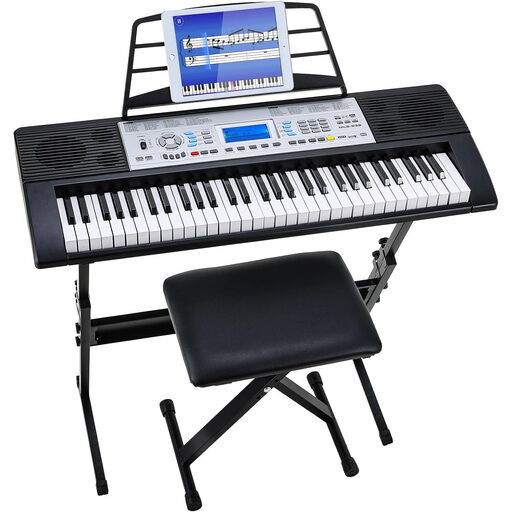
Keyboard set, 61 keys, with stand and stool
Could suit you if you're looking for a compact practice set-up with a stand and stool included.
The product name lists 500 sounds and a three-level learning function. A 61-key range may be too limited for arrangements with parts that span a wide range.
Joybuy
Frequently asked questions
Does a keyboard need 88 keys to learn film themes?
No, not for every arrangement: first compare the range needed for the parts you want to play. An 88-key model is suitable for practising across the full piano range; the Roland FP-10 is a digital piano with a PHA-4 Standard keyboard, while the keyboards discussed here have 61 or 76 keys.
How do I connect a keyboard in a rehearsal studio?
Choose the connection based on the available audio inputs and the connection you want to use. Korg lists separate L/MONO and R outputs for the EK-50; Yamaha describes a combined PHONES/OUTPUT socket for the PSR-EW320. USB-MIDI isn't the same as an analogue audio output.
What can I do if the keyboard breaks too soon during normal use?
If the product doesn't meet what you could reasonably expect, the seller is responsible for putting things right. ACM ConsuWijzer lists repair, replacement or a refund as possible solutions, and points out that there isn't simply a fixed two-year warranty period for every product in the Netherlands.
What product safety rules apply to a keyboard in the Netherlands?
Electrical and electronic devices placed on the market in the Netherlands must comply with the relevant European product rules. According to Ondernemersplein, after assessing the applicable requirements, the manufacturer affixes the required CE marking and draws up an EU declaration of conformity. A brand or model page on its own doesn't prove that a specific item on offer complies with these requirements.


