
Essay writer with limited access to charging
You don’t want to interrupt long writing sessions to charge your keyboard. According to Logitech, the battery-powered Signature K650 and wired K120 are two different ways to deal with this limitation.


When power sockets are in short supply, a keyboard that uses replaceable batteries can be useful if you don’t want to plan charging breaks. A rechargeable model may offer more connection options, but you’ll need to be able to charge it. A wired USB keyboard doesn’t need its own battery, but it does use a suitable port on your computer. Then compare the layout, size and typing feel of the specific model.
You don’t want to interrupt long writing sessions to charge your keyboard. According to Logitech, the battery-powered Signature K650 and wired K120 are two different ways to deal with this limitation.
You want to leave room for your work and position your hands comfortably. Trust and CHERRY offer compact models; also consider the key feel and layout of the version you choose.
Perhaps you switch between a computer and a tablet and want to know which connections and switching options the model supports. Trust and CHERRY describe models with more than one connection option.
When power sockets are scarce, the power source is a sensible place to start. Then consider typing comfort, connectivity and the key layout.
| What to consider | What to look for | Who should pay particular attention? |
|---|---|---|
| No interruptions for charging | Check whether the model uses batteries or has a rechargeable battery, and which connection is used for charging. | I don’t want to stop to charge during a long writing session. Around 36% of consumers prioritise being able to write without interruptions for charging. |
| Typing comfort and setup | Compare the dimensions, key shape and layout; also consider whether you can position your hands and screen comfortably. | When I’m editing a lot of text, I want a key feel and workspace that suit me. Around 29% of consumers put typing feel and posture first. |
| Layout and connection | Check the exact QWERTY version and punctuation marks, and whether your device supports Bluetooth or the USB connection you’ve chosen. | I want the punctuation and connection to work well with my writing device. Around 21% of consumers prioritise compatibility and key layout. |
| Avoiding battery management | Check whether your computer has a suitable spare USB port and whether the cable will work with your setup. | I don’t want to manage batteries or a rechargeable battery, and I’m happy to use a cable. Around 14% of consumers mainly prefer a wired option. |
A model with replaceable batteries will eventually need new batteries; a model with a rechargeable battery will need charging at some point.
Choose based on the connections available to you, and think about how you can keep typing if the batteries or rechargeable battery run out.
The exact key layout and visible punctuation can vary between versions. This matters most when you type a lot of text and punctuation.
Check the layout of the specific model before ordering, not just the product range.
A wired USB model gets its power from the computer, but it does use a suitable USB port.
First check which spare connection your computer has, then make sure the keyboard plug is compatible.
If your computer doesn’t have the required connection, you may need an adapter.
The battery-powered Signature K650 and wired K120 are different options for anyone dealing with limited access to power sockets.
According to Trust, the compact, rechargeable Lyra is designed for use with multiple devices.
According to CHERRY, the compact KW 9200 MINI offers a rechargeable option that also has a wired connection mode.
The separate Magic Keyboard (USB-C) with a Dutch layout may suit devices that Apple lists as compatible with this version.
The Dutch KB216 version is a wired USB option for a computer with a spare USB-A port.
This selection includes wired USB models and wireless keyboards with rechargeable batteries. For each version, check that the connection and key layout suit your computer and writing needs.
 No image available
The wired connection suits anyone who doesn’t want to rely on a keyboard battery or charging, as long as a suitable USB port is available.
TKL layout; QWERTY; for PC and PS5.
 No image available
A rechargeable wireless model for anyone who also wants a wired connection option; bear in mind that it has a US QWERTY layout.
Mechanical; US QWERTY.
 No image available
The listed connection options also include a wired connection; check whether the US QWERTY layout suits your writing needs.
75% layout; US QWERTY; wired, Bluetooth and 2.4 GHz.
 No image available
This rechargeable model is designed for use with multiple devices; check which connections your devices support.
Rechargeable; for multiple devices.
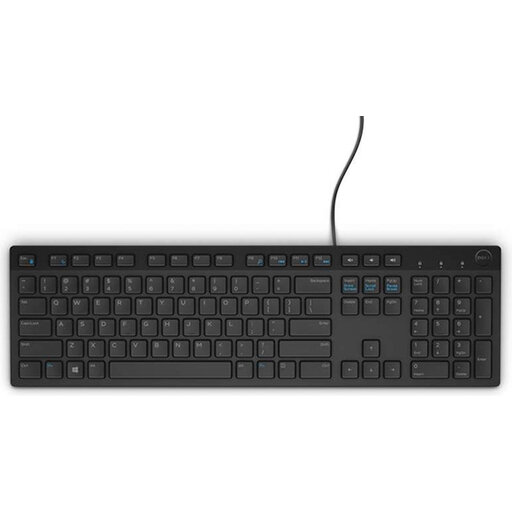 No image available
USB power means you don’t need to charge a keyboard battery, but your computer must have a suitable spare port.
Belgian AZERTY layout; USB.
No. According to Dell, a wired USB keyboard such as the Dell KB216 gets its power through USB, as long as your computer has a suitable spare port. A wireless model avoids a cable to the computer, but uses batteries or needs charging at some point.
Choose a key layout and size that suit you, and set up your workspace to meet your needs. Arboportaal advises changing posture, looking away from the screen regularly and taking micro-breaks during screen work; a keyboard on its own cannot prevent discomfort.
Test the connection, layout and keys you use most often. ACM ConsuWijzer explains that online purchases from a business generally come with a statutory 14-day cooling-off period after delivery; terms and exceptions may apply. The Dutch government states that products must be fit for purpose and that there is no fixed statutory warranty period in the Netherlands.
The screen-work guidelines described by Arboportaal are aimed at employers and employees, and don’t automatically constitute product requirements for a personal essay. For employees who work at a screen for more than two hours a day, Arboportaal describes separate workplace requirements, including that the screen and keyboard must not be attached to one another.