
Student in a shared room
Wants to keep typing noise down while writing, for their own sake or for a flatmate. Manufacturers describe some models as quiet, but these descriptions aren’t comparable sound measurements.


Choose based on what makes writing in your room most difficult: typing noise, limited desk space, connectivity or your workstation setup. A wired keyboard works without batteries, while a compact Bluetooth model can save space and switch between devices; wireless models do need a suitable connection and power source. Always check the keyboard layout and connection on the version you’re planning to buy.
Wants to keep typing noise down while writing, for their own sake or for a flatmate. Manufacturers describe some models as quiet, but these descriptions aren’t comparable sound measurements.
Wants to leave room for a book and notes, and may need a compact keyboard that can switch between devices. Check that the connection and layout suit your device.
Wants to position a separate keyboard comfortably as part of an adjustable workstation. Arboportaal recommends a relaxed posture with neutral joint angles as a starting point; changing position and taking breaks are important too.
| What to consider | What should you look for? | Who should pay particular attention? |
|---|---|---|
| Quiet typing | Look at the keys on the exact version and its description of the sound; don’t treat manufacturers’ claims as sound measurements you can compare. | In a shared room, I want to keep typing noise down; around 33% of consumers say quiet typing is their top requirement. |
| Desk space | Check the dimensions and physical layout. If it’s Bluetooth, check that it works with your laptop or tablet too. | With a small desk, I want to leave room for my book and notes; around 25% of consumers prioritise desk space and switching between devices. |
| Workstation setup | Consider whether you can position the keyboard comfortably beside your laptop. Leave room for your book too, and vary your posture and activities. | If I’m writing for a long time, I want to position my keyboard separately from the laptop screen; around 25% of consumers prioritise their workstation setup. |
| Connection and power | Before ordering, check the port required, and whether the version needs an adapter, receiver or power source. | I want a straightforward connection without needing extra accessories; around 17% of consumers prioritise connectivity and avoiding additional costs. |
Trust and CHERRY describe the keys on certain models as quiet, but these product descriptions don’t provide comparable sound measurements.
Use the description as one factor in your choice. Also consider the key feel, size and layout of the version you’re looking at.
The letter order alone doesn’t tell you whether the physical keys, symbols and connection will suit your device and preferences.
Check the images and specifications for the exact version, and confirm the port or Bluetooth compatibility beforehand.
An unsuitable connection or layout could mean you need an adapter or a different version.
According to Trust, the Trust Ody II uses a USB receiver. A wireless keyboard also needs a suitable connection and power source.
Check how the model is powered, whether it needs a receiver and whether your computer has the right connection.
The K120 is a wired option, while the Pebble Keys 2 K380s is a compact Bluetooth model for anyone who wants to switch between devices.
The Ody II is a wireless model with a USB receiver for anyone who doesn’t want a cable across their desk.
The STREAM KEYBOARD is a wired option with SX scissor switches for anyone looking for a flatter keyboard.
These Joybuy products suit different workspaces, from a permanent wired setup to compact models for anyone looking to save space or use several devices. Check the layout and connection required for each version.
 No image available
This model may suit a permanent desk setup with a wired connection; the product name lists a metal casing and mechanical keys.
 No image available
If you’re looking for a compact model with more than one connection option, this set may be worth considering; check that the US English layout suits you.
 No image available
The Mini version may suit you if desk space is limited; check that the US layout works with your typing habits.
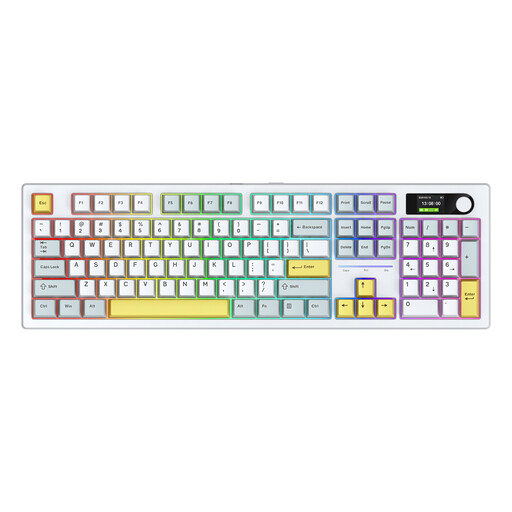 No image available
This model may be worth considering if you’re looking for different connection options; check that the listed version and keyboard layout suit the way you’ll use it.
 No image available
A foldable model may suit you if you want to store your keyboard compactly; check that the stated compatibility works with your device.
Not just because you’re a student. A separate keyboard lets you position the screen and your hands independently; Arboportaal discusses workstation advice in the context of screen work. Employers’ legal requirements don’t automatically apply to private study.
According to Logitech, the Logitech Pebble Keys 2 K380s uses Bluetooth and can switch between three devices. According to Trust, the Trust Ody II uses a USB receiver that can be stored inside the keyboard. Check in advance which connection your laptop or tablet supports.
Take flat batteries to a collection point separately and don’t put them in your general waste. Check what type of power your keyboard uses; Milieu Centraal provides advice on disposing of flat batteries and rechargeable batteries separately.
If you buy from a business in the Netherlands, you’re entitled to a product that works as it should, and the seller is your point of contact if there’s a fault. The Dutch government states that there is no fixed statutory guarantee period. Online purchases from a business often come with a 14-day cooling-off period; check the terms and any applicable exceptions.