
Entering recipes with lots of custom fields
You enter recipes into a form or spreadsheet and often repeat the same steps. First, check which actions your software already supports through the keyboard.


Start by considering how you fill in custom fields: configurable keys can help with repeated actions supported by your software, while standard keys may be all you need if you can already navigate your form using Tab. Then weigh up long typing sessions, desk space, device connectivity and number entry. A keyboard cannot create recipe fields or read handwriting; product features mentioned here are manufacturers’ descriptions, not proof of faster data entry.
You enter recipes into a form or spreadsheet and often repeat the same steps. First, check which actions your software already supports through the keyboard.
You type up lots of handwritten recipes one after another and want to consider your posture, where you place the paper and the variety of options available.
You need space for recipe cards or switch between a computer and a tablet. Size and connectivity are important considerations.
First, test the field order and Tab or Shift+Tab navigation in your own form. Microsoft Support describes these keys for moving between fields in the Excel data form. Then decide whether you need extra features and whether the layout suits your workspace.
| What to consider | What to look for | Who might find this especially important? |
|---|---|---|
| Repeated field actions | Test Tab and Shift+Tab in your form first. Then check whether the shortcuts or macros you want work with your software. | If I go through the same fields and actions for every recipe, I want to remember fewer separate steps. Around 36% of consumers prioritise repeated field actions. |
| Typing posture during long sessions | Consider the keyboard layout and the positions of the keyboard, screen and handwritten recipes together. | When I type up lots of recipes one after another, I want to choose a layout that feels comfortable and set up my workspace well. Around 29% of consumers give typing posture top priority. |
| Space and devices | Measure the available desk space and check that the connection and keyboard layout work with the devices you use. | If my work surface also needs room for recipe cards, or I switch between devices, the set-up matters a lot. Around 21% of consumers prioritise space or switching between devices. |
| Standard keys and numbers | Try entering a recipe with lots of quantities and check whether you need a numeric keypad and where the decimal separator is. | If my form is already easy to navigate and I mainly enter quantities, I don’t want to choose extra features without a clear reason. Around 14% of consumers give ease of use or number entry top priority. |
Keys can perform supported actions, but the fields and their order are set by the form or application.
Create a test recipe with the fields you want and try the existing keyboard controls before setting up key functions.
Setting up key functions can take extra time.
A compact layout and a separate numeric keypad call for different desk set-ups. The right choice depends on the recipes you enter.
Try entering a recipe with lots of quantities and check the physical layout before choosing a keyboard.
Trust describes the Keyra as a keyboard with a split layout. Arboportaal also highlights repetitive actions, static strain and the set-up of the entire workspace. A keyboard’s shape is no proof that it will prevent discomfort for any individual.
Consider the keyboard alongside the position of your screen and handwritten recipes, and vary your activities during long sessions.
The MX Keys S is worth considering if you want to combine configurable keys with repeated actions supported by your software. The MX Keys Mini is a separate compact model.
The Lyra is a compact option for limited desk space or use with multiple devices; the Keyra has a split layout for you to try and assess.
The K10 Pro is an option if you’re looking for a full-size keyboard and want to configure keys or macros yourself.
The KC 1000 is a straightforward, wired office option for forms you can navigate using standard keys.
These Joybuy products suit different ways of entering recipes with custom fields. Check the layout of each model and make sure its stated features suit your software and workspace.
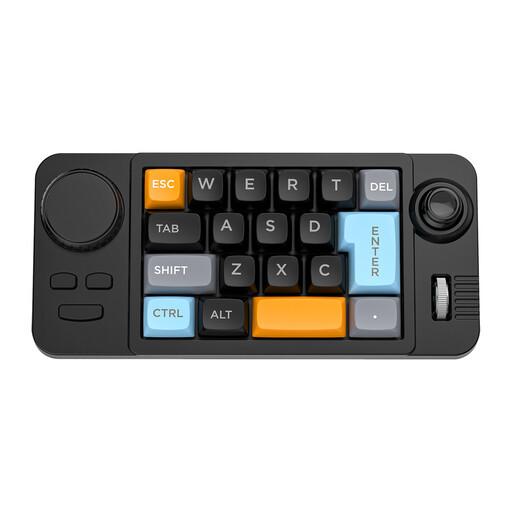 No image available
The product name describes a wired keyboard with 19 keys, hot-swappable keys, macro programming, a joystick, rotary knob and RGB lighting. Check that the macro software works with your recipe application; programmable keys cannot add fields that aren’t there.
 No image available
The product name describes a full-size QWERTY keyboard with a numeric keypad and a plug-and-play connection. Check that the layout and connection are compatible with your computer and recipe application.
 No image available
The product name describes a wired mechanical keyboard with 94 keys, a metal design, phone stand and wrist rest. Check the layout and how much space the set-up takes up; the product name is no proof that this design will be more comfortable for everyone.
 No image available
According to the product name, this model has a US QWERTY layout. Check that the key layout suits the way you type and your computer’s input settings.
 No image available
The product name lists Touch ID and a numeric keypad. Check that this model and its features are compatible with the computer you use to enter recipes.
No. The form or software determines the fields and their order. In the Excel data form, for example, the entry boxes follow the column headings, and you can use Tab or Shift+Tab to move between fields. Programmable keys are only relevant if you often repeat extra actions and your application supports them.
That depends on the software you use. Receptenmaker describes recognising the title, ingredients and method from a photo, after which you can check the result. This is the provider’s description, not an independently measured recognition accuracy. Also check whether the custom fields you want are available.
Check the connection, operating system and exact keyboard model. Trust lists a USB receiver and two Bluetooth connections for the Lyra, and names Windows, macOS, iPadOS and Android among the compatible systems. Then test your form and keyboard layout on the device you actually use.
According to the Dutch Arboportaal, in the described work situation the screen and keyboard must not be attached to each other if an employee works at a screen for more than two hours a day. This is not a general purchasing requirement for every private user.
No. ACM ConsuWijzer explains that the legal guarantee depends on what you could reasonably expect from the product with normal use. If a product is faulty, the seller is responsible for providing an appropriate solution free of charge; a manufacturer’s or seller’s guarantee is separate.