
Editor working alongside colleagues
You edit a lot of text while other people work at the same desk or nearby. Both the sound of the keys and how easy they are to reach matter. CHERRY, Logitech and Trust describe certain models as quiet.


Start by checking which connection is available and permitted on the computer you use. Then make sure the arrow and editing keys are easy to reach. A compact keyboard can free up desk space, while a larger model keeps the numeric keypad. Also consider how the keys sound in your shared workspace: manufacturers’ claims about quietness are not based on comparable sound measurements.
You edit a lot of text while other people work at the same desk or nearby. Both the sound of the keys and how easy they are to reach matter. CHERRY, Logitech and Trust describe certain models as quiet.
You often move the cursor and revise passages. So pay attention to the layout and position of the editing keys, not just the keyboard’s dimensions. BakkerElkhuizen points out that these keys can be in different places on compact models.
You take your keyboard with you or use more than one computer. The desk space available and the connections you’re allowed to use both affect which model is practical. Logitech and Trust describe different wireless connection options.
CHERRY, Logitech and Trust describe certain models as quiet, but these are manufacturers’ descriptions, not comparative sound measurements. Try typing on both standard and larger keys in the place where you work.
| What to consider | What should you check? | Who should take this into account? |
|---|---|---|
| Typing noise | Try standard and larger keys in the room where you work. Compare how they feel and sound for yourself rather than relying on product descriptions alone. | If I type alongside colleagues, I want to disturb them as little as possible. Around 36% of consumers say reducing typing noise is their top priority. |
| Editing keys | Check where the arrow keys, Delete and other frequently used keys are. Try the layout of the exact model you’re considering. | When making lots of corrections, I want to reach the keys I use most easily. Around 29% of consumers say a familiar layout and easy-to-reach editing keys are their top priority. |
| Connection | Check which ports are available, whether Bluetooth is supported and whether you’re allowed to pair a device or use a USB receiver. | On a shared computer, I want to use a connection that’s available and permitted, or switch easily between my own devices. Around 21% of consumers say a suitable connection is their top priority. |
| Desk space | Measure the space you have, including room for your mouse, and check whether you need a numeric keypad. Consider your whole setup: screen, keyboard and mouse. | If I want to give my mouse and hands more room, a compact model still needs to suit the kind of editing I do. Around 14% of consumers say having free desk space is their top priority. |
CHERRY, Logitech and Trust’s descriptions of their keyboards as quiet are manufacturers’ claims. Without comparable measurements, they don’t tell you how the models compare with one another or how much noise you’ll hear in your workspace.
Try typing on standard and larger keys in a suitable setting, and consider the people working nearby.
On compact layouts, the arrow and editing keys may be in different places. This can matter if you often revise passages while editing.
Compare the layout of the exact model with the key combinations you use.
Bluetooth and a USB receiver require different capabilities from your computer. A shared computer may also have restrictions on pairing devices or using a receiver.
Check which ports are available, whether Bluetooth is supported and whether you have permission to connect. Also check which connection and accessories are included with the model you choose.
According to the Dutch Government, there is no fixed statutory warranty period in the Netherlands. You’re entitled to expect a product to do what you could reasonably expect of it. A manufacturer’s warranty does not replace these rights.
Keep your proof of purchase and contact the retailer if a product is faulty.
The STREAM range includes compact and larger wired keyboards. The STREAM KEYBOARD TKL is a version without a numeric keypad.
The Pebble Keys 2 K380s and MX Keys Mini are two different compact models, each with its own layout and features.
The Ody II is a wireless option with a USB receiver and a larger keyboard.
This selection includes wired USB keyboards and wireless models with a USB receiver or Bluetooth, including versions with a numeric keypad.
 Image unavailable
This set could suit you if you want a numeric keypad and are allowed to use a USB receiver with your computer.
Keyboard and mouse set; Trust describes the keys as quiet. Connects via a single magnetic USB receiver; US/QWERTY layout; numeric keypad.
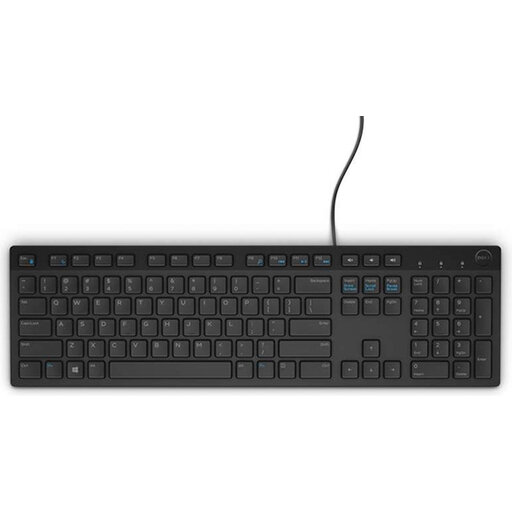 Image unavailable
This model could suit you if you’re looking for a wired keyboard with a Belgian AZERTY layout and have a USB port available.
Wired USB connection; Belgian AZERTY layout; numeric keypad and multimedia keys. The product description calls its chiclet keys quiet.
 Image unavailable
This keyboard could suit you if you want a numeric keypad and can work wirelessly using a USB receiver.
Trust describes the low-profile keys as soft and virtually silent. USB receiver; full-size with numeric keypad; US QWERTY layout. Battery-powered and not rechargeable.
 Image unavailable
This set could suit you if you want a full-size keyboard and mouse that share the same USB receiver.
Keyboard and mouse set with numeric keypad; US/QWERTY layout; wireless connection via USB receiver; integrated wrist rest. The product description calls the keys soft and virtually silent.
 Image unavailable
This model could suit you if you want to switch between several devices and use a numeric keypad.
According to the product description, it can connect to up to four devices via USB receiver and Bluetooth. Full-size with numeric keypad; US QWERTY layout; built-in rechargeable battery. The description calls the scissor-switch keys virtually silent.
No. A more compact keyboard can free up space, but check that the arrow and editing keys are easy for you to reach. Their position can vary between layouts.
Check which connection the model uses and whether it’s available and permitted on the computer. The Logitech Pebble Keys 2 K380s uses Bluetooth; the Trust Ody II models mentioned use a USB receiver.
Set up your whole workspace properly, and regularly break up screen work with another task or a break. Simply switching to a different keyboard won’t replace those breaks.
No. According to the Dutch Government, there is no fixed statutory warranty period in the Netherlands. You’re entitled to expect a product to do what you could reasonably expect of it, depending on factors such as the product and normal use. Contact the retailer if a product is faulty; any manufacturer’s warranty is in addition to your statutory rights.
Not simply because the desk is shared. Arboportaal states that employees who work with a screen for more than 2 hours a day must have a screen and keyboard that are not attached to one another. When working on a laptop, it must therefore be possible to use a separate screen or keyboard. This requirement does not automatically apply to every reader.