Which instrument is right for you?

Player looking for different intro sounds

You want to practise an intro using piano, organ or other keyboard sounds, perhaps with automatic accompaniment. Start by looking at the sounds and controls on a standalone keyboard. Yamaha lists these features for the PSR-E383, for example.

Keyboard player rehearsing with a band

You want to hear your intro clearly in the rehearsal room. In this case, how the exact instrument connects to the available audio system matters more than the number of built-in sounds alone.

Piano player with a longer part

You’re practising a piano intro where the keyboard range or key action is important. For example, compare an easy-to-play 88-key keyboard with a model featuring hammer action. Yamaha describes the P-145 as having a GHC keyboard.

What should you look for when choosing?

Compact keyboard

A good fit if: you’re practising a short intro with different sounds or accompaniment and want to take a compact instrument with you. Yamaha lists 61 touch-sensitive keys and accompaniment Styles for the PSR-E383.

Bear in mind: check that 61 keys cover your part and that the audio output is compatible with the rehearsal room’s equipment.

Portable digital piano

A good fit if: your intro needs a wider range or you mainly practise piano. According to Korg, the Liano has 88 touch-sensitive keys with a lightweight LS keyboard; the specification consulted is for the US version.

Bear in mind: a lightweight keyboard feels different from hammer action, and an 88-key instrument takes up more space.

What to consider What should you check? Who should consider this?
Sounds and accompaniment Compare the sounds and any accompaniment patterns on the exact model with what your intro requires. Yamaha lists a range of Voices and automatic accompaniment Styles for the PSR-E383. If I want to practise my intro with a recognisable instrument sound or accompaniment, I want to be able to select it easily. Around 33% of consumers prioritise sounds and accompaniment.
Connections and audibility Check which inputs are available on the mixer or amplifier in the rehearsal room, then compare them with the instrument’s audio output. Allow for a suitable cable if needed. If I want to play through the equipment already there, it needs to connect properly. Around 27% of consumers prioritise connectivity and audibility.
Transport, space and power Check the dimensions, weight and power requirements of the version you’re buying, and find out exactly what’s included. If I take the instrument to rehearsals, I want to know whether I can transport and set it up with the space and power available. Around 20% of consumers put portability and set-up first.
Key range and touch Try out the lowest and highest notes in your part across the instrument’s range. If you’re playing piano, compare the key action too: 88 keys don’t automatically mean the same playing feel. For a piano part, I want all the notes to fit on the keyboard and the key action to suit what I’m practising. Around 20% of consumers choose primarily based on range and playing feel.

Common buying mistakes

  • Assuming a USB port is an audio output

    USB-to-host and an audio output don’t necessarily do the same job. Casio lists USB-to-host for the CT-S300, while Korg specifies a combined headphone and line-out connection for the Liano.

    Before buying, compare the output on the exact model with the input on the mixer or amplifier available.

  • Assuming 88 lightweight keys mean hammer action

    Korg describes the Liano as having a lightweight LS keyboard, while Yamaha lists a GHC keyboard for the P-145. So the same number of keys doesn’t guarantee the same playing feel.

    Take your piano part and preferred key action into account, and try the keyboard if possible.

  • Assuming all the essentials are included

    Power supplies, cables, stands and pedals can vary by version or bundle. This is especially important if you want to use the instrument in the rehearsal room straight away.

    Check what’s included in the specific offer and what equipment is available in the rehearsal room.

Brands to compare

Yamaha

The PSR-E383 is a keyboard with sounds and accompaniment; the P-145 is a portable digital piano with 88 keys.

  • Yamaha lists 61 touch-sensitive keys and accompaniment Styles for the PSR-E383.
  • According to Yamaha, the P-145 has a GHC keyboard. Check connections and accessories for each model and version.

Casio

The CT-S300 is worth considering if you want to take a compact keyboard with touch-sensitive keys to rehearsals.

  • Casio lists a weight of 3,3 kg and USB-to-host for the CT-S300.
  • USB-to-host alone doesn’t confirm that you can connect the instrument directly to an analogue audio input.

Korg

The Liano is an option if you want 88 keys with a light touch rather than hammer action.

  • Korg lists a lightweight, touch-sensitive LS keyboard and a combined headphone and line-out connection for the Liano.
  • The specification consulted is for the US version. If you’re buying a version sold in the Netherlands, check the power supply and what’s included in the box.

Roland

The GO:KEYS 3 range is worth considering if you want to develop an intro with different sounds or accompaniment.

  • Roland describes the GO:KEYS 3 as offering sounds and accompaniment.
  • The microphone input mentioned in the manual applies specifically to the GO:KEYS 5, not automatically to the GO:KEYS 3.

Joybuy products for song intros

This selection features 61-key instruments for practising song intros, with built-in sounds. Some offers also include a stand, bench or stool. When choosing, check the audio connections and what’s included with the version you’re considering.

MLS-931 61-key digital piano in black

MLS-931 61-key digital piano, black

A good fit if you want to practise an intro with different sounds and are looking for a 61-key instrument.

The product description lists a weighted, touch-sensitive keyboard, 300 sounds, 300 rhythms and stereo speakers.

Also listed: a headphone socket, audio inputs and outputs, USB-MIDI and a music stand. Check which audio connection is compatible with the equipment in your rehearsal room.

View at Joybuy

Black electronic keyboard with 61 keys

61-key electronic keyboard, black

A good fit if you’re looking for a compact keyboard with different sounds and rhythms to practise an intro.

The product description lists 500 sounds, 300 rhythms, built-in speakers, audio inputs and outputs, and a headphone socket.

Also listed: dual tone, recording and playback, USB-MIDI, a metronome and a lesson function.

View at Joybuy

61-key keyboard set with stand and bench

61-key keyboard set with stand and bench

A good fit if you’re looking for a keyboard set to practise an intro with different sounds and rhythms.

The product title lists 300 tones, 300 rhythms, and a set with a stand and bench.

The product description lists speakers, a headphone socket, audio connections, USB-MIDI and OTG. Check which connection you need for the rehearsal room.

View at Joybuy
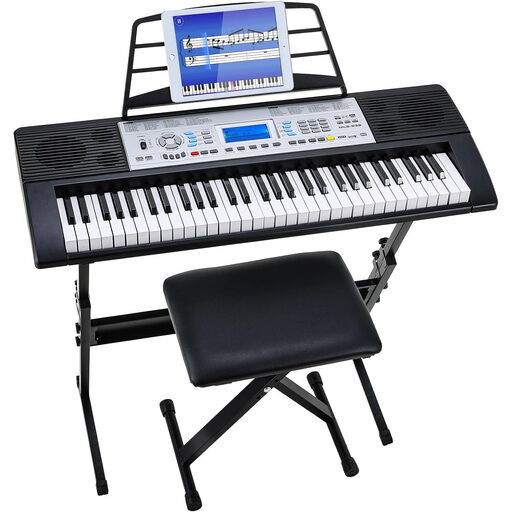
61-key keyboard set with stand and stool

61-key keyboard set with stand and stool

A good fit if you’re looking for a keyboard with built-in sounds and speakers for practising on your own.

The product title lists 500 sounds, a 3-level learning mode and an LCD screen.

The product description lists dual speakers, an adjustable stool and a mains adaptor. Check which items are included with the version you choose.

View at Joybuy

Frequently asked questions

Do you always need 88 keys for a song intro?

No, it depends on the range of your part. According to Yamaha, the Yamaha PSR-E383 has 61 keys; the Korg Liano and Yamaha P-145 have 88 keys, according to their manufacturers. Check that the lowest and highest notes in your intro fall within the range of the keyboard you choose.

How do you connect a keyboard in the rehearsal room?

First check which input is available on the mixer or amplifier, then compare it with the audio output on the exact instrument. Korg lists a combined headphone and line-out connection for the Liano. The USB-to-host connection listed by Casio for the CT-S300 doesn’t, by itself, tell you whether there’s a suitable analogue connection.

Can you use a MIDI controller without extra equipment?

Don’t assume a MIDI controller produces sound on its own. Novation describes the sounds for the Launchkey 25 as being accessed through software on a computer. Check whether you already have a suitable computer with software or another sound source, or choose an instrument that produces its own sounds.

Should you check the CE mark and product safety?

Yes. If you’re buying a new electronic instrument offered for sale in the EU, check that the required product information and CE marking are present. According to the Dutch government, electronic devices placed on the EU market must meet the applicable safety requirements. This alone doesn’t confirm that a particular offer meets them.

What if the instrument develops a fault during normal use?

For a consumer purchase in the Netherlands, if a product doesn’t work as you could reasonably expect during normal use, the seller must put it right free of charge, for example by repairing or replacing it, according to ACM ConsuWijzer. Keep your proof of purchase and contact the seller. A commercial warranty period doesn’t replace your statutory rights.
