
Student with a musical score
You want to play the vocal melody and accompaniment from your arrangement. Compare the highest and lowest notes with the keyboard’s range; Yamaha and Korg specify models with 61, 76 and 88 keys respectively.


Start by checking the lowest and highest notes in your arrangement. A compact keyboard may be suitable if all the parts fit within its range, while a digital piano with weighted keys is better for practising piano technique. Then check whether you can practise quietly, change the key to suit your voice and set up the instrument in your shared music room.
You want to play the vocal melody and accompaniment from your arrangement. Compare the highest and lowest notes with the keyboard’s range; Yamaha and Korg specify models with 61, 76 and 88 keys respectively.
You want to rehearse without using the speakers. Check the headphone output on the exact model; Yamaha and Korg list one for specific models.
You want to learn the song in a key that suits your voice or practise along with a chord progression. Yamaha specifies transposition on certain keyboards, while Roland says the GO:KEYS 3 works with preset and user-created chord progressions.
Choose this option: if the parts fit within the keyboard’s range and you want to practise independently.
Bear in mind: the shorter keyboard and the difference between touch-sensitive and weighted keys.
Choose this option: if 61 keys aren’t enough for your arrangement, but you want a keyboard with its own sounds.
Bear in mind: the extra space it takes up; according to Yamaha, the PSR-EW320 is 1.148 mm wide and has organ-style keys, not weighted piano action.
Choose this option: if you want to practise a piano part with a wider range or weighted keys.
Bear in mind: its size and weight; according to Korg, the B2 is 1.312 mm wide and weighs 11,4 kg.
Choose this option: if you want to practise along with a repeating chord progression.
Bear in mind: a progression won’t automatically provide the right accompaniment for your musical number; compare the chords with the score.
| What to consider | What should you check? | Who should consider this? |
|---|---|---|
| Key range and action | Compare the lowest and highest notes in both the vocal melody and accompaniment with the exact model. Also check whether the keys are touch-sensitive or weighted. | If you want to play the whole part on one instrument, its range is crucial; around 29% of consumers make the range of the part their main priority. |
| Practising with headphones | Check whether the model has a headphone output and whether the connection is compatible with your headphones. | If you use a shared space and don’t want to use the speakers, listening through headphones is important; around 23% of consumers prioritise silent practice. |
| Key for singing | Check whether the model offers transposition and whether the selected key suits your song. | If you want to adapt the part to your vocal range, transposition may be useful; around 18% of consumers make this their main priority. |
| Space and set-up | Measure the playing area, including the music rest, and check the dimensions, weight and power supply of the exact model. | If you need to set up or move the instrument in a shared room, size and weight matter; around 18% of consumers make these their main priority. |
| Learning independently and accompaniment | Check the learning features and chord accompaniment separately; don’t assume a musical number is built in. | If you want to practise without a teacher or play along with chords, suitable practice features are important; around 12% of consumers prioritise learning independently or accompaniment. |
If notes fall outside the keyboard’s range, you may not be able to practise the whole part on that instrument.
Before choosing, check the lowest and highest notes in all the parts and compare them with the exact model.
These are different features. Yamaha describes the PSR-EW320’s keys as touch-sensitive and organ-style; Korg specifies weighted hammer action for the B2.
Choose the type of action that suits your practice goals, and check the key range separately.
Built-in songs, lessons or accompaniment don’t prove that your musical number or all the items you need are included with the instrument.
Compare the features with your score and check what’s included with the exact model.
You may need headphones, a compatible cable, a stand or a pedal for your set-up. Check in advance which items are included with the model you’ve chosen.
The models described range from compact keyboards to an 88-key digital piano.
The CT-S300 is a portable keyboard for anyone looking for a compact instrument with touch-sensitive keys.
The GO:KEYS 3 may suit you if practising along with a preset or self-created chord progression fits the way you like to work.
The B2 is a digital piano with 88 weighted keys for anyone mainly practising piano parts.
These product options are intended for practising on a standalone 61-key instrument. Compare their features and set-up with your score and shared music room.
 No image available
May suit you if you want to practise with headphones and adjust the key to suit your voice or change the timing.
61 keys; weighted, touch-sensitive keyboard; headphone socket, transposition and metronome. The product name also mentions USB-MIDI, speakers and a music stand.
 No image available
May suit you if you want to practise in a shared music room with headphones and support for keeping time.
61 keys; the product description lists a metronome, headphone port, MIDI, recording function and a three-step learning system. It also mentions speakers and a music stand.
 No image available
May suit you if you want to practise independently with learning support and your own set-up.
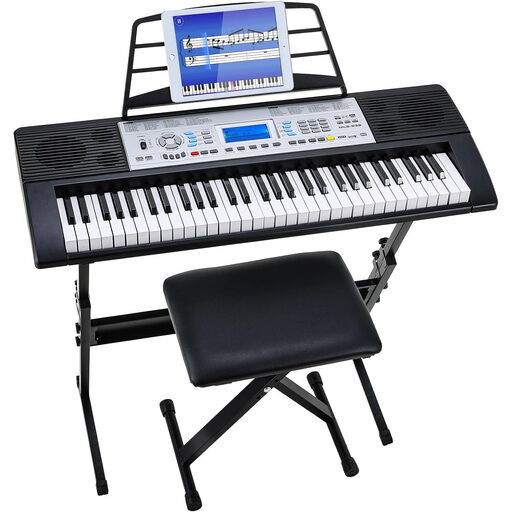
61 keys; the product name lists 500 sounds, a three-level learning mode, two speakers and an LCD screen. The set name includes a stand and stool.
It depends on the arrangement, not just the genre. Compare the lowest and highest notes you need to play with the exact keyboard; according to the manufacturers, the Yamaha PSR-E383, Yamaha PSR-EW320 and Korg B2 have 61, 76 and 88 keys respectively.
Measure the available space and check the power supply, headphone connection and whether you’ll need a pedal. Korg lists an adapter, music rest and sustain pedal for the B2; for another model, check what’s included with it.
No. A learning feature or built-in song list doesn’t prove that your particular musical number is included. Yamaha lists built-in songs and a Song Book for those presets with the PSR-E383; check separately that you can use the sheet music you need.
Buying a keyboard doesn’t give you music rights. BumaStemra describes a limited educational exception for using music as part of the curriculum at a state-funded or non-profit institution; this doesn’t automatically cover a performance or party. The Dutch government says that a copy for personal use must not be distributed or made available to the public. Whether a particular recording or performance requires permission depends on the specific use and rights involved.
According to the Dutch government, when you buy from a business at a distance, you generally have a 14-day cooling-off period, subject to applicable conditions. ACM ConsuWijzer explains that your statutory guarantee applies alongside any manufacturer’s or seller’s warranty. If a product doesn’t meet reasonable expectations under normal use, contact the seller.