
Painter with limited desk space
You draw with a pen or pen display and want to keep your other hand on the keys without cluttering your work surface. The Logitech MX Keys Mini and Keychron K3 Max are examples of compact keyboard designs.


For digital painting across two screens, choose a compact keyboard if desk space matters, a full-size keyboard if you also do a lot of typing, or a shortcut pad alongside your regular keyboard if you mainly want to control drawing commands with one hand. Check that the keys and any dial can trigger the commands you need in your drawing software. If both screens are connected to one computer, you won’t need to switch between devices to manage your display layout; Microsoft Support explains how to arrange multiple monitors in Windows.
You draw with a pen or pen display and want to keep your other hand on the keys without cluttering your work surface. The Logitech MX Keys Mini and Keychron K3 Max are examples of compact keyboard designs.
You often switch tools or use brush and display commands. Compare Krita’s shortcut settings with a dedicated XPPen or Huion pad.
You enter a lot of text while you work and want to weigh up how much desk space a full-size keyboard takes up. Logitech offers both compact and full-size versions of the MX Keys.
First decide whether space, drawing commands, connectivity or everyday typing is your main priority. Then compare the layout and controls with your computer and drawing software.
| What to consider | What to look for | Who it’s for |
|---|---|---|
| Desk space and layout | Compare the dimensions and key layout with the space you need for your pen and pen display. Keychron describes the K3 Max as a 75% model with 84 keys and no separate number pad. | When I use a keyboard, pen and pen display side by side, I want to leave enough room to work. Around 36% of consumers say desk space is their top buying priority. |
| Shortcuts and dial controls | Check that your drawing software supports the commands you want and find out how to set them up. XPPen lists ten keys, a dial and up to 40 commands across four sets for the ACK05. | When I switch tools often, I want my most-used drawing commands within reach of my free hand. Around 29% of consumers put painting commands first. |
| Connectivity and software | Check the supported connection type, available ports and required software. Set up your screens on one Windows computer through Windows; you don’t need a keyboard feature for switching between devices. | When I connect a new device, I want to know in advance whether it will work with my computer and drawing software. Around 21% of consumers make connectivity and software compatibility their top priority. |
| Everyday typing | Decide whether you need a full-size keyboard for typing or a separate pad to use alongside a keyboard. Also consider whether you need a number pad. | When I enter a lot of text as well as painting, I want to keep using my regular keyboard. Around 14% of consumers make full typing functionality their top buying priority. |
You don’t need a feature for switching between devices to manage the layout of two monitors connected to one computer.
Before choosing, work out whether you’ll be using one computer with two screens or actually switching between multiple computers.
A one-handed pad is designed for controlling commands. It won’t replace a regular keyboard for extensive typing.
Choose a compact full keyboard if you’ll be typing a lot on the same device as well as using painting commands.
The number of keys or saved commands doesn’t tell you whether a particular command will work well in your drawing software.
Make a note of the commands you use most often and check that you can set them up in the software and its accompanying driver.
The MX Keys Mini is a compact keyboard option, while the MX Keys S is a full-size model with programmable features.
The K3 Max is a compact mechanical keyboard with a customisable layout and commands.
The ACK05 is a one-handed shortcut pad for drawing commands.
The Keydial mini K20 is a one-handed pad for programmable commands.
The ExpressKey Remote is a separate control device with buttons and a Touch Ring.
These keyboards are for anyone weighing up layout and space for everyday typing while painting digitally.
 No image available
The full-size layout suits anyone who does a lot of typing as well as using drawing commands.
Mechanical, tri-mode wireless, full-size with 108 keys, hot-swappable, US layout, 8000mAh, RGB and Thocky Linear Switches.
 No image available
The Mini is a compact keyboard option to help you make the most of the space available at your workstation.
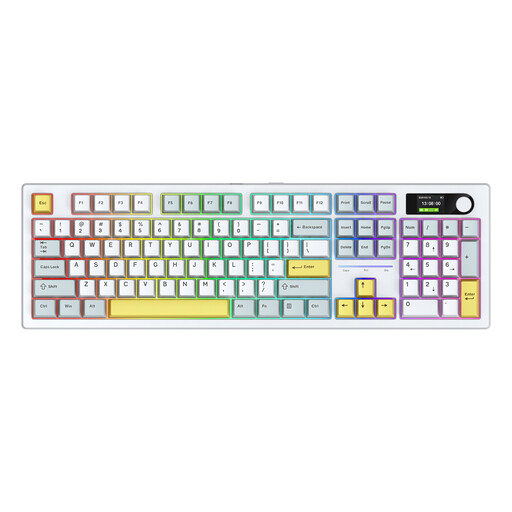
White; US Qwerty layout. Compare the layout with the keys you’re used to before buying.
 No image available
The 104-key layout is an option if you want to use a regular keyboard as well as drawing commands.
Colour screen, replaceable switches, 3MODE and RGB.
 No image available
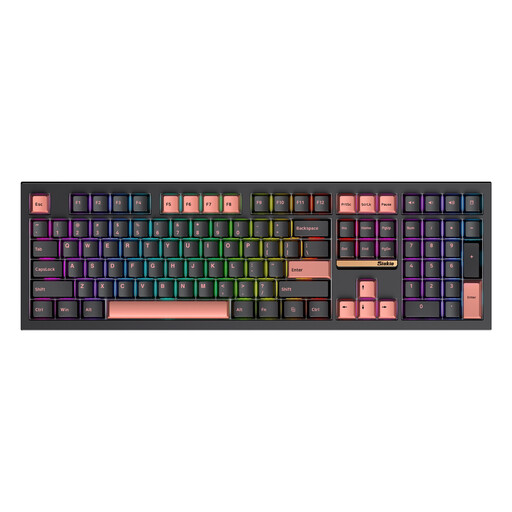
The 108-key layout is an option if you also enter a lot of text while painting.
Mechanical keyboard with replaceable switches, 3MODE and RGB.
 No image available
The foldable design is an option if you’re looking for a compact keyboard for your workstation.
Wireless Bluetooth model with touchpad.
Not if both screens are connected to the same computer: you manage the display layout on that computer. Switching between devices is only relevant if you also use multiple computers or other devices.
First check which shortcut corresponds to the command you want, then assign it by following the instructions for the keyboard or pad. Krita has shortcut settings; XPPen explains that the ACK05 sets are configured through the driver.
A shortcut pad is designed for one-handed control and won’t replace a full typing keyboard for extensive text entry. Choose one as an extra if you’ll keep your regular keyboard, or compare compact and full-size keyboards if you want one device for both typing and commands.
Check which connection, receiver and configuration software come with the version you’re choosing, and whether they’re compatible with your computer. The European Commission explains the EU rules for radio equipment; CE marking is only required when the applicable EU rules say it is. These general rules don’t confirm that a specific model complies.
In addition to any manufacturer’s warranty, you’re covered by the legal guarantee. ACM ConsuWijzer explains that the seller is responsible for providing an appropriate solution if a product develops a fault sooner than you could reasonably expect with normal use. The Netherlands has no fixed statutory guarantee period that applies equally to every keyboard.