
Frequent data entry
You work with sequences of temperatures, rainfall or other figures and want to decide whether a dedicated numeric keypad is worth the desk space.


If you regularly enter readings, first consider whether a dedicated numeric keypad will fit on your desk. Then choose between a full-size model, a more compact keyboard with a numpad or a different layout. Beside a bright window, assess key visibility and screen glare separately: Arboportaal points out that bright sunlight can make a screen harder to read, which key backlighting won’t fix.
You work with sequences of temperatures, rainfall or other figures and want to decide whether a dedicated numeric keypad is worth the desk space.
You want to be able to read your keys and screen during the day. So consider both the key legends and the positions of your screen, window and blinds.
You switch between entering figures, taking notes and working with charts, and need to weigh up a narrower keyboard, a split layout and space for your mouse.
Start with the layout that suits the way you enter figures. Then consider readability in daylight, space for your mouse and hands, and compatibility with your computer.
| What to consider | What should you check? | Who is this important for? |
|---|---|---|
| Entering figures | Check whether the exact version has a numpad, whether Num Lock is easy to identify and whether the physical layout suits your computer. | If you regularly enter readings and want to keep the figures together, pay particular attention to a built-in numpad; around 36% of consumers prioritise entering figures. |
| Readability in daylight | View the keys from your usual working position and check your screen position and blinds. Backlighting is mainly worth considering in changing or low light. | If you work beside a window, you’ll want to read your keys and screen without keyboard lighting masking screen glare; around 29% of consumers prioritise readability in daylight. |
| Typing posture and mouse space | Measure the available desk space and consider where your mouse will go. A split layout may take some getting used to. | If you type for long periods as well as entering figures, you’ll want a comfortable hand position and room for your mouse; around 21% of consumers say this is their top priority. |
| Connectivity and switching | Check whether it uses USB-A or USB-C, whether an adapter or receiver is needed, whether it supports Bluetooth and what layout the version you choose has. | If you want to move your keyboard or switch between devices, the key consideration is whether its connection suits your equipment; around 14% of consumers prioritise this. |
Lighting beneath the keys won’t change reflections on your screen. Arboportaal lists bright sunlight as a possible cause of reduced screen readability.
Check the keys in daylight and review your screen position and blinds before making backlighting a deciding factor.
A keyboard range may include versions with different country layouts, so symbols and keys may be in different places from where you expect them.
Before ordering, check the item number or version and look at the actual layout.
In the Netherlands, statutory guarantees apply alongside any commercial warranty. According to ACM ConsuWijzer, the seller is responsible if a product doesn’t do what you could reasonably expect when used normally.
Compare what an additional cover plan offers with the rights you already have.
The KB216 version with a Dutch layout is a full-size wired keyboard with a numpad, designed for a permanent workstation.
According to the manufacturer, the UltraBoard 960 V2 range combines a more compact size with a built-in numpad.
The MX Keys S is a wireless option for anyone who switches between devices or wants adjustable key backlighting.
The Keyra is a wireless split keyboard with a full layout, for anyone considering a different typing posture.
The KC 6000 SLIM is a slim, wired full-size alternative.
These Joybuy products range from wired keyboards to models with a numpad or wireless connectivity. Check the layout, connection and features that matter for your workstation for each version.
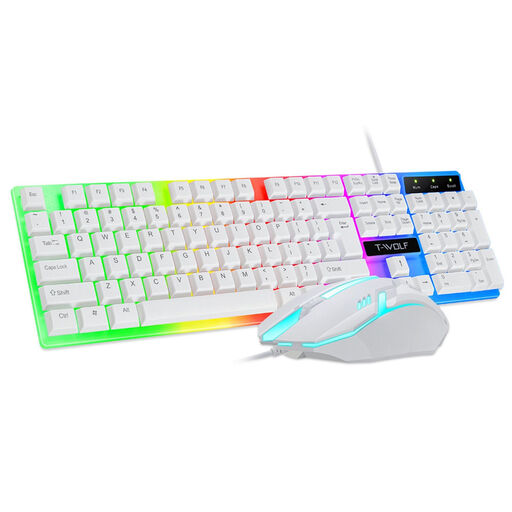 Image unavailable
A wired option for a permanent workstation where backlighting is useful.
The product name lists colourful backlighting and matte, non-slip keys.
 Image unavailable
Suited to a permanent workstation where you want to enter readings using a separate numeric keypad.
Full-size, black and plug-and-play, according to the product name.
 Image unavailable
A wired option for entering figures if you’re also looking for a mechanical keyboard.
The product name lists a numpad, RGB backlighting, volume knob and PBT keycaps with an MDA profile.
 Image unavailable
An option if you want to combine numeric data entry with a wireless keyboard for multiple devices.
The product name lists a full-size layout with a numpad and scissor keys. Please note: this version has a US QWERTY layout.
 Image unavailable
An option for entering figures if you use a compatible Mac with Apple silicon.
The product name lists a Dutch version with white keys. Compatibility is limited to Mac models with Apple silicon.
Not necessarily. Logitech describes the MX Keys S backlighting as adapting to the surroundings, while Arboportaal points out that bright sunlight can make a screen harder to read. Check the keys in daylight and, if needed, tackle screen glare by adjusting your setup and blinds.
Check your computer’s connection and the exact version. The Dell KB216 version reviewed uses USB-A; BakkerElkhuizen lists USB-C for the UltraBoard 960 V2, with a USB-A adapter included. For a wireless model, make sure the compatible Bluetooth connection or receiver works with your equipment too.
Follow the instructions for your specific model. Logitech recommends unplugging a wired device first, not spraying liquid directly onto it and cleaning the keys with a soft, slightly damp cloth. Spill-resistant doesn’t mean a keyboard is washable.
For consumer purchases in the Netherlands, statutory guarantees apply alongside any commercial warranty. ACM ConsuWijzer says the seller is responsible if a product doesn’t do what you could reasonably expect when used normally. According to the Dutch government, online purchases from a business usually come with a 14-day cooling-off period, although there are exceptions; so compare any additional warranty plan with the rights you already have.
For employees who work with display screen equipment for more than two hours a day, Arboportaal describes a rule that the screen and keyboard must not be attached to each other. These are workplace regulations, not a product specification or a requirement for every private buyer.