Which buying considerations matter?
Start with the layout and the keys you use most often. Then assess your workstation setup, and consider any extra features in light of how you work.
| Consideration |
What to look for when buying |
Who should pay particular attention? |
| Window and browser navigation |
Check the physical layout and the position of the arrow and navigation keys. If the keyboard has macro software, check that it works with your system. |
If I often switch between an editor, a form and a preview, I want the keys I need to be easy to reach. Around 33% of consumers say navigation is their main buying consideration. |
| Posture when typing for long periods |
Consider the keyboard’s width, the space for your mouse and your hand position. Also check whether you need a numeric keypad. |
During long building and testing sessions, I want to be able to position my keyboard and mouse comfortably and vary my activities. For around 27% of consumers, posture is the top priority. |
| Quiet, straightforward typing |
Check the connection and physical layout of the version you’re considering. Don’t judge typing noise solely by the manufacturer’s description. |
If I mainly type on a fixed or shared workstation, I want a straightforward layout that suits my connection. Around 20% of consumers say quiet, uncomplicated typing is their main concern. |
| Switching between devices |
Check how many devices are supported, how they connect, and whether the operating system and available ports are compatible. |
If I really do build or check the site on more than one device, I want to be able to switch connections easily. This is the main buying consideration for around 20% of consumers. |
Keyboards on Joybuy
This selection includes compact and full-size keyboards for browser work, typing and use with one or multiple devices.
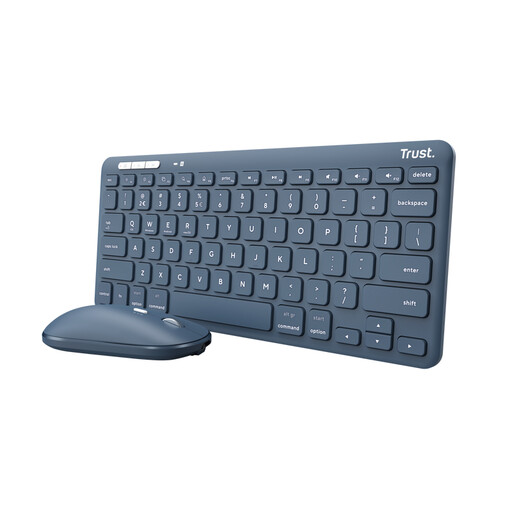 Image unavailable
Trust Lyra keyboard with mouse, wireless, QWERTY US English, blue
Could be a good fit if you’re looking for a keyboard and mouse together for a workstation with varied tasks.
The product name lists RF and Bluetooth connectivity and a QWERTY US English layout.
Joybuy
 Image unavailable
Ajazz AK820 Pro 75% mechanical keyboard, tri-mode, QWERTY US, Flying Fish switches
A compact option to consider if you want to keep navigation keys within easy reach while building a site.
The product name lists a 75% layout, tri-mode connectivity, hot-swappable keys, QWERTY US and compatibility with Windows and Mac.
Joybuy
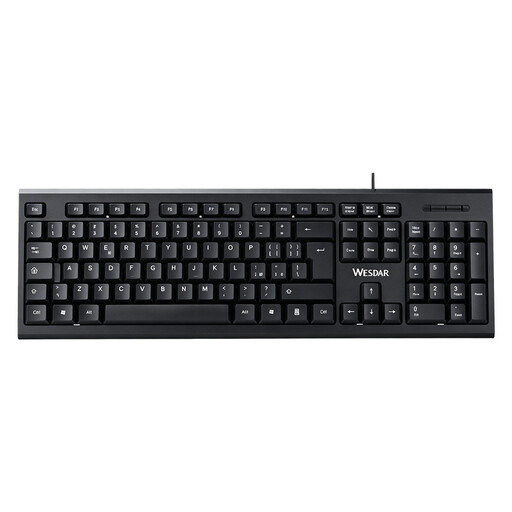 Image unavailable
Wired keyboard with numeric keypad, QWERTY, black
Could be a good fit if you enter a lot of numbers and use a fixed workstation with a wired connection.
The product name lists a full-size layout, numeric keypad, QWERTY layout and plug-and-play connection. Allow enough room for your mouse when positioning it.
Joybuy
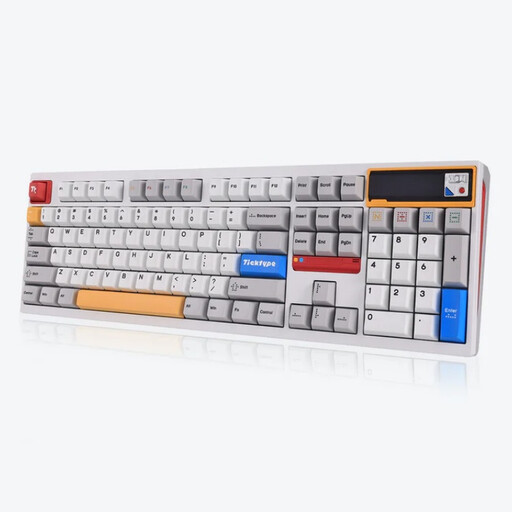 Image unavailable
Ticktype DP104, full-size mechanical keyboard with 108 keys, US layout, Powder White
A full-size layout is worth considering if you use a larger keyboard and frequently use its extra keys as well as typing.
The product name lists 108 keys, hot-swap, tri-mode connectivity and Silent Tactile Switches. A full-size layout takes up more room, so consider how much space you’ll have for your mouse.
Joybuy
 Image unavailable
Trust Vaiya wireless keyboard, full-size with numeric keypad, QWERTY US
Could be a good fit if you’re looking for a full-size layout and connectivity with multiple devices.
The product name lists a numeric keypad, scissor keys and QWERTY US. If you choose a full-size keyboard, consider where you’ll position your mouse.
Joybuy
Frequently asked questions
Do I need a special keyboard to use multiple browser windows?
No, you can use your operating system and browser shortcuts. Windows has keyboard controls for arranging windows, while Microsoft Edge includes Ctrl+N to open a new window. Check which shortcuts work with your system and layout.
How should you set up your workstation for long building and testing sessions?
Position your keyboard and mouse so you can use them comfortably, and vary your posture and tasks. Arboportaal notes that a narrow keyboard can leave more room to position your mouse closer. This doesn’t mean that one keyboard can prevent discomfort.
What should you check before connecting a wireless keyboard?
Check that the connection method and operating system supported by the exact version are compatible with your computer. Kensington lists Bluetooth or a 2.4 GHz USB-A receiver for the KB675, and says that Windows 11 on Arm is not currently supported.
What are your rights if a keyboard is faulty or you buy online?
When you buy as a consumer in the Netherlands, you’re entitled to a product that meets reasonable expectations, but there is no fixed statutory warranty period. According to the Dutch government, for online distance purchases from a business, you’ll often have a 14-day cooling-off period. The circumstances of the purchase may matter; report any fault to the seller.
Does an employee in the Netherlands have to buy a separate keyboard when working on a laptop?
Not necessarily. Arboportaal says that if an employee spends more than two hours a day working at a screen, the screen and keyboard must not be attached to each other. When using a laptop, the employee must then be able to use a separate screen or keyboard; this is not a general requirement for every reader to buy one.


