Choose a keyboard with a numeric keypad if you often enter dates, quantities or amounts. Programmable keys are worth considering if your catalogue software supports the actions you want to use. For long data-entry sessions or limited desk space, the keyboard’s shape or layout may matter more, but a keyboard won’t create custom fields in your catalogue.
Who is this relevant to?
Collectors who enter lots of numbers
If you often enter dates, quantities, measurements or purchase prices for each coin, a numeric keypad can keep those numbers close at hand. OpenNumismat lists coin characteristics, issue details and catalogue numbers among the possible fields.
Collectors with repetitive tasks
If you repeatedly perform the same tasks when working with custom catalogue fields, check that both your software and the keyboard software support those actions. Keychron and Logitech describe features for customising or combining key actions.
Collectors with long data-entry sessions
The keyboard’s shape and the position of the numeric keypad can make a difference if you catalogue for long periods. Logitech, Kensington and R-Go Tools describe different shapes and layouts; consider these alongside your own desk setup and typing style.
What should you look for?
| Consideration |
What should you check? |
Who should prioritise this? |
| Numbers and coin details |
Check whether the model has a numeric keypad and whether it will fit in the space available next to your mouse. |
If I enter lots of dates, measurements or amounts, I want to be able to type those numbers quickly. Around 36% of consumers give number entry top priority. |
| Repetitive tasks |
Test one action in your catalogue software and check that it’s supported by the configuration software and operating system. |
When I repeat the same supported action often, I want to know if I can assign it to a key. Around 29% of consumers prioritise repetitive tasks like these. |
| Shape for longer sessions |
Try the keyboard shape at your own workstation, and consider your screen, chair and mouse setup too. |
For longer data-entry sessions, I want a shape and hand position that suit my workstation. Around 21% of consumers give shape and positioning top priority. |
| Desk space |
Measure the space available for your keyboard, mouse and coin-collecting materials; compare an integrated numeric keypad with a separate one. |
If I want to keep space free for my mouse and collecting materials, I pay attention to where the numeric keypad sits. Around 14% of consumers give desk space the greatest consideration. |
Common things to watch out for
-
Confusing a programmable key with custom catalogue fields
Custom fields are managed by the catalogue application. A macro or customised key will only work if both the keyboard software and your programme support the action you want.
Make a note of one task you repeat and test it in your own catalogue software before choosing programmable keys.
-
Assuming every version has the same layout
The Keychron V6 Max version described on the Joybuy product page has an ANSI US layout and Banana switches. That doesn’t mean every version of the model has the same layout or switches.
Before buying, check the full model name, keyboard layout and switch version of the variant you’ve chosen.
-
Choosing a fixed numeric keypad without measuring the space for your mouse
An integrated numeric keypad is attached to the keyboard, while a separate one can be positioned independently. These setups require different amounts of desk space.
Measure the space available and compare a full-size keyboard with a compact model and a separate numeric keypad.
Brands to consider
Keychron
Keychron says the V6 Max combines a full-size layout with customisable keys and macros.
- Keychron describes key remapping and macros through configuration software.
- The version mentioned has an ANSI layout; check the layout and switch variant of the model you’re considering.
Logitech
The MX Keys S is designed for software-based shortcuts, while the ERGO K860 has a split design and numeric keypad.
- Logitech lists Smart Actions for the MX Keys S through Logi Options+.
- The features described don’t, on their own, tell you whether your catalogue software supports every action you want.
CHERRY
The KC 6000 SLIM is a wired, full-size keyboard for a Windows workstation.
- CHERRY lists a numeric keypad and USB-A; on Windows, CHERRY KEYS can assign macros and text to keys, among other functions.
- Check that the version you want suits your operating system, keyboard layout and cataloguing workflow.
Kensington
Kensington says the Pro Fit Ergo KB620-RC combines a curved layout with a numeric keypad and customisable keys.
- Kensington lists 20 programmable keys.
- The manufacturer describes it as optimised for Windows and macOS; some features may not be supported in ChromeOS.
R-Go Tools
R-Go Tools describes a modular setup with a split keyboard and a separate numeric keypad.
- According to the manufacturer, the numeric keypad can be positioned on the left or right.
- Check the version and connections for each component separately.
Joybuy keyboards for cataloguing
If you enter coin details, you’ll find keyboards with a numeric keypad alongside more compact models here. Macros and onboard memory are also listed for the AJAZZ AK820 MAX. Check each model’s layout and features to make sure they’re right for your catalogue software.
 Image unavailable
Wired full-size keyboard with numeric keypad, QWERTY
The numeric keypad may be useful if you often enter dates, quantities and amounts.
Wired, plug and play, full-size and with a QWERTY layout; the product name also mentions a black version.
View at Joybuy
 Image unavailable
Apple Magic Keyboard with Touch ID and numeric keypad
The numeric keypad suits a workflow that involves lots of number entry.
The product name mentions Touch ID and a numeric keypad.
View at Joybuy
 Image unavailable
AJAZZ AK820 MAX 75% mechanical keyboard, US QWERTY
The listed macros and onboard memory may be useful if you want to set up repetitive tasks and your catalogue application supports them.
The product name mentions a 75% layout, tri-mode connectivity and Flying Fish switches. Macros don’t create catalogue fields; the action you want must be supported by the keyboard software and your catalogue application.
View at Joybuy
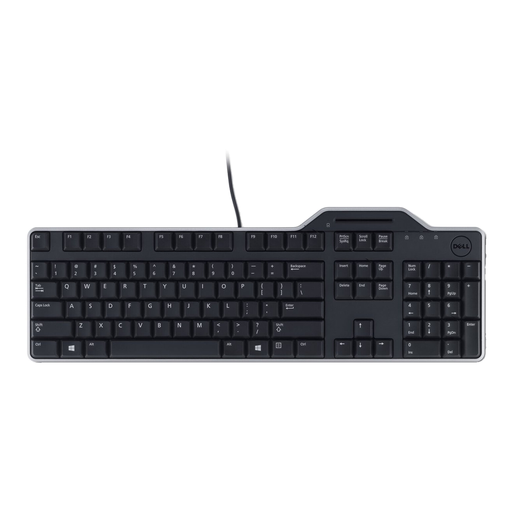 Image unavailable
DELL KB813 Smartcard keyboard, AZERTY
A numeric keypad can be useful if you enter lots of coin details as numbers.
The version listed has an AZERTY layout and USB connection; the product information mentions use with Windows.
View at Joybuy
 Image unavailable
AJAZZ AK820 Pro 75% mechanical tri-mode keyboard, US QWERTY
The 75% layout may appeal if you’re looking for a more compact keyboard setup.
The product name describes a mechanical keyboard with a US QWERTY layout and tri-mode connectivity. Check that the layout suits the way you use it.
View at Joybuy
Frequently asked questions
Will a programmable keyboard create custom fields in my coin catalogue?
No. Custom fields are managed by the catalogue application; keyboard software can only configure keys or actions. Test the action you want in your own programme. OpenNumismat is one example of software that offers customisable coin fields.
How do I set up a compact keyboard with a separate numeric keypad?
Depending on the version, a separate numeric keypad can be positioned on the left or right. Check the connections for both components, then try positioning them next to your mouse and cataloguing materials.
How long do I have to change my mind if I buy a keyboard from a business online?
According to the Dutch Government, distance purchases generally come with a 14-day cooling-off period. This guidance applies to distance purchases from a business; a purchase from a private individual isn’t automatically covered. Check the seller’s information for your specific order.


