
Builder who relies on coding and Git shortcuts
You often switch between code, tests and version control, and want coding symbols and shortcuts to be easy to reach. GitHub Docs covers shortcuts for GitHub Desktop on both Windows and macOS.


Start with the physical keyboard layout and check that you can easily reach the coding symbols, arrow keys and shortcuts you use in your editor and version control software on your operating system. For example, GitHub Docs lists different shortcuts for Windows and macOS. Then choose a keyboard to suit your workspace: a compact, programmable model if desk space is limited, a lower-profile keyboard if you switch between devices, or a split model if hand positioning is your priority. With any model, check the exact layout, connection options and system compatibility.
You often switch between code, tests and version control, and want coding symbols and shortcuts to be easy to reach. GitHub Docs covers shortcuts for GitHub Desktop on both Windows and macOS.
You consider your hand position alongside your mouse, screen and posture. Arboportaal recommends varying your tasks and taking microbreaks when working at a screen.
Your main considerations are desk space, typing noise or the ability to switch between computers. Which matters most will depend on your workspace and devices.
Start with the physical layout and how easy the keys are to reach. Then weigh up hand position, desk space, key feel and switching between devices in the context of your workspace.
| What to consider | What to check before buying | Who should pay particular attention? |
|---|---|---|
| Coding symbols and shortcuts | Try out the symbols, arrow keys and shortcuts you use most for your editor and GitHub Desktop on the exact physical layout. Check whether you’re looking at the Windows or Mac version. | I want to write code and use version control without having to search for keys or key combinations first. Around 29% of consumers prioritise easy access to coding symbols and shortcuts. |
| Hand position | Compare a fixed split with separately positionable halves, and consider where your mouse and screen will go too. | When I work at my computer for long periods, I want to position my hands to suit the rest of my workspace. Around 23% of consumers make hand position their top priority. |
| Desk space | Measure the space available and decide whether you need a number pad, separate arrow keys and a function row. | I want to leave room for my mouse or other items, and could work with a more compact layout if needed. Around 18% of consumers consider desk space their main priority. |
| Key feel and typing noise | Check the mechanism on the version you’re considering and, if possible, try the keyboard in a similar environment to yours. | In a shared space, I want a key feel that suits my preferences while being considerate of others. Around 18% of consumers prioritise key feel and typing noise. |
| Switching between devices | Check how many devices the exact version can connect to, which connection options it has and whether any configuration software works with your systems. | I work across several development devices and want to check whether one keyboard will suit them all. Around 12% of consumers say switching between devices is their top priority. |
Key and symbol positions can vary between ANSI, ISO and different regional versions. You’ll notice this particularly when you enter code frequently.
Check the full model and variant name, and look at images of the physical keys before you order.
On a compact model, you may need to use an extra key layer to access some functions. This can affect frequently used navigation and function keys.
Check the editor and version control shortcuts you use, paying particular attention to how the arrow and function keys work.
A different keyboard shape won’t, on its own, determine how your entire workspace is set up. Arboportaal also recommends varying your tasks and taking microbreaks when working at a screen.
Assess the keyboard alongside your screen, mouse and posture. Don’t assume that one particular model will prevent discomfort.
An additional manufacturer’s warranty doesn’t replace your rights if a product is faulty. According to the Dutch Government, there is no fixed statutory warranty period in the Netherlands.
Keep your proof of purchase and report any fault to the seller.
The V1 ISO is a compact, wired option with reprogrammable keys, while the Q6 Ultra 8K has a full-size ANSI layout.
The MX Keys S could suit you if you want a lower-profile keyboard with device-switching features; the ERGO K860 has a fixed split design.
The KC 6000 SLIM is a full-size wired option for a dedicated Windows workstation.
The Freestyle2 is designed for anyone who wants to position the two keyboard halves separately.
These keyboards cater to different needs, including programmable keys, compact layouts, working across multiple devices, key feel and hand positioning.
 No image available
An option if you want programmable keys and a number pad.
The product description lists programmable keys via HP Accessory Center, a full-size layout with number pad and compatibility with Windows 11. The keyboard connects wirelessly via a USB receiver, and its feet adjust up to 6 degrees.
 No image available
A compact, wired option if you want to remap keys or set up macros.
The product description lists a compact layout with 81 keys, arrow, function and navigation keys, and a USB-C connection. Key remapping and macros can be set up using the web-based configuration tool described.
 No image available
A keyboard with a full-size layout and the option to switch between multiple devices.
The product description lists quiet, low-profile scissor keys, a number pad and connections to up to four devices via Bluetooth or a USB receiver. The physical layout is US QWERTY, so check that it suits how you work.
 No image available
A compact mechanical option if you’re looking for a programmable knob and hot-swappable switches.
The product name specifies an 80% layout and US QWERTY. The description lists tri-mode connectivity, hot-swappable switches, a programmable knob and a rechargeable battery.
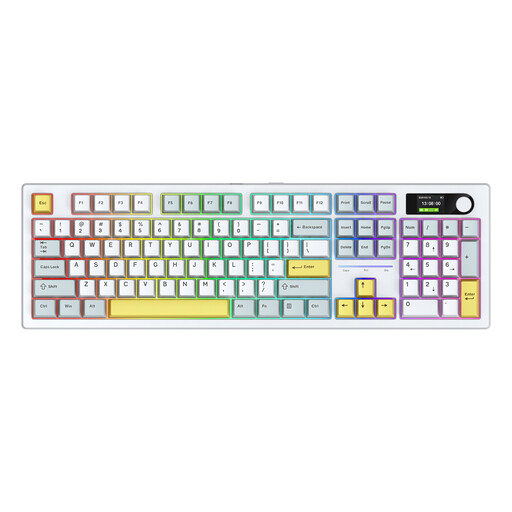 No image available
An option if you want to compare an Alice layout with a full-size keyboard.
The product name specifies 104 keys and a blue and white finish. The description lists an Alice layout, hot-swappable switches and three connection modes.
No. Start by checking the shortcuts for your version control software and see whether your keyboard layout works well with them. For example, GitHub Docs lists separate shortcuts for GitHub Desktop on Windows and macOS.
First, check the physical version of your keyboard. In Windows, you can add or change layouts in the language and input settings, as explained by Microsoft Support. This setting won’t change the physical shape or markings on the keys.
For an online consumer purchase, you’ll usually have 14 days from delivery to change your mind, subject to exceptions listed by ACM ConsuWijzer. You also have statutory rights if a product is faulty. The Dutch Government states that there is no fixed statutory warranty period and that you can contact the seller.
No. There’s no general requirement for every private buyer to choose a particular type. However, for employees who work at a screen for more than 2 hours a day, Arboportaal sets out requirements for the workstation: the screen and keyboard must not be attached to one another. This is not a general requirement to buy a split keyboard.