Which keyboard suits which user?

If you enter lots of figures

If you’re building a budgeting app and often check sequences of figures, consider whether a built-in or separate number pad is worth the extra space it takes up. CHERRY and BakkerElkhuizen describe models with, respectively, a full-size layout and a separate number pad.

If you mainly type code and tests

For lots of typing, commands and navigation, a familiar physical layout is important. Compare the key positions with the shortcuts you use in your editor and test environment.

If you work at a screen for long periods

If hand and mouse positioning are important to you, consider an adjustable or split layout. Kinesis describes adjustable keyboard halves, but a keyboard is not a treatment for health problems.

Which factors should you consider when buying?

What to consider What to look for when buying Who should pay particular attention?
Entering figures Think about how often you enter sequences of figures and where the number pad is positioned. BakkerElkhuizen describes a separate number pad that can sit to the left or right of a compact keyboard. If I often enter budget figures, I want to reach the keys without having to position my mouse awkwardly far away. Around 33% of consumers make entering figures their top priority.
Layout for coding and testing Compare the physical layout with your current keyboard and try the key combinations you use in your editor and test environment. When working with lots of code and test commands, I want symbols, navigation keys and function keys to be in familiar positions. Around 25% of consumers prioritise this layout.
Hand position while typing Check the dimensions, adjustability and mouse position; also see whether you can try out the layout. A product claim won’t tell you how a keyboard will feel to you. If I work at a screen for long periods, I want to take the position of my hands and mouse into account when choosing. Around 25% of consumers put working posture first.
Connections and devices Check the ports on your computers and the exact keyboard version. Logitech says the MX Keys S can switch between up to three devices; BakkerElkhuizen lists USB-C with a USB-A adapter for the UltraBoard 950 V2. If you work on more than one computer, you’ll want to know in advance how to connect the keyboard and switch between devices. Around 17% of consumers make connections and switching between devices their top priority.

Which buying mistakes can you avoid?

  • Choosing a compact keyboard without trying out your number-heavy work

    An embedded number pad that you use via NumLock works differently from a built-in or separate number pad.

    Try entering a representative series of budget figures before deciding whether the layout works for you.

  • Assuming versions with the same model name are identical

    The BakkerElkhuizen UltraBoard 950 Wireless and UltraBoard 950 V2 have different connections; keyboard layouts can also vary between versions.

    Compare the full model name, physical layout, connection and included components for the version you’re considering.

  • Taking an ergonomic claim as a guarantee against discomfort

    A different keyboard layout doesn’t guarantee a particular physical outcome. Your workstation setup and the way you work also play a part.

    Assess the keyboard alongside your workstation, and don’t base your health expectations on a product claim alone.

Which brands are worth considering?

Logitech

The MX Keys S is worth considering if you want to switch between devices; the ERGO K860 is a separate split-keyboard product line.

  • Logitech says the MX Keys S can switch between up to three devices.
  • The split design is a feature of the ERGO K860, not automatically the MX Keys S. Check the layout of the version you’re considering.

CHERRY

The KC 6000 SLIM is a slim, wired, full-size keyboard with a number pad.

  • CHERRY lists a scissor mechanism, Windows compatibility and USB-A for this model.
  • These specifications don’t confirm wireless connectivity or Mac compatibility for this version.

BakkerElkhuizen

The UltraBoard models vary in size, number entry and connection.

  • The manufacturer lists an embedded number pad accessed via NumLock for the UltraBoard 950 Wireless, and a separate number pad for the UltraBoard 955 V2 Numeric.
  • According to the manufacturer, the UltraBoard 950 V2 is wired and has USB-C with a USB-A adapter. Don’t confuse this version with the Wireless model.

Kinesis

The Freestyle2 is worth considering if you want to adjust the distance between the two keyboard halves.

  • Kinesis describes adjustable halves and different versions for PC, Mac and different connections.
  • Check the version and physical layout you’re considering; adjustability doesn’t guarantee an individual health outcome.

Keyboards at Joybuy

These Joybuy products are suited to typing, coding and testing, or entering budget data. Check whether each model’s layout works for your daily tasks.

HP 725 Multi-Device Rechargeable Wireless Keyboard

HP 725 Multi-Device Rechargeable Wireless Keyboard

A wireless option worth considering if you want to switch between devices.

Rechargeable; designed for use with multiple devices.

View at Joybuy

Trust Vaiya wireless keyboard with number pad, US QWERTY layout, black

Trust Vaiya wireless keyboard, full-size, US QWERTY, black

Worth considering if you often enter figures and want a full-size keyboard with a number pad.

Scissor keys; US QWERTY layout; listed as a wireless model for multiple devices.

View at Joybuy

AJAZZ AK820 75% wired mechanical keyboard, US QWERTY, Red Switch-Black

AJAZZ AK820 75% wired mechanical keyboard, US QWERTY, Red Switch-Black

A compact layout to consider if you mainly type code and test commands.

83 keys; hot-swappable linear switches; volume knob; white backlighting; PBT keycaps with OEM profile.

View at Joybuy
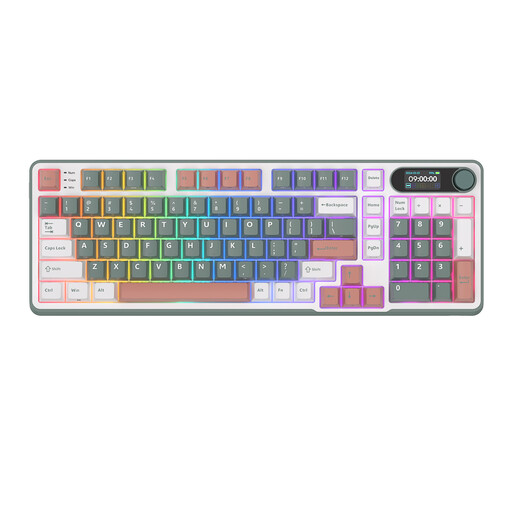
RK ROYAL KLUDGE S98 96% wireless mechanical keyboard, 98 keys, Blue Switch, Camping Green

RK ROYAL KLUDGE S98 96% wireless mechanical keyboard, 98 keys, Blue Switch, Camping Green

Worth considering if you’re looking for a more compact layout with a choice of connection options.

Bluetooth, 2.4G and USB-C; RGB; Smart Display and control knob.

View at Joybuy
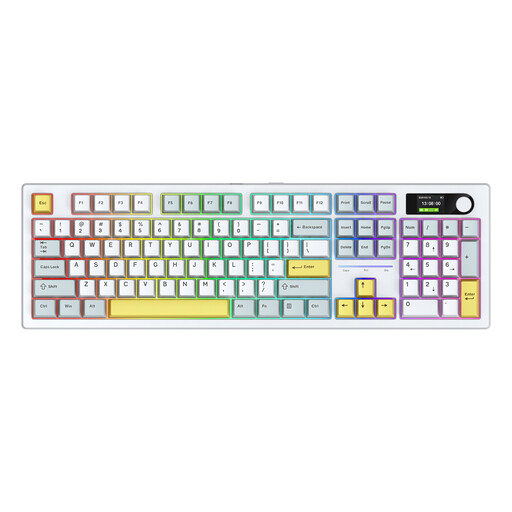
SIUKIE ACH105 104-key mechanical keyboard with Alice layout, Blue and White

SIUKIE ACH105, 104 keys, Alice layout, Blue and White

Worth considering if you’re thinking about an Alice layout for extended typing.

Mechanical keyboard; detachable switches; 3MODE RGB and colour display.

View at Joybuy

Frequently asked questions

Will a programmable key automatically run my automated tests?

No, a programmable key won’t automatically run your tests. Logitech describes Smart Actions in its app as a way to group actions together; check separately how your editor or test environment starts tests.

How do I set up a split keyboard?

Position and adjust the halves to suit your workstation, then try your usual key combinations. The available spacing depends on the Freestyle2 version, so check the specifications of the model you’ve chosen.

What can I do if my keyboard develops a fault after purchase?

If you buy as a consumer in the Netherlands, you’re entitled to a product that is fit for purpose and can contact the seller to find a solution. According to the Dutch government, there is no fixed statutory two-year guarantee period for every product in the Netherlands.

Am I legally required to use a separate keyboard with a laptop?

According to Arboportaal, for employees who work at a screen for more than two hours a day, the screen and keyboard must not be joined together. When using a laptop, it must therefore be possible to use a separate screen or keyboard; this is not a general product requirement for every private buyer.

How can I check whether a keyboard works with multiple computers?

Check the connection and how you switch between devices for each version. Logitech says the MX Keys S can switch between up to three devices; according to the manufacturer, the BakkerElkhuizen UltraBoard 950 V2 is a wired model with USB-C and a USB-A adapter.
