What should you look for?
Start with the physical keyboard layout and your computer’s input source. Then compare the features and design that suit your day-to-day workspace.
| What to consider |
What to look for |
Who is this important for? |
| Code characters and customisable keys |
Compare the physical ANSI or ISO layout with your selected input source. Also check whether you can customise the key functions you want in the software you use. |
If I want to tailor code characters and repeated key actions to my workflow, customisation is my top priority. Around 36% of consumers say this is their main consideration when buying. |
| Posture during long sessions |
Compare a fixed split frame with two separately positioned parts, and consider how much desk space you have. Arboportaal also recommends changing tasks and taking microbreaks during screen work. |
During long typing sessions, I want to be able to adjust the position of my hands and arms at my workstation. Around 29% of consumers say posture is their top priority. |
| Quiet typing |
Check the exact version and decide whether the manufacturer’s description suits your shared workspace. CHERRY describes the KC 1000 as quiet; this is not a direct noise comparison between the models mentioned. |
If I work close to other people, I mainly want a keyboard that suits a quiet working environment. Around 21% of consumers put quiet typing first. |
| Connectivity and devices |
Check which connection the specific version offers and whether your computer supports it. Keychron lists Bluetooth and 2.4 GHz for the V6 Max; according to the manufacturer, the CHERRY KC 1000 is wired. |
If I switch between devices, I want a connection that suits the way I use my computer. Around 14% of consumers make connectivity their top buying priority. |
Joybuy keyboards
These Joybuy options have a range of layouts and connections. Compare the specific version with your input source, computer and desk setup.
 No image available
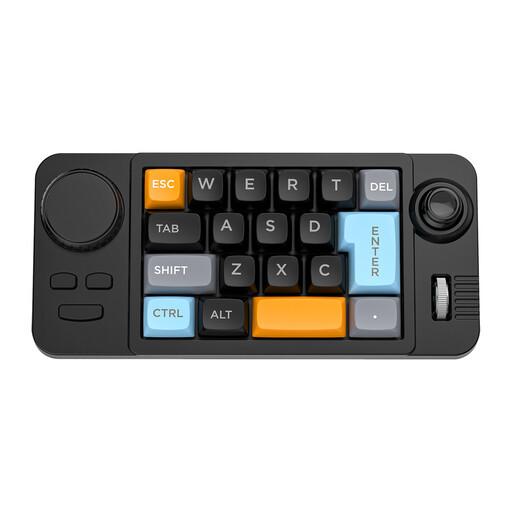
NAXSIR 19-key Wired Gaming Keyboard
Suitable if you’re looking for a wired setup with extra controls via a joystick and rotary knob; check that the layout suits your input source.
The product name lists hot-swappable keys, programmable macros, RGB lighting, a joystick and a rotary knob.
View at Joybuy
 No image available
Wired Keyboard with Numeric Keypad, QWERTY Layout
Suitable for a fixed desk setup if you want a numeric keypad and a full-size layout.
The product name lists a wired plug-and-play connection, QWERTY layout, arrow keys and function keys.
View at Joybuy
 No image available
AULA F75 MAX, 75%, QWERTY US, Reaper Switch
Suitable if you’re looking for a 75% layout and want to choose between wired use and wireless connections.
The product name lists a mechanical keyboard with a US QWERTY layout and wired, Bluetooth and 2.4 GHz connections.
View at Joybuy
 No image available
AJAZZ AK980 V2, 98%, QWERTY, Gift Switch V2
Suitable if you’re looking for an extensive yet more compact layout and want to compare several connection options.
The product name lists a mechanical keyboard with a 98% layout, QWERTY, USB-C, Bluetooth and 2.4 GHz.
View at Joybuy
 No image available
REDRAGON Wired 94-key Full Metal Mechanical Keyboard
Suitable for a fixed desk setup if you’re looking for a wired mechanical keyboard with a wrist rest.
The product name lists 94 keys, a metal casing, a phone stand and a wrist rest.
View at Joybuy
Frequently asked questions
My code characters don’t match the symbols on the keys. What should I check first?
Check that your selected input source matches the physical keyboard layout. Microsoft Support explains how to add or change layouts in Windows; Apple Support describes the differences between ANSI and ISO layouts for Mac keyboards.
Will a programmable key run my automated tests by itself?
No. A programmable key or macro doesn’t mean your testing environment will work automatically. Check which action you want to set up and whether the relevant configuration software works in your setup.
Should I buy a split keyboard if I spend a long time working on the app?
Not necessarily. Choosing between a fixed split frame and two separately positionable sections depends on your desk setup. Arboportaal also recommends changing tasks and taking microbreaks during screen work; a keyboard alone can’t guarantee a pain-free working day.
What are my rights when I buy a keyboard online?
According to the Dutch government, online consumer purchases often come with a 14-day cooling-off period. You’re also entitled to a product that is fit for purpose; the Netherlands has no fixed statutory guarantee period, and the retailer is your point of contact if a product is faulty.
What rules apply to screen work as an employee?
According to Arboportaal, for employees who work at a screen for more than 2 hours a day, the screen and keyboard must not be attached to each other. If they use a laptop, they must be able to use a separate screen or keyboard; this is a conditional workplace requirement, not a general buying requirement for every reader.


