
Student who does a lot of coding
Looking for a layout that makes punctuation, navigation keys and shortcuts practical to use. Check the physical layout on your own computer before prioritising compactness.


Start with a layout that makes the punctuation, arrow keys and shortcuts you use for coding easy to access. Then compare noise, size and connectivity. A compact model can be a good fit when desk space is limited, while an adjustable mechanical keyboard may appeal if you want to customise the keys. Before buying, check the exact layout and make sure the connection and any software are compatible with your computer.
Looking for a layout that makes punctuation, navigation keys and shortcuts practical to use. Check the physical layout on your own computer before prioritising compactness.
Wants to consider key noise when someone nearby is studying or sleeping, without losing sight of finding a suitable layout. Descriptions such as ‘quiet’ are manufacturers’ claims, not comparable noise measurements.
Wants to leave room for a mouse and possibly a laptop screen set up separately, while still being able to find the keys needed for coding easily.
First check the physical layout and the keys you use while coding. Then weigh up noise and space alongside connectivity and extra customisation options.
| What to consider | What should you check? | Who is this important to? |
|---|---|---|
| Coding and navigation keys | Check the physical layout and the position of the punctuation, arrow keys and shortcuts you use. | When I code, I want to find the symbols and navigation keys without changing the way I work. Around 29% of consumers put the layout for coding and navigation first. |
| Key noise | If possible, assess the noise of the exact version; a manufacturer's claim is not a comparable noise measurement. | If I work near someone who is studying or relaxing, I want to take noise into account rather than judge by the product name. Around 23% of consumers put quiet typing in a shared room first. |
| Connectivity and ease of use | Check which ports are available and whether your keyboard uses a cable, Bluetooth or a USB receiver. | If I mainly want a straightforward connection, I’d prefer a connection type that works with my computer. Around 18% of consumers prioritise an easy purchase and connection. |
| Space and set-up | Measure the space for your keyboard and mouse, and consider the position of any laptop screen. | At a small desk, I want to be able to position my input devices and screen comfortably. Around 18% of consumers give space and set-up top priority. |
| Customising keys | Check which software, connection mode and model version you need for the settings you want. | If I want to customise keys or macros, I want to know which features are actually included with the version I choose. Around 12% of consumers prioritise customisation. |
The physical layout can vary between regional versions. The model name alone won’t always tell you where the symbols are on the keys.
Check the layout of the exact version and compare the keys you use while coding.
A manufacturer's description of key noise is not an independent comparison. A keyboard alone also doesn’t determine how your entire workspace is set up.
If possible, assess the sound and feel of the keys for yourself. Set up your workspace too, and change your posture and tasks during longer study sessions.
A model name may refer to different versions or to a bundle with extra accessories. For the Keychron K3 Max, Keychron says hot-swap is available only on a specific version.
Check the full product name, the version, what’s included and which connections you need.
The MX Keys Mini is a compact option, while the K120 is a full-size wired keyboard. They’re different solutions, not variations of the same model.
The Ody II is a full-size keyboard with a wireless USB receiver.
The K3 Max is a compact mechanical option for comparing connection types and key customisation.
The KC 1000 is a slim, full-size wired keyboard with a numeric keypad.
This selection mainly features compact mechanical keyboards, alongside a wireless keyboard-and-mouse set for a small workspace.
 No image available
The compact layout may suit you if you want to save desk space; check that the US layout works for you.
68 keys; US layout.
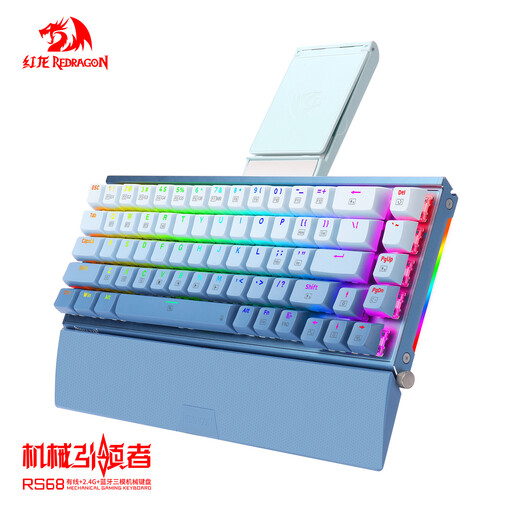 No image available
The product name mentions both wired and wireless use; check which connection you want to use with your computer.
Mechanical keyboard; the product name mentions hot-plug and wired, wireless and Bluetooth connections.
 No image available
The product name specifies a wired version; check that your computer has the required connection.
Mechanical keyboard; the product name mentions hot-swappable keys and 82 keys.
 No image available
According to the product name, this set includes a keyboard and mouse; check that you need both and that the US layout works for you.
The product name specifies RF wireless and Bluetooth.
 No image available
The 75% layout may be worth considering if you’re looking for a more compact wired keyboard; check the physical key positions for your coding work.
The product name mentions 83 keys, hot-swappable linear switches and a volume knob.
Not just because you’re a student. For employees who spend more than 2 hours a day working with a screen, Arboportaal sets out rules requiring the screen and keyboard to be separate; laptop users must be able to use a separate screen or keyboard. This requirement for employees does not automatically apply as a legal obligation to independent study. When setting up your workspace, also consider using a separate mouse and where to position your screen.
According to Keychron support, the keyboard must be connected by cable for Launcher to recognise it. Launcher won’t recognise the keyboard over Bluetooth or 2.4 GHz; also check compatibility with your exact model and computer.
Position your screen and input devices so you can type comfortably, and change your posture and tasks from time to time. Arboportaal stresses that a well-set-up workspace is not enough on its own if you don’t vary what you do; a keyboard cannot guarantee that you’ll avoid discomfort.
According to the Dutch government, when buying online from a business you usually have a 14-day cooling-off period; check whether it applies to your purchase. In the Netherlands, there is no fixed statutory warranty period: you’re entitled to a product that works properly, taking factors such as the product, its price and its normal lifespan into account. A manufacturer's warranty is an additional benefit and does not remove your statutory rights against the seller.