
Code researcher at a shared desk
You regularly use symbols, shortcuts and function keys, and don’t want to disturb your colleagues unnecessarily. So consider both the layout and the noise made by the specific keyboard version.


Start with a layout that gives you comfortable access to the code, shortcut and function keys you need, then consider typing noise and the space available on your desk. A wired TKL keyboard with scissor switches is an option if you want to keep noise down and can do without a number pad. Wireless connectivity, a split design and programmable keys involve other trade-offs. A keyboard won’t speed up a slow script: profiling helps you find the parts of your software that are taking the most time.
You regularly use symbols, shortcuts and function keys, and don’t want to disturb your colleagues unnecessarily. So consider both the layout and the noise made by the specific keyboard version.
You connect your keyboard to different workstations or devices. Check which connections are available and whether you’re allowed to use any configuration software on your work computer.
You want to take hand position into account when choosing a keyboard. A split keyboard offers a different setup, but it is not a proven treatment for or way to prevent physical complaints.
Start with the keys you use most when investigating code. Then consider noise, hand position and the connections available at your shared workspace.
| What to consider | What should you look for? | Who is this important to? |
|---|---|---|
| Typing noise | Consider the key mechanism and the specific version. If possible, try it in a similar room; a manufacturer’s description is not a comparative sound measurement. | If I type a lot next to colleagues, I want to keep the noise of my keystrokes to a minimum. Around 36% of consumers say noise is their main consideration. |
| Code and function keys | Check the physical layout, the position of the symbols and whether you need to use Fn for the function keys. | When investigating code, I want quick access to the symbols and functions I use most. Around 29% of consumers say the keyboard layout for coding is their main consideration. |
| Hand position | Check that there’s room on your desk for both halves of a split keyboard and that the setup feels comfortable for you. | If I want to position my hands differently, I give more weight to the keyboard’s shape. Around 21% of consumers say hand position is their main priority. |
| Connecting and switching | Check which USB connection or wireless option is available, and whether you’re allowed to use any required software on your work computer. | When I work in different places, I want to connect easily or switch between devices. Around 14% of consumers prioritise connectivity or switching devices. |
A different keyboard won’t automatically change how long a script takes to run. The Python Software Foundation describes profiling as a way to gather statistics about parts of a program and find bottlenecks.
Investigate the script first, and only choose a different keyboard if the controls are holding you back while you work.
A TKL model has no number pad, and a compact layout may also arrange keys differently. Some functions require an Fn combination.
Check the exact layout, including the symbols and function keys you use most.
Claims about quiet typing, noise-reducing key stability and acoustic foam come from manufacturers. They don’t provide comparable sound measurements for the versions discussed.
If keeping things quiet for colleagues is essential, assess the noise made by the exact version and switch in a suitable working environment.
The STREAM KEYBOARD TKL is a compact, wired option with scissor switches and no number pad.
The MX Keys S is a full-size, low-profile keyboard with device switching and customisable shortcuts.
The wired Split Break v.2 has two separate keyboard halves that can be positioned independently.
The K3 Max SE is a compact, programmable mechanical option; a Dutch product listing describes a version with Milk POM Banana switches and a US layout.
This selection includes keyboards for typing at a shared desk, with options for a full-size layout, wireless use and switching between devices.
 No image available
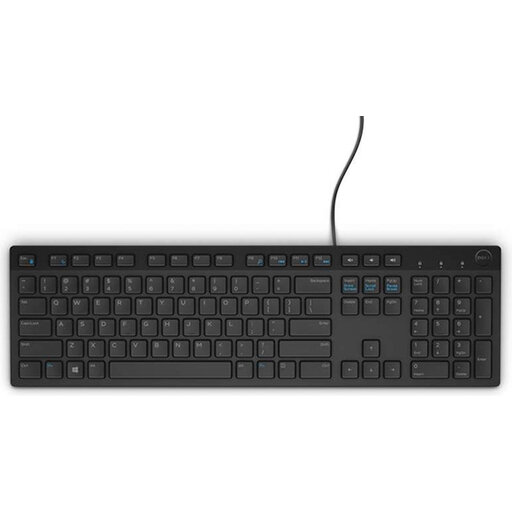
A wired model for anyone who wants a full-size layout with a number pad at a shared workspace.
The product description lists a Belgian AZERTY layout, USB connection, multimedia keys and quiet chiclet keys.
 No image available
A compact keyboard and mouse set for anyone who works in different places and wants to switch between devices.
The product description lists a USB receiver, Bluetooth, three adjustable height settings and a rechargeable battery. It describes the keys as quiet scissor keys.
 No image available
An option if you’re looking for a full-size keyboard with a number pad and a wireless USB receiver.
The product description lists quiet keys, multimedia keys and a US QWERTY layout with a number pad. The title also describes it as spill-resistant.
 No image available
A keyboard and mouse set for anyone looking for a full-size layout and an integrated wrist rest.
The product description lists a US QWERTY layout, 2.4 GHz connection and multimedia keys. It describes the keys as quiet.
 No image available
A full-size layout with a number pad for anyone who wants to use their keyboard with several devices.
The product description lists scissor keys and connectivity via a USB receiver and Bluetooth, with up to four devices.
No, not by itself. Profiling helps you establish which parts of a programme run, and how often and for how long. The Python Software Foundation explains how these statistics can help you find bottlenecks. Choose a keyboard to suit the way you work when investigating the script.
Check which connection is available and whether you’re allowed to use the software you need. The manual says the wired R-Go Split Break v.2 uses USB-C with a USB-A adapter; the software-controlled break indicator requires R-Go Break software.
Arboportaal sets out requirements for employees’ computer workstations. In the situation described for laptop use, an employee must be able to use a separate screen or keyboard. This does not mean that every individual buyer has to purchase a particular keyboard model.
For a typical online consumer purchase in the Netherlands, you generally have a statutory cooling-off period of up to and including 14 days after delivery, subject to legal exceptions. ACM ConsuWijzer explains the cooling-off period; also check the seller’s return costs and conditions before buying.
You may have statutory rights in addition to any commercial guarantee. According to ACM ConsuWijzer, if a product breaks too soon during normal use, the seller must deal with it free of charge in line with the applicable rights. There is no single fixed statutory guarantee period for every keyboard.