What should you consider when choosing?
Start with the physical layout and the characters you use often. Then consider connectivity and configuration, and finally factor in posture and noise.
| What to consider |
What should you check? |
Who is this important for? |
| Layout for code and documentation |
Compare the physical key shapes and legends with your selected keyboard layout. Test your programming symbols, arrow keys and shortcuts. |
If I often switch between code and Dutch text, I want the characters to match what I’m used to; around 33% of consumers put the layout first. |
| Typing without an internet connection |
Check the connection type and whether you can set up your preferred key changes in advance. Save documentation locally if you need it offline. |
When I work offline, I want to type without relying on online configuration; around 27% of consumers prioritise this convenience when working offline. |
| Posture and comfort |
Consider whether the shape suits your posture and whether your keyboard, screen and desk are arranged to work well together. |
When typing for long periods, I want a keyboard shape and workspace that suit my posture; around 27% of consumers make comfort their main priority. |
| Noise in a shared space |
Check the exact switch variant and, if possible, try out the sound in a similar setting. |
If I work in a shared space, I want to consider how noisy my typing is; around 13% of consumers prioritise quietness. |
Keyboards on Joybuy
These models are keyboards for coding and documentation. Their names specify different layouts; check that the stated US layout suits your computer settings and the characters you use.
 No image available
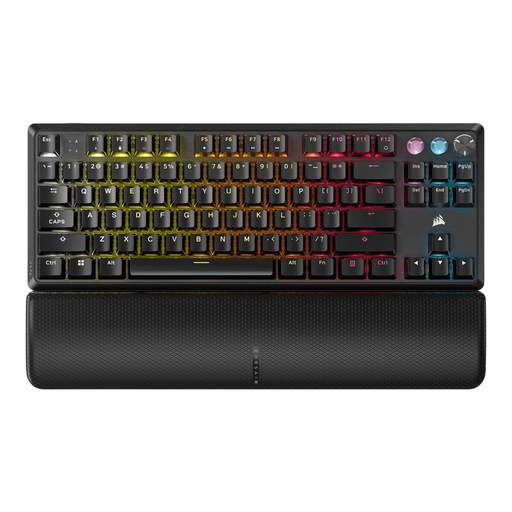
Corsair K70 PRO TKL Magnetic-Mechanical Keyboard – US QWERTY, MGX v2
The TKL layout and US QWERTY designation make this model worth comparing if you don’t need a number pad and care about the physical layout.
The product name specifies Magnetic-Mechanical and MGX v2. If you want to work without an internet connection, check the connection type of the exact variant.
View on Joybuy
 No image available
Corsair K55 CORE TKL Keyboard – US QWERTY
The TKL designation may suit you if you’re looking for a keyboard without a number pad. Check that the US QWERTY layout matches the characters you use and your computer settings.
If offline use is important, check the connection type of the exact variant.
View on Joybuy
 No image available
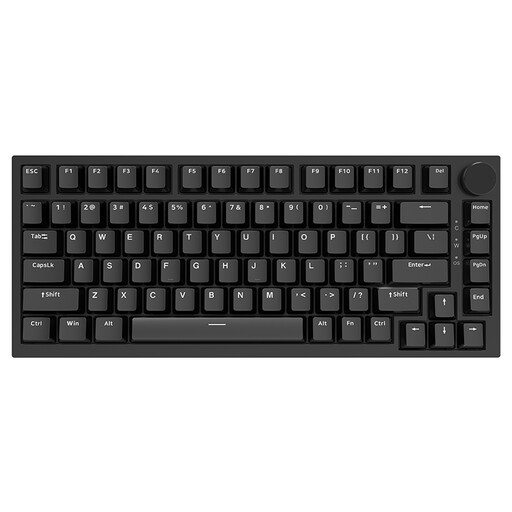
AJAZZ AK820 75% Wired Mechanical Keyboard – US QWERTY, Red Switch, Black
The product name specifies a wired connection, a 75% layout and US QWERTY. Compare the layout with the navigation keys and characters you need.
The stated variant is Red Switch and Black. Check that this version suits your preferences.
View on Joybuy
 No image available
KEYSME Lunar 01 80% Tri-Mode Mechanical Keyboard – US QWERTY, White
The name specifies an 80% layout and Tri-Mode. Check that the physical layout includes the navigation keys you use when coding.
The stated variant is US QWERTY and White. Check that the connection and configuration suit the way you work offline.
View on Joybuy
 No image available
Razer DeathStalker V2 Pro Tenkeyless Gaming Keyboard – US Layout
The tenkeyless design may suit you if you don’t need a number pad. Check that the stated US layout matches your selected input layout.
If you want to type without an internet connection, check the connection type of the exact variant.
View on Joybuy
Frequently asked questions
Does a programmable keyboard make my documentation available offline?
No. A keyboard handles input; save documentation on your computer if you want to access it without an internet connection. Keychron describes Launcher as a web app, but this does not confirm that you can change keys through the app offline.
Why do programming symbols sometimes appear differently from the key legends?
As well as checking the physical keyboard, check your selected input layout. Microsoft Support explains how to add or change layouts in Windows; then test the characters you use in your own code.
Is a TKL keyboard suitable for programming?
A TKL model may suit you if you don’t need a number pad and its navigation keys work for the way you do things. Check the physical layout and try your usual shortcuts before making a choice.
Do I have a cooling-off period when buying online in the Netherlands?
According to ACM ConsuWijzer, online purchases generally come with a statutory cooling-off period of up to 14 days after delivery. There are exceptions, including certain personalised products, so check the terms for your specific purchase.
Is a manufacturer’s warranty the same as the full warranty?
No. ACM ConsuWijzer distinguishes between a manufacturer’s or seller’s warranty and the statutory guarantee in the Netherlands. If a product is faulty, the seller is responsible for providing a solution under the applicable terms.


