Who should consider this choice?

Developer who uses lots of shortcuts

If you often edit code or repeat actions in your editor, customisable keys could suit your input workflow. Keychron says the K3 Max supports key customisation via QMK/Launcher; this won’t affect your website’s responsiveness.

Someone who spends long hours at a screen

When you type for long periods at a fixed workstation, hand and wrist position are worth considering. Arboportaal also recommends changing your posture and tasks, and taking breaks.

Developer who works in different locations

If you take your keyboard with you or switch between devices, size, connection and layout all matter. Logitech says the Pebble Keys 2 K380s can switch between three devices; check that its layout suits you.

What should you look for when choosing?

Compact and programmable

Choose this if: you often perform the same actions in your editor while coding and want to customise keys. Keychron describes the K3 Max as a 75% keyboard with QMK/Launcher.

Bear in mind: a compact layout may take some getting used to. According to Keychron, hot-swap is available only on the specific RGB hot-swappable version.

Low-profile office or multi-device keyboard

Choose this if: you mainly switch between devices. Logitech says the MX Keys S and Pebble Keys 2 K380s can each switch between up to three devices.

Bear in mind: size, layout and connection vary by model. Multi-device features won’t automatically make a web page suitable for mobile screens.

Split ergonomic keyboard

Choose this if: hand position is your main concern during long typing sessions. The Logitech ERGO K860 has a curved, split design, while the R-Go Split Break consists of two separate sections that can be positioned independently.

Bear in mind: these designs may take some getting used to. A keyboard is no substitute for setting up your workstation properly and varying your activities. Manufacturers’ claims about ergonomic benefits are not independently established health outcomes.

Wired scissor-switch keyboard

Choose this if: you work in one fixed location and are considering a low-profile wired model. CHERRY describes the STREAM KEYBOARD as having an SX scissor mechanism.

Bear in mind: a cable makes it less convenient to move between workstations. Check the specifications of the exact version.

What to consider What should you check? Who is this important for?
Shortcuts and key customisation Check whether the exact version supports key customisation and whether the required software works on your computer. If I repeat the same actions in my editor while coding, I want to be able to customise keys for them. Around 33% of consumers say shortcuts and key customisation are a priority when making this choice.
Posture during long typing sessions Compare separate keyboard halves with a fixed split, and make sure your workstation is set up properly and you vary your activities. During long typing sessions, I want to consider the position of my hands and wrists, not just the keys themselves. Around 25% of consumers prioritise posture.
Portability and switching between devices Check the size, supported connections and operating systems for the version you’re considering. If I switch between workstations or devices, I want a layout and connection that suit the way I work. Around 25% of consumers prioritise portability and switching between devices.
Quiet typing and layout Check the exact keyboard layout and key feel; don’t assume how noisy it is based on the product category alone. For a fixed or shared workstation, I want a key feel and layout that suit the way I type. Around 17% of consumers prioritise quiet, straightforward typing.

Common pitfalls

  • Confusing a keyboard feature with a website feature

    Macros or customisable keys won’t automatically change your route guide’s mobile layout or keyboard accessibility.

    Assess your input workflow separately from testing at different screen widths and checking that the site works without a mouse.

  • Assuming every version of a model is identical

    Layout, connection and available features can vary between versions. Keychron says hot-swap is available only on the RGB hot-swappable version of the K3 Max.

    Before buying, compare the full specifications, layout, switches and connection for the exact version.

  • Thinking an ergonomic model is a complete solution for working at a screen for long periods

    A keyboard’s shape is just one part of your workstation. Arboportaal also recommends paying attention to posture and varying your activities.

    Choose a design you can position as you like, and review your workstation set-up and breaks at the same time.

Brands to consider

These brands showcase different keyboard designs and use cases; their inclusion does not in itself mean they are available at Joybuy.

Keychron

The K3 Max is a compact, programmable mechanical option for coding.

  • Keychron describes QMK/Launcher as supporting key customisation on the K3 Max.
  • According to Keychron, hot-swap is available only on the RGB hot-swappable version; check the exact keyboard layout too.

Logitech

The MX Keys S, Pebble Keys 2 K380s and ERGO K860 represent, respectively, a larger multi-device keyboard, a compact model and a split design.

  • Logitech lists switching features for the specific MX Keys S and K380s models.
  • Claims about posture benefits for the ERGO K860 come from Logitech and do not automatically apply to other keyboards.

R-Go Tools

The Split Break is designed for anyone considering separately positioned keyboard halves and a break indicator.

  • R-Go Tools’ product information describes two separate sections.
  • An associated health benefit has not been independently established; check whether the exact version is wired or wireless too.

CHERRY

The STREAM KEYBOARD is a low-profile wired option for a fixed workstation.

  • CHERRY describes this model as having an SX scissor mechanism and quiet keystrokes.
  • The product information doesn’t give a measured noise level or necessarily cover every STREAM version.

Keyboards at Joybuy

This selection includes compact mechanical keyboards with customisable keys, wireless options for different workstations and a wired keyboard for a fixed set-up.

RK ROYAL KLUDGE R65, wired, 60%, 66 keys, Chartreuse Switch, Phantom

RK ROYAL KLUDGE R65, wired, 60%, 66 keys, Chartreuse Switch, Phantom

A compact option for anyone who wants to use programmable keys while coding.

Wired mechanical keyboard; 60% layout with 66 keys; QMK/VIA; hot-swappable switches.

View at Joybuy

RK ROYAL KLUDGE R75, wired, 75%, K Silver Switch, Blackberry Mousse Color

RK ROYAL KLUDGE R75, wired, 75%, K Silver Switch, Blackberry Mousse Color

A good fit for anyone looking for a wired mechanical keyboard with programmable key functions.

75% layout; hot-swappable switches.

View at Joybuy

AULA S75 Pro, 75%, wireless, tri-mode, TFT display and rotary knob

AULA S75 Pro, 75%, wireless, tri-mode, TFT display and rotary knob

A compact wireless option for anyone considering working in different locations.

75% layout; tri-mode; hot-swappable switches.

View at Joybuy

HP 725 Multi-Device Rechargeable Wireless Keyboard

HP 725 Multi-Device Rechargeable Wireless Keyboard

A wireless option for anyone looking for a keyboard that works with multiple devices.

Rechargeable; wireless.

View at Joybuy
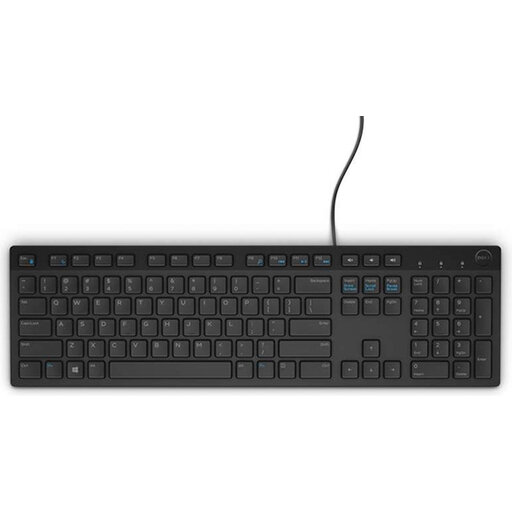
DELL KB216, USB, Belgian AZERTY layout, black

DELL KB216, USB, Belgian AZERTY layout, black

A wired option for typing at a desktop computer, if the Belgian AZERTY layout suits you.

USB connection; Belgian AZERTY layout.

View at Joybuy

Frequently asked questions

Will a programmable keyboard make my hiking route guide responsive?

No. Customising keys changes your own input workflow; you need to build and test the responsive screen layout separately. Chrome DevTools can simulate mobile screen widths, but Chrome for Developers describes this as an initial approximation, not a complete substitute for testing on a real mobile device.

How can I test whether the route guide works without a mouse?

Navigate through links, buttons, forms and any map controls using Tab and other relevant keys. The W3C recommends a logical tab order; custom controls may need extra work to support keyboard use.

How should I set up for long periods of typing?

Set up your workstation to suit your body, vary your posture and tasks, and take breaks. Arboportaal gives this as workstation advice; an ergonomic keyboard alone is no substitute for these measures.

What workplace rule applies if I work at a screen for more than two hours a day as an employee?

According to Arboportaal, for employees who work at a screen for more than two hours a day, the screen and keyboard must not be attached to each other. If you work on a laptop, it must be possible to use a separate screen or keyboard. This is a conditional workplace rule, not a general requirement for every individual buyer.

What warranty and cooling-off period apply to an online purchase in the Netherlands?

The Dutch government explains that statutory warranty means a product must be fit for purpose, and that the Netherlands has no fixed statutory warranty period. According to ACM ConsuWijzer, online consumer purchases generally come with a cooling-off period of up to 14 days after delivery. Check which exceptions apply and who the seller is.
