Who is this choice for?

Logic-focused coder

You write formulas and code, and want to know where to find braces, brackets, arrow keys and keyboard shortcuts. Toetsenbord.org discusses the importance of programming symbols; also check the physical layout and your computer’s keyboard language.

Frequent number cruncher

You enter sample figures and results, and weigh up whether a built-in numeric keypad is worth the extra desk space. Logitech and Keychron’s product information shows that keyboards come in both full-size and compact layouts.

Long-session typist

You read documentation alongside your code and want to be able to adjust the position of your keyboard, hands and mouse. R-Go Tools describes a keyboard with two separate halves; check whether this setup suits your workspace.

What should you look for when buying?

Compact, programmable keyboard

Ideal for: anyone who prioritises symbols, key layers and mouse space over a built-in numeric keypad. According to Keychron, the V1 is a wired model with a 75% layout and QMK support.

Trade-off: there’s no built-in numeric keypad. Keychron describes customising keys through its Launcher web app; set up the functions you need in advance if you plan to work offline.

Full-size keyboard with numeric keypad

Ideal for: anyone who regularly enters figures or sequences of numbers. The Logitech K120 is a wired USB option; Keychron describes the V6 Max as a full-size model with hot-swappable switches and several connectivity options.

Trade-off: a full-size keyboard takes up more space than a compact model. For the V6 Max, check which connection method and keyboard layout will work with your computer.

Split keyboard

Ideal for: anyone who wants to choose the position of each half of the keyboard during long typing sessions. R-Go Tools lists a wired QWERTY US version of the Split Break.

Trade-off: the different shape may take some getting used to; if you enter a lot of figures, you may also need a separate numeric keypad. According to R-Go Tools, this model’s break indicator works with software.

What to consider What should you look for? Who is this important for?
Symbols and navigation Check whether the layout is ANSI or ISO, the key legends, your computer’s keyboard language, and the arrow and navigation keys available. When I write code, I want to find the symbols and navigation keys I need quickly. Around 33% of consumers prioritise symbols and navigation.
Entering figures Think about how often you enter figures and check whether the version you choose has a built-in numeric keypad. If I enter figures often, a separate numeric keypad could be useful; I weigh that against the space I want to keep free on my desk. Around 25% of consumers prioritise entering figures.
Hand position Check whether you can position the halves as you like, and whether the layout and mouse position suit your workspace. When I type for long periods, I want to be able to adjust the position of my hands and keyboard. Around 25% of consumers prioritise hand position.
Basic offline use Check the connection to your computer and set up any key functions you need in advance. Accessing documentation offline depends on your saved files and software. When I work without an internet connection, I want to be able to plug in and type without needing configuration software first. Around 17% of consumers make straightforward offline use their top priority.

Common buying mistakes

  • Choosing by ‘QWERTY’ alone

    The QWERTY label alone doesn’t tell you whether the physical layout is ANSI or ISO, or which characters your computer will enter when you press a key.

    Check the full layout and try the symbols you use in your code.

  • Choosing a compact keyboard without considering your number-crunching

    A compact model such as the Keychron V1 has no built-in numeric keypad; according to their product information, the Logitech K120 and Keychron V6 Max both have a full-size layout.

    Consider how often you enter figures alongside how much desk space you want to keep free.

  • Confusing typing offline with changing settings offline

    Simply typing or reading saved documentation is different from changing key functions. For the models reviewed, Keychron describes customising keys through its Launcher web app.

    Set up the key functions you need and check them before working without an internet connection.

Brands to consider

Keychron

The V1 reviewed is a compact, wired 75% model; the V6 Max is a full-size mechanical model with a numeric keypad and several connectivity options.

  • Keychron lists QMK support for the V1 and hot-swappable switches for the V6 Max.
  • Check the exact model and ANSI or ISO version. Keychron describes the Launcher web app for customising keys.

Logitech

The K120 reviewed is a full-size wired USB option with a numeric keypad.

  • Logitech says the K120 connects via USB with no download or installation required.
  • This model doesn’t offer the programmable key layers described for the Keychron V1 reviewed here. This comparison applies to these models, not to every keyboard from either brand.

R-Go Tools

The Split Break reviewed is a wired split model with two separate halves.

  • According to R-Go Tools, you can use the halves in different positions.
  • The Dutch product page reviewed lists a QWERTY US version. The break indicator is powered by R-Go Break software.

CHERRY

The MX 2.0S reviewed is a wired mechanical model available with different switch variants.

  • CHERRY lists versions with or without lighting, and different MX switch variants.
  • Check the exact version and keyboard layout; don’t assume it has advantages for programming based on its gaming-focused product presentation.

Keyboards at Joybuy

This selection includes keyboards for coding and entering figures, with compact and full-size layouts. Check that each model’s connection and layout will work with your computer.

RK ROYAL KLUDGE R98 Pro wired mechanical keyboard with numeric keypad

RK ROYAL KLUDGE R98 Pro Wired Mechanical Keyboard

The wired connection and numeric keypad mentioned may suit anyone who enters figures and prefers to type using a wired keyboard.

The product name lists a numeric keypad, volume knob, RGB lighting and hot-swappable switches; the version listed is Phantom Color, Beige Switch.

View at Joybuy

AULA WIN60HE 60% wired keyboard with QWERTY US layout

AULA WIN60HE 60% Wired Gaming Keyboard, QWERTY US

The compact, wired layout may suit you if you want to save desk space and are looking for a US layout.

The product name lists a 60% format and QWERTY US layout. Check that the layout matches your computer’s keyboard language.

View at Joybuy

Royalaxe X68 wired keyboard with 68 keys and US layout

Royalaxe X68 65% Wired Mechanical Keyboard, 68-Key US Layout

The compact, wired layout may suit you if you’re looking for a US layout and want to save space.

The product name lists 68 keys, a US layout and Hall effect magnetic switches.

View at Joybuy
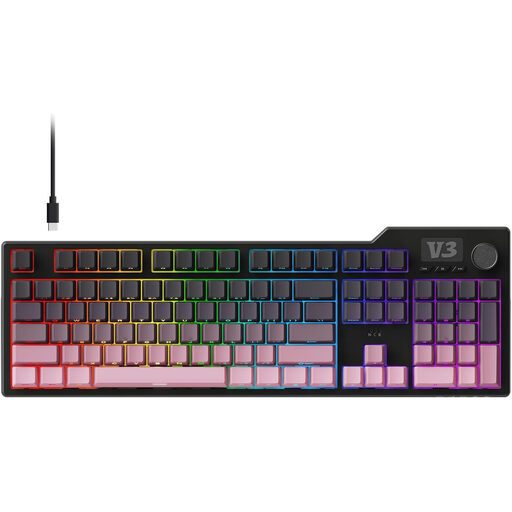
AJAZZ AK35I V3 full-size mechanical keyboard

AJAZZ AK35I V3 Full-Size Gasket Gaming Mechanical Keyboard

A full-size layout may suit you if you want to use a full keyboard when entering figures.

The product name lists a full-size mechanical keyboard. Check the connection and layout of the version you choose.

View at Joybuy

HP 450 programmable wireless keyboard

HP 450 Programmable Wireless Keyboard

This model may suit you if you’re looking for a wireless keyboard with programmable shortcuts.

The product name lists wireless connectivity and programmability. Check in advance which settings and connection you need for your computer and working setup.

View at Joybuy

Frequently asked questions

Do I need a programmable keyboard to read documentation offline?

No. Reading documentation offline depends on the documents and software on your computer. Logitech says the K120 can be used via USB without a download or installation; Keychron describes its Launcher web app as a separate way to customise keys.

How can I make sure the key legends match the symbols I type?

Check both the physical ANSI or ISO layout and your computer’s keyboard language. Then try the symbols you use in your code; the key legends alone don’t determine which characters the software enters.

How can I use a split keyboard if I enter lots of figures?

Position the halves to suit your workspace and decide whether you also want to use a separate numeric keypad. R-Go Tools describes a separate Numpad Break that can be used with the Split Break; check the connection for the version you choose.

What are my rights if a keyboard I bought online isn’t right for me or breaks?

According to ACM ConsuWijzer, for a typical online purchase the statutory cooling-off period ends 14 days after delivery; check which exceptions apply to your purchase. Statutory guarantees also apply alongside any guarantee from the retailer or manufacturer. This statutory protection may be relevant if a product doesn’t meet what you could reasonably expect.

Is a split keyboard legally required for working with a screen?

The Dutch government’s information does not state that there is a general requirement to buy a split keyboard. However, for employees who work with a screen for more than 2 hours a day, Arboportaal says the screen and keyboard must not be attached to each other. This is a conditional workplace requirement, not a general product requirement for every individual buyer.
