Start with the physical keyboard layout and check that the coding and debugging shortcuts are easy to reach on your computer. Microsoft Visual Studio Code maps shortcuts to your active keyboard layout. Then choose between a compact, quiet or adjustable split keyboard to suit your workspace, bearing in mind the trade-offs involved.
Which keyboard is right for you?
Coder who uses keyboard shortcuts
While building your practice log, you regularly switch between code and the debugger. How easily you can reach symbols and function keys is therefore an important factor when choosing a keyboard. Microsoft Visual Studio Code states that keyboard shortcuts depend on the active keyboard layout.
Coder in a shared workspace
When building your practice log, you want to consider typing noise as well as the feel of the keys and how much desk space you have. CHERRY describes the STREAM KEYBOARD as quiet; this is a manufacturer claim, not an independent comparison.
Coder who wants to adjust their hand position
You want to be able to adjust your hand position during longer coding sessions. A split keyboard may make this possible, but it is no guarantee of relief from discomfort.
What should you look for when coding and debugging?
| What to consider |
What should you check? |
Who is this important for? |
| Layout and shortcuts |
Compare the physical keyboard layout with the software layout, and check commonly used symbols and debugger shortcuts, including F5 and F9 in Visual Studio Code. |
If I often switch between the editor and debugger while coding, I want my familiar symbols and shortcuts to be easy to use. Around 36% of consumers prioritise layout and shortcuts. |
| Typing noise |
Check the exact switch variant and, if possible, assess the sound of the complete keyboard in a similar workspace. |
In a shared workspace, I want to consider noise without assuming that a particular switch name means the whole keyboard is quiet. Around 29% of consumers prioritise a quieter workspace. |
| Adjustable hand position |
Check that both keyboard halves fit on your desk, which version is compatible with your operating system, and whether you find the positioning comfortable. |
During longer sessions, I want to be able to set the distance and angle between my hands without expecting this to prevent or relieve discomfort. Around 21% of consumers prioritise an adjustable hand position. |
| Devices and connections |
Check the connection options and number of supported paired devices for the exact version. A wired connection does not automatically mean USB-C charging. |
If I want to use my keyboard with several computers, I check which connection options the version I choose actually offers. Around 14% of consumers prioritise switching between devices. |
Pitfalls to avoid when choosing
-
Assuming a 75% or ISO layout keeps the key positions you’re used to for coding
The physical keyboard layout and active software layout affect the symbols and shortcuts you use. A layout label alone doesn’t confirm that the two will match on your system.
Check both layouts and test the symbols and debugger shortcuts you use frequently.
-
Choosing a compact or split model without checking the Fn layer
According to its manual, the Mac version of the Kinesis Freestyle2 places F1–F12 behind the Fn key. Microsoft Visual Studio Code uses F5 and F9, among other keys, for debugging actions.
Compare the version for your operating system with the shortcuts you use, or customise the shortcuts in your editor.
-
Treating a manufacturer’s description such as “quiet” or “ergonomic” as a personal guarantee
A product description doesn’t prove how the keyboard will sound or feel in your workspace, or guarantee that a particular hand position will suit you.
Assess typing noise, positioning and how easy it is to get used to separately for your workspace.
Relevant brands
Logitech
Worth considering if you’re comparing compact models and low-profile mechanical versions with different switches.
- Logitech lists programmable keys and no number pad among the features of the MX Keys Mini.
- The MX Mechanical Mini is available with different switch types. Check the exact variant; features of one version don’t automatically apply to another.
Keychron
The K3 Max ISO is worth considering if you’re looking for a compact mechanical keyboard with customisable keys and several connection options.
- Keychron specifies a 75% layout, key remapping, and wired, Bluetooth and 2.4GHz connectivity.
- Check the physical layout and exact switch variant, and whether the key legends match your software layout.
Kinesis
The Freestyle2 is worth considering if you want to adjust the position of the two keyboard halves.
- Kinesis describes separately positionable modules and operating-system-specific shortcuts.
- According to the manual, F1–F12 are on an Fn layer on the Mac version. The keyboard is not a treatment for discomfort.
CHERRY
The STREAM KEYBOARD is a wired scissor-switch alternative to consider if ease of use and typing noise matter in your workspace.
- CHERRY describes its own SX scissor mechanism and says the keystrokes are quiet.
- The description of the sound is a claim by CHERRY, not an independent comparison with other keyboards.
Joybuy products
This selection includes compact mechanical keyboards for coding, along with a full-size scissor-switch keyboard for anyone looking for a number pad and the ability to use it with multiple devices.
 No image available
AULA F75 75% wireless mechanical keyboard, US QWERTY
An option if you’re looking for a compact mechanical layout and US QWERTY suits the way you code.
The product title specifies a 75% layout and three-mode wireless connectivity. The keyboard layout is US QWERTY.
View at Joybuy
 No image available
Ticktype EVO75 mechanical keyboard, US layout
Suited to anyone looking for a compact mechanical layout with customisable keys.
The product title specifies a US layout, three connection modes, hot-swap and VIA compatibility.
View at Joybuy
 No image available
AJAZZ AK820 MAX 75% mechanical keyboard, US QWERTY
An option if you’re looking for a compact mechanical layout and the US QWERTY layout works with your software.
The product title specifies a 75% layout, three-mode wireless connectivity and Flying Fish switches.
View at Joybuy
 No image available
Trust Vaiya wireless keyboard, full-size, US QWERTY
For anyone looking for a full-size keyboard with a number pad that can be used with multiple devices.
The product title specifies scissor-style keys and a US QWERTY layout.
View at Joybuy
 No image available
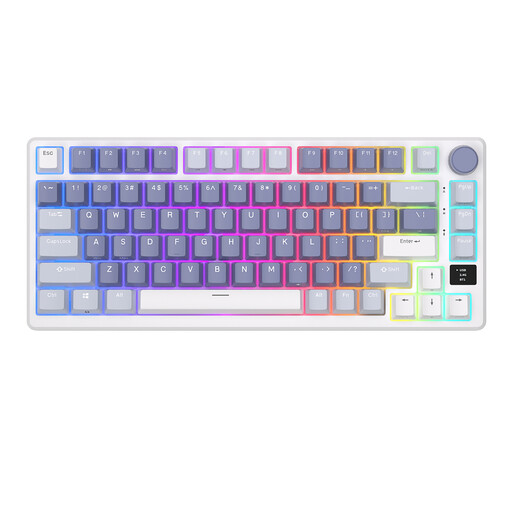
RK ROYAL KLUDGE M75 Ocean Blue, 75%
Suited to anyone looking for a compact mechanical layout with a choice of connection options.
The product title specifies 81 keys, Bluetooth, 2.4 GHz and USB-C, plus hot-swappable Cream switches.
View at Joybuy
Frequently asked questions
Does a compact keyboard need separate F keys for debugging?
No, but check how to activate F5 and F9 if you use those shortcuts in Visual Studio Code. Microsoft says you can customise shortcuts and that they correspond to the active keyboard layout.
How should you get started with a split keyboard?
Kinesis advises new Freestyle2 users to start with the modules side by side, then adjust their position. Also check that you have the version for your operating system: according to Kinesis, the system-specific shortcuts won’t work if you use the Mac version on Windows, or vice versa.
Who can help if a keyboard you bought online is faulty?
For a consumer purchase in the Netherlands, the seller must provide a solution if a product is faulty; a manufacturer’s warranty does not replace your statutory rights. According to the Dutch government, online purchases also usually come with a 14-day cooling-off period, subject to legal exceptions.
Are you legally required to use a separate keyboard when coding on a laptop?
Not every buyer is. According to Arboportaal, for employees who work at a screen for more than two hours a day, the screen and keyboard must not be attached to each other. When using a laptop, the employee must therefore be able to use a separate screen or keyboard.


