
Programmer who uses keyboard shortcuts
You switch between code, navigation and the debugger. Check that the physical layout and key accessibility suit your editor.


When choosing a keyboard for programming a flashcard trainer with a debugger, first look for a layout that gives you easy access to code symbols, arrow keys and function keys in your editor. Then consider whether you need a compact programmable keyboard, a full-size model, a quieter option or an adjustable split keyboard. Compact models require extra thought about the position of navigation and function keys. A split keyboard offers a different hand position, but may take some getting used to.
You switch between code, navigation and the debugger. Check that the physical layout and key accessibility suit your editor.
If you do a lot of typing, consider the position of your hands and how your workspace is set up. An adjustable split keyboard is an option to consider, not a guarantee of a particular outcome.
You’re looking for a key feel and noise level that suit your surroundings, without losing sight of the keys you use for debugging.
Start with the layout and the keys you use while coding and debugging. Then choose a keyboard shape and key type that suit your workspace and preferences.
When to choose it: If you want a full-size layout and are considering a low-profile keyboard, the Logitech MX Keys S is worth a look.
Trade-off: A full-size keyboard takes up more width than a compact model. Manufacturer descriptions of how quiet a keyboard is aren’t comparative measurements.
When to choose it: A TKL model such as the Keychron K8 Pro is an option if you want a separate navigation cluster and customisable keys.
Trade-off: The K8 Pro version described has an ANSI layout; hot-swap is not available on every version.
When to choose it: The Kinesis Freestyle2 is an option if you want to adjust the distance between the two halves of the keyboard.
Trade-off: Tenting depends on the configuration or an accessory; a split layout may take some getting used to.
When to choose it: The CHERRY KC 6000 SLIM is a good fit if you’re looking for a flat, full-size model with a USB-A connection.
Trade-off: CHERRY lists Windows compatibility for this model. Also check that the regional keyboard layout suits you.
| What to consider | What should you check? | Who is this important for? |
|---|---|---|
| Layout and debugger keys | Check the physical and configured layout, code symbols, arrow keys and function keys in your own editor. Visual Studio Code / Microsoft notes that keyboard shortcuts depend on the active keyboard layout; its documentation includes F5, F10 and F11 for debugging actions. | If I switch between code, navigation and functions while debugging, I want to use the keys I need without having to search for them. Around 33% of consumers prioritise layout and debugger keys. |
| Hand position | Consider the distance and angle between the keyboard halves alongside your desk, screen and mouse. Check whether any tenting accessories are included with the version you’re considering. | When typing for longer periods, I want to check that the position of my hands suits my workspace. Around 27% of consumers put hand position first. |
| Key noise and typing feel | Check the exact switch type and, if possible, try out how it feels to type on. A product description doesn’t compare noise levels. | In a shared space, I want to choose a key feel and noise level that suit the setting. Around 20% of consumers prioritise noise and typing feel. |
| Customising keys | Check that your preferred key layout or macros work with your operating system and the version you’ve chosen. Switching between devices is especially relevant if you use multiple systems. | If I want to use custom key layouts or macros, I also check that the required software suits the way I work. Customisation is the top priority for around 20% of consumers. |
The position of symbols and keyboard shortcuts can depend on the physical and active keyboard layout. A layout you’re used to may feel different on another version.
Check which version is on offer, then try the code symbols and keyboard shortcuts you use most often in your own editor.
Keychron doesn’t list hot-swap as a feature on every version of the K8 Pro.
Before buying, compare the full version description and check exactly which version you’re choosing.
An adjustable keyboard won’t automatically change the position of your screen, desk or mouse. Accessories also vary between versions.
Consider your workspace as a whole and check which accessories are included with the configuration you’ve chosen.
The MX Keys S is a low-profile, full-size keyboard; the MX Mechanical Mini is a more compact mechanical model with a choice of switches.
The K8 Pro is a TKL model for anyone looking for a compact layout with customisable keys and macros.
The Freestyle2 is designed for anyone who wants to adjust the distance between the two halves of the keyboard.
The KC 6000 SLIM is a flat, full-size keyboard with a USB-A connection.
These keyboards are suited to programming and debugging, with a choice of compact and full-size layouts and options for customising keys.
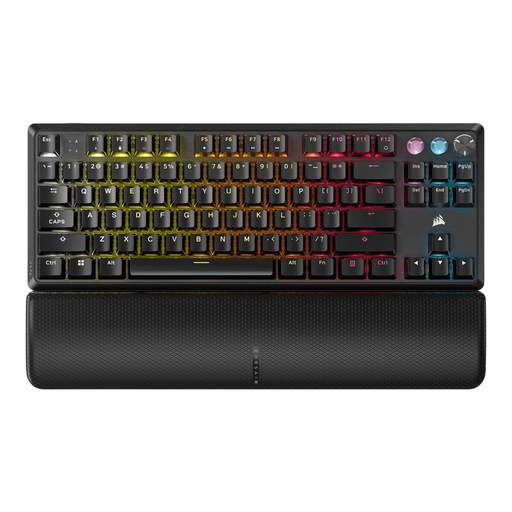 No image available
A TKL model with a US QWERTY layout to consider if you’re looking for a compact keyboard for coding and debugging.
 No image available
A TKL keyboard to consider if you’re looking for a compact layout and quieter keys for a shared space.
 No image available
A compact 75% layout to consider if you want to keep the function and arrow keys.
 No image available
A TKL model to consider if you’re looking for a compact layout and programmable keys.
 No image available
A full-size layout to consider if you value a number pad and quiet keys.
Not for every editor. The default controls described by Visual Studio Code / Microsoft include F5, F10 and F11. Check how to press these keys on the layout you’re considering, and review your own keyboard shortcut settings.
If you choose a suitable model, consider the distance between the halves alongside your posture, screen, desk and mouse. Kinesis lists several Freestyle2 configurations and tenting options; check which accessories are included with the version you’re considering.
For online purchases from a business, you’ll generally have a 14-day cooling-off period, according to the Government of the Netherlands. There’s no fixed term for the statutory guarantee in the Netherlands: the seller must supply a product that meets expectations. Check the applicable returns policy and contact the seller if your product is faulty.
For employees who work at a screen for more than 2 hours a day, Arboportaal states that the screen and keyboard must not be attached to each other; when using a laptop, it must be possible to use a separate screen or keyboard. This workplace requirement doesn’t automatically apply to personal or shorter-term use.