Start with the layout: check that the symbols you use for coding, along with the navigation and function keys you need for your debugger, are easy to reach. Then choose based on your workspace and how you use your keyboard: you might prefer a more compact board, configurable keys, quieter typing or an adjustable hand position. None of these features makes one keyboard right for everyone.
Who is this for?
Coders who debug frequently
You regularly switch between code, debugging and navigation. Look at how easy it is to reach symbols, arrow keys, function keys and configurable shortcuts. RTINGS.com highlights these keys as things to consider when choosing a keyboard for programming.
Coders with limited desk space
You want to leave room for your mouse without losing keys you use while debugging. RTINGS.com recommends checking which keys are directly accessible on a smaller layout and which require a key combination.
Coders who spend long hours at a screen
You take hand position and your workspace setup into account, without assuming that a keyboard described as ergonomic will, by itself, prevent discomfort. Arboportaal also recommends varying your posture and taking short breaks.
What should you look for when buying?
When coding with a debugger open, the layout is the first thing to check. After that, your available desk space, hand position and typing feel can help determine your choice.
| What to consider |
What should you check? |
Who is this for? |
| Coding symbols and layout |
Check the exact model to see where characters such as braces, brackets, backslash and pipe are positioned, then compare this with your operating system’s layout. |
If you enter lots of symbols while programming, you’ll want them to be easy to reach. Around 33% of consumers give symbol layout top priority. |
| Debugger navigation |
Compare the keys you use in your development environment with the keyboard layout; check whether any keys are missing or require an extra layer. |
If you often switch between code and your debugger, direct access to navigation and function keys can be important. Around 27% of consumers prioritise debugger navigation. |
| Hand position and mouse space |
Consider the keyboard’s size, where you place your mouse and any adjustment options together. |
If you want to change your hand position or need room for your mouse, assess the layout as part of your overall workspace. Around 20% of consumers give workspace setup top priority. |
| Typing feel and noise |
Check the specific key mechanism or switch type; don’t assume how loud it will be based on the brand name alone. |
If you work near other people, both the noise and the feel of the keys may matter. Around 20% of consumers prioritise quiet typing. |
Pitfalls to avoid when choosing
-
Assuming a compact model has a full layout
A smaller layout may leave out keys or put them behind a key combination, which can be inconvenient if you need them immediately while debugging.
Before choosing, compare the layout of the exact model with the debugger shortcuts you use.
-
Assuming ISO or QWERTY determines where all coding symbols appear
A keyboard range may include several language variants, so the legends and symbol positions can differ.
Check the full language variant, the physical keys and your operating system settings.
-
Seeing a split keyboard as a standalone solution to discomfort
An adjustable keyboard is just one part of your workspace. Arboportaal also recommends paying attention to your setup, varying your posture and taking breaks.
Assess your whole setup and seek appropriate workplace advice if you start experiencing work-related discomfort.
Brands to compare
Keychron
The K8 Pro ISO is a tenkeyless range with a function row and arrow keys. Compare the available ISO language variants with the layout you need.
- Keychron lists key remapping and macros for the K8 Pro ISO.
- The ISO models mentioned have different language layouts; ISO does not automatically mean a Dutch layout.
Logitech
The MX Keys S is a low-profile wireless keyboard for anyone looking for a typing experience without mechanical switches.
- Logitech lists backlighting and programmable actions via Logi Options+.
- Check that you can use Logi Options+ on your work system and that the model has the layout you want.
Kinesis
The Advantage360 has two separately positionable halves and adjustable tenting for anyone who wants to change the position of their hands.
- Kinesis describes a split design with adjustable positioning.
- Its orthogonal layout and thumb keys differ from a conventional keyboard. Ergonomic benefits are no guarantee that discomfort will go away.
CHERRY
The KC 200 MX is a wired mechanical office model for anyone who doesn’t need a wireless connection.
- CHERRY lists several MX2A switch variants and four extra keys for volume and the calculator.
- The extra keys aren’t specifically for debugging; check that the switch variant and layout are right for you.
Joybuy product picks
This selection focuses on compact and tenkeyless keyboards. Compare the layout of each model and check that the keys you need for coding and debugging are directly accessible.
 No image available
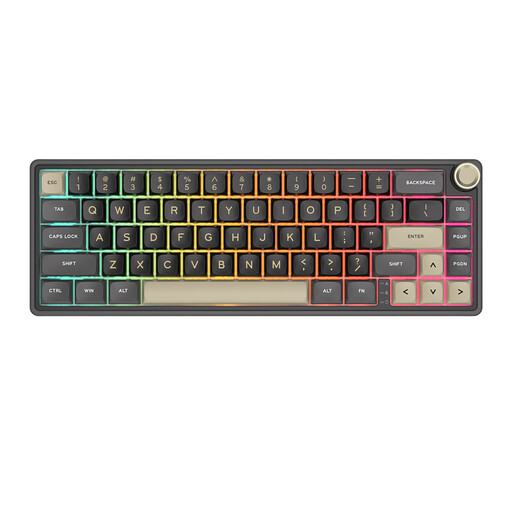
RK ROYAL KLUDGE R65, QMK/VIA, Chartreuse switches
A compact model to consider if you want to save desk space and are looking for configurable keys.
The product name lists 66 keys, hot-swappable switches and PBT keycaps. The description mentions key remapping and macro support via QMK/VIA.
View at Joybuy
 No image available
AJAZZ AK820 MAX 75%, US QWERTY
A 75% model to consider if you’re looking for a more compact board and the US QWERTY layout suits you.
The product name lists tri-mode wireless connectivity, Flying Fish switches and an 8000 mAh battery.
View at Joybuy
 No image available
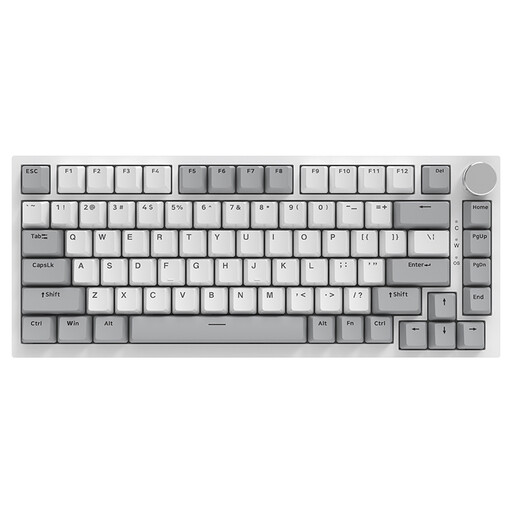
AJAZZ AK820 75%, wired, US QWERTY
A wired 75% model to consider if you don’t need a wireless connection and want US QWERTY.
The product name lists hot-swappable linear switches and PBT keycaps.
View at Joybuy
 No image available
AJAZZ AK820 Pro 75%, tri-mode, US QWERTY
Consider this model if you’re looking for a compact board with a US QWERTY layout.
The product name lists wired, Bluetooth and 2.4G connectivity, a TFT screen and hot-swappable switches.
View at Joybuy
 No image available
Razer DeathStalker V2 Pro Tenkeyless, US layout
A tenkeyless model to consider if you’re looking for a more compact keyboard with a US layout.
According to the product information, Razer Synapse is required for full functionality.
View at Joybuy
Frequently asked questions
Do I need a keyboard with a function row for debugging?
Not necessarily. Compare the shortcuts in your development environment with the layout of the exact model. On a compact keyboard, some keys may be behind an extra layer; remapping can be an alternative if the model supports it.
How should I set up my keyboard for longer coding sessions?
Adjust your workspace to suit your body, vary your posture and take short breaks. Arboportaal recommends this for screen work; it doesn’t mean that one type of keyboard will prevent discomfort.
What can I do if a keyboard I bought online is uncomfortable to type on or develops a fault?
For a standard online consumer purchase in the Netherlands, you generally have a 14-day cooling-off period after delivery, subject to legal exceptions. Products must also do what you can reasonably expect of them under normal use. According to ACM ConsuWijzer, the seller is responsible for providing an appropriate solution if a product is faulty; this does not mean there is a fixed statutory two-year guarantee.
Do I have to use a separate keyboard with a laptop?
For an employee who works at a screen for more than two hours a day, the screen and keyboard must not be attached to each other, according to Arboportaal. When using a laptop, it must be possible to use a separate screen or keyboard. This is a conditional workplace requirement, not a general requirement for every private buyer.


