Who is this choice relevant to?

Command-line coder who uses lots of shortcuts

You want quick access to programming symbols, arrow keys and frequently used commands. RTINGS.com highlights the importance of keys such as the arrow keys, function row and number pad when choosing a keyboard for programming.

Home worker beside a bright window

You want the keys to be easy to read and distracting light in your workspace kept under control. Logitech describes lighting that adapts to your surroundings, while Arboportaal also offers advice on positioning your workspace in relation to the window.

Frequent typist in a shared workspace

You’re weighing up typing comfort and noise for others, and may be considering a different keyboard shape. Arboportaal describes the repeated hand movements involved in screen work; CHERRY and Perixx describe a low-profile and a split keyboard respectively.

What should you consider when choosing?

Compact mechanical keyboard

A good fit if: you want to keep space free beside your mouse and are looking for mechanical switches.

Consider: a compact model may put certain inputs behind key combinations; check the switch type too.

Mechanical keyboard with more keys

A good fit if: you want to remap keys and dedicated navigation keys are important to you.

Consider: check the exact layout, switches and keycaps of the version you’re buying.

Low-profile office keyboard

A good fit if: you’re looking for a low-profile design and don’t need mechanical switches.

Consider: manufacturers describe the sound and feel of their keyboards, but these descriptions aren’t sound measurements that can be compared directly.

Split keyboard

A good fit if: you want to try a different hand position and the layout suits your workspace.

Consider: allow for its size and the possibility of an adjustment period; an ergonomic shape doesn’t guarantee a medical outcome.

What to consider What to look for Who should pay extra attention?
Programming symbols and navigation Compare the physical layout with the input layout selected in your settings. RTINGS.com lists the arrow keys, function row and number pad among the keys to consider. If I use lots of symbols and arrow keys while working in the command line, I want them within easy reach; around 33% of consumers prioritise layout and navigation.
Readability in daylight Check the key legends in the light you work in. Arboportaal recommends positioning your viewing direction parallel to the window when working at a screen. If I want to read the keys easily beside a bright window, I also consider the screen’s position and the blinds; around 27% of consumers prioritise visibility in light from a window.
Typing comfort Consider key feel, height, width and hand position. Arboportaal describes the repeated movements of fingers and hands involved in screen work. For longer typing sessions, I want a shape and key feel that suit my workspace; around 20% of consumers prioritise typing comfort.
Typing noise Check the exact switch type. Logitech lists different switch types for the MX Mechanical Mini; CHERRY describes the STREAM KEYBOARD as quiet. If other people work in the same room, I want to know how the version I choose sounds; around 20% of consumers prioritise quiet typing.

Common mistakes when choosing

  • Focusing only on ‘QWERTY’

    The physical keyboard layout and the input layout selected in your settings aren’t the same thing. The exact version determines where the legends and frequently used characters appear.

    Look at photos of the exact version and check the programming and command-line characters you use most against the input layout you plan to use.

    A different layout may take some getting used to or make frequently used characters less convenient to type.

  • Confusing backlighting with a solution to window glare

    Keyboard lighting and screen glare are two different things. Backlit keys won’t stop distracting daylight from reflecting off your screen.

    If glare is a problem, adjust your screen position or blinds first, then consider the benefits of keyboard lighting separately.

  • Assuming every version has the same switches

    The Logitech MX Mechanical Mini is available with different switch types, including Tactile Quiet, Clicky and Linear. The model name alone doesn’t tell you which version you’re choosing.

    Check the switch type of the version you’re actually ordering.

  • Seeing a split keyboard as a guaranteed fix for discomfort

    A different shape changes your hand position, but it doesn’t prove that an individual user will experience a medical benefit.

    If possible, try the layout first. If you already have, or are starting to develop, work-related discomfort, consider having your workspace assessed.

    A different shape may take some getting used to; available desk space and taking breaks are also important.

Brands to consider

Logitech

The MX Keys S and MX Mechanical Mini are options for a low-profile keyboard and a compact mechanical model respectively.

  • Logitech describes lighting on these models that adapts to your surroundings.
  • The MX Mechanical Mini is available with different switch types, so check the version.

Keychron

The K8 Pro ISO is a TKL model; the Q6 Ultra 8K ISO is a full-size alternative.

  • Keychron lists programmable features for both models and hot-swap support for the relevant versions.
  • Check the exact layout and keycaps. The listed Q6 Ultra 8K ISO versions are ISO-DE, ISO-ES, ISO-FR, ISO-PT and ISO-IT; check which layout is available to suit your preference.

CHERRY

The STREAM KEYBOARD is a wired, low-profile office keyboard with an SX scissor mechanism.

  • CHERRY describes its key action as quiet.
  • This description isn’t a sound comparison with other keyboards; this model doesn’t have mechanical switches.

Perixx

The PERIBOARD-512 is a wired split keyboard for anyone who wants to try a different layout.

  • Perixx lists a palm rest, membrane switches and a USB-A connection.
  • Perixx says compatibility is broader with Windows than with other systems; check that it works with your device.

Keyboards at Joybuy

This selection includes compact keyboards and models with programmable keys, with a range of layouts and switch types. In particular, check that the stated US layout and key functions suit your input settings and programming work.
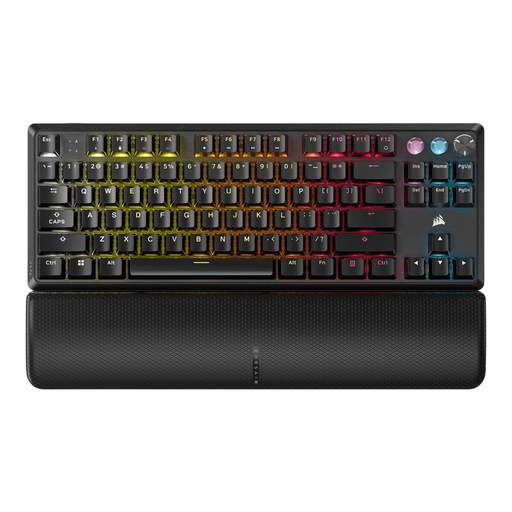
Corsair K70 PRO TKL Magnetic-Mechanical with US QWERTY layout

Corsair K70 PRO TKL Magnetic-Mechanical, US QWERTY, MGX v2

The TKL layout with US QWERTY and programmable keys is a compact option if you want to customise lots of commands.

Magnetic switches; the product information mentions macros and remapping. TKL models don’t have a number pad.

View at Joybuy

Corsair K55 CORE TKL with US QWERTY layout

Corsair K55 CORE TKL, US QWERTY

The product information describes membrane keys for everyday typing and support for customising keys.

The US QWERTY layout is TKL, so there’s no number pad. The description also mentions an adjustable keyboard height.

View at Joybuy
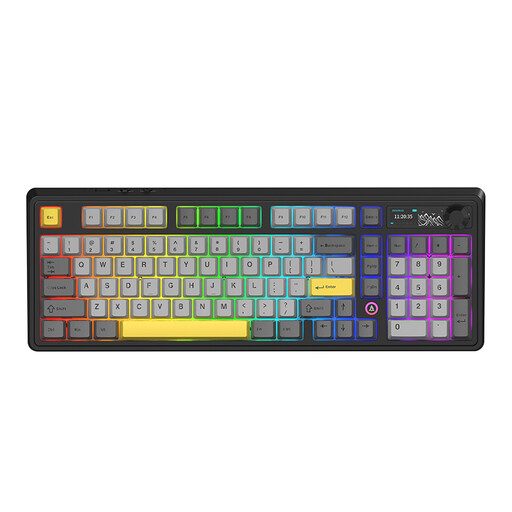
AJAZZ AK980 V2 wireless mechanical keyboard with QWERTY layout

AJAZZ AK980 V2, 98% QWERTY

The 98% layout is a compact option if you want to keep plenty of keys within easy reach.

Mechanical and hot-swappable; the product information lists a volume knob, TFT display, 10000mAh battery and connectivity via cable, Bluetooth or 2.4G.

View at Joybuy
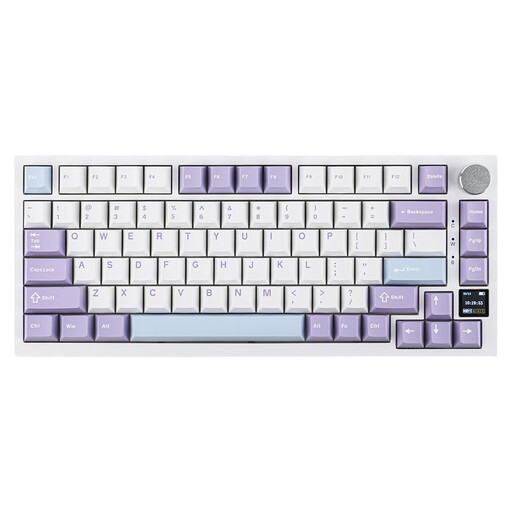
AJAZZ AK820 Pro 75% mechanical keyboard with US QWERTY layout

AJAZZ AK820 Pro 75%, US QWERTY

The 75% layout with 83 keys is a compact option for a desk with limited space.

Mechanical, with hot-swappable linear switches. The product information lists connectivity via cable, Bluetooth or 2.4G, and white backlighting.

View at Joybuy

Razer DeathStalker V2 Pro Tenkeyless with US layout

Razer DeathStalker V2 Pro Tenkeyless, US Layout

According to the product description, the US tenkeyless version offers programmable keys and macro recording.

The description lists optical switches and customisable RGB lighting. Tenkeyless means there’s no number pad.

View at Joybuy

Frequently asked questions

How can I check that the programming symbols match the keys?

Check both the physical layout of the version you’re buying and the input layout selected in your settings. Microsoft Support explains how to manage keyboard layouts in Windows; changing the software layout won’t change the legends printed on the keys.

Can a backlit keyboard help with glare from a bright window?

Keyboard lighting won’t prevent glare on your screen. For problems caused by daylight, Arboportaal recommends positioning your viewing direction parallel to the window and using suitable blinds, among other measures; keyboard lighting is a separate feature.

Should an employee who works on a laptop for long periods be able to use a separate keyboard?

According to Arboportaal, the screen and keyboard must not be attached to each other when an employee works at a screen for more than 2 hours a day. An employee using a laptop must therefore be able to use a separate screen or keyboard; this is a conditional workplace requirement, not a general requirement for every individual buyer.

What cancellation period and guarantee apply to an online purchase in the Netherlands?

ACM ConsuWijzer states that online purchases generally come with a statutory cancellation period of up to 14 days after delivery, subject to exceptions. You’re also entitled to a product that, under normal use, meets what you could reasonably expect from it; the statutory guarantee isn’t simply a fixed two-year period for every keyboard.

What can I do if a wired ergonomic keyboard isn’t working properly?

First, check the connection and compatibility of the exact version. For the PERIBOARD-512, Perixx recommends connecting the USB plug directly to the computer if you have connection problems, and testing the keyboard on another computer if necessary.
