
Writer of long club documents
You mainly write and edit continuous text, and want a layout that feels familiar. Microsoft Support notes that Word keyboard shortcuts may work differently with other layouts.


First, choose a keyboard layout that suits your computer and typing habits. Then decide whether you need a fixed place to write, extra room beside your mouse or the ability to switch between devices. A compact keyboard can leave more room for mouse work, while a larger layout may offer navigation keys and possibly a numeric keypad. You add images using your document software, so check the keyboard’s connection and the exact version too.
You mainly write and edit continuous text, and want a layout that feels familiar. Microsoft Support notes that Word keyboard shortcuts may work differently with other layouts.
You switch between text, images and mouse controls while putting everything together. Desk space and easy-to-reach navigation keys may therefore be important.
You work on the same document pack on, for example, a computer and a tablet, and want to switch between them without having to pick up a different keyboard each time.
Start with a layout and connection that suit your computer and writing habits. Then decide how much space you need and whether you want to switch between devices.
| What to consider | What should you check? | Who should bear this in mind? |
|---|---|---|
| Familiar layout and controls | Compare the layout of the exact version with your computer and the keys you use when editing. Microsoft Support warns that Word shortcuts can vary between layouts. | If I do a lot of writing and editing, I want a layout that suits my habits; around 40% of consumers prioritise a familiar layout and controls. |
| Space for text and images | Check the keyboard’s width and which navigation keys it has. Adding images is still a function of your document software. | If I often switch between the keyboard and mouse, the space available on my desk matters; around 30% of consumers prioritise space for working with images and text. |
| Posture during longer sessions | Consider the space for your keyboard and mouse, as well as the setup of your overall workstation. According to R-Go, the R-Go break indicator requires compatible software; Arboportaal advises alternating screen work with other activities. | If I write for longer periods, I want to consider my workstation and working routine, not just the keyboard; around 20% of consumers prioritise posture. |
| Switching between devices | Check which devices and connections the exact version supports. Logitech says the Signature Slim K950 can pair with three devices. | If I work on the document pack on more than one device, I want to switch easily; around 10% of consumers give switching between devices top priority. |
A keyboard may have a different layout from the one you’re used to. Microsoft Support notes that Word shortcuts can vary between layouts; the R-Go Compact Break, for example, is available in QWERTY-US.
Check the layout of the exact version on the product page, not just the brand or product range.
A different layout may take some getting used to, and you may need another version.
Adding images is a function of your document software. Customisable keys can change certain controls, but they don’t replace this software step.
First check which document software you use, then decide whether extra keys or macros would be useful for tasks you do regularly.
A keyboard alone doesn’t determine how your workstation is set up or whether you vary your work. Arboportaal highlights the importance of alternating screen-based tasks with other activities.
Also consider where you place your mouse, your workstation setup and your working routine; a break indicator is, at most, a helpful reminder.
You may also need to make changes to your workstation to create a suitable setup.
The STREAM KEYBOARD is a wired option for a permanent writing setup; according to CHERRY, the STREAM KEYBOARD ULTIMATE can connect to multiple devices.
The Signature Slim K950 is designed for switching between devices. Logitech lists backlighting and programmable keys for the MX Keys S.
The wired R-Go Compact Break in QWERTY-US is a compact option for anyone who values space beside the keyboard and a break reminder.
The K3 Max is a compact mechanical option for anyone who wants to customise their keys.
This selection includes keyboards and keyboard sets for writing, mouse work and use with multiple devices.
 No image available
An option to consider if you want to switch between devices while writing.
Wireless keyboard for multiple devices; the product name specifies a rechargeable version.
 No image available
A set to consider if you also need a mouse when editing text and images.
Includes a keyboard and mouse; the name specifies RF Wireless, Bluetooth and QWERTY US English.
 No image available
A keyboard and mouse set to consider for a permanent writing setup if you’re looking for a complete set.
The product name specifies quiet keys, a wrist rest and a US/QWERTY layout.
 No image available
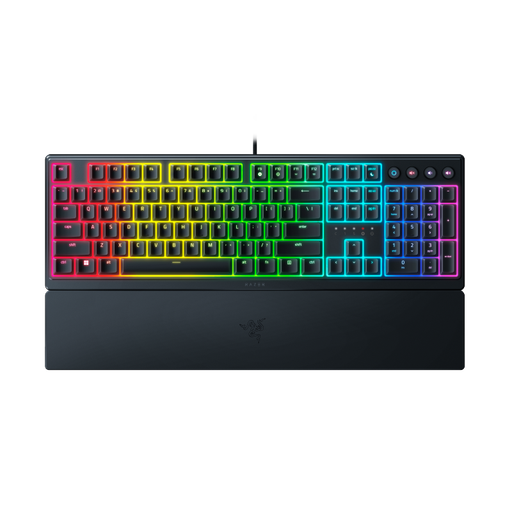
An option to consider if you’re looking for a keyboard with a full layout and a US layout.
The product name specifies a low-profile gaming keyboard with a US layout.
 No image available
An option to consider if you want a Dutch layout and navigation while writing on a compatible Mac model.
The product name specifies Touch ID, a numeric keypad and use with Mac models with Apple Silicon.
No, you don’t need a special keyboard for this. In Word, place the cursor in your document and select Insert, then Pictures. The keyboard helps you type and control the software, but the image feature comes from the document software, according to Microsoft Support.
Set up your workstation to suit you, and alternate screen work with other tasks or breaks. Arboportaal advises varying your activities; a break indicator can be a helpful reminder at most.
According to ACM ConsuWijzer, online consumer purchases generally come with a statutory 14-day cooling-off period from delivery, subject to exceptions. Faulty products are also covered by statutory consumer rights: the seller must offer an appropriate solution if the product doesn’t meet the standard you were entitled to expect. A manufacturer’s warranty doesn’t replace these statutory rights.
Don’t assume you’re free to use other people’s photos. The Dutch government says you may need the creator’s permission to use copyright-protected photos. If people are recognisable in the images and the club processes or shares them, you must also assess whether there is an appropriate legal basis under the GDPR. The Dutch Data Protection Authority lists consent as a common, but not the only possible, legal basis.
For employees who do screen work for more than 2 hours a day, Arboportaal says the screen and keyboard must not be attached to each other. When using a laptop, it must be possible to use a separate screen or keyboard. This isn’t a general purchasing requirement for every club volunteer.