
Anyone practising chord changes
You want to learn to play chord changes with your own fingers, and perhaps play along with a rhythm. Automatic chord functions can be useful, but they are no substitute for practising on your own.


If your main aim is to practise chord shapes and changes on your own, choose a keyboard that feels comfortable to play and check that it has a headphone socket. Automatic accompaniment can help you practise in time, but it is no substitute for playing the chords yourself. A larger keyboard or more accompaniment features also means weighing up the space it takes and how easy it is to operate. If your goal is to develop piano technique, consider a digital piano with weighted keys too.
You want to learn to play chord changes with your own fingers, and perhaps play along with a rhythm. Automatic chord functions can be useful, but they are no substitute for practising on your own.
You share your home or practise when other people are around. You’ll want to know whether the keyboard has a headphone socket and which sounds can still be heard without the speakers.
The spare room has other uses too. The keyboard’s size and weight may therefore affect where you can set it up and how easily you can put it away.
First decide whether you want to practise keyboard chords or piano technique. Then compare the playing space, headphone socket and controls to find what suits your room and the way you practise.
| What to consider | What to look for | Who should pay extra attention? |
|---|---|---|
| Playing chords yourself | Try playing the chord shapes you want with both hands. Check whether you can control the rhythm and chord accompaniment separately. | If I really want to learn the finger changes, I need to be able to play the chord shapes myself and use accompaniment only to support the rhythm. Around 36% of consumers make practising chord changes their top priority. |
| Practising quietly | Check whether the exact model has a headphone socket and what size plug you need. Headphones won’t necessarily stop the sound of the keys from being heard. | If other people are at home, I want to practise without sound from the speakers and take into account any noise that still carries. Around 29% of consumers make quiet practice their top priority. |
| Space and storage | Measure the space for the keyboard and where you’ll store it, allowing room for your hands and cables. Casio lists the CT-S300 as measuring 930 × 256 × 73 mm and weighing 3,3 kg; Yamaha lists 61 keys for the PSR-E383 and 76 for the PSR-EW320. | If the spare room has other uses too, I want to know whether the instrument is easy to put away after practising. Around 21% of consumers focus mainly on whether it fits and how easy it is to store. |
| Keys to suit your learning goals | Ask your piano teacher what type of key action you need. For piano technique, Bax Music recommends considering a digital piano with 88 hammer-action keys as an alternative to a keyboard. | If I want to learn piano technique, the feel of the keys matters more than accompaniment features alone. Around 14% of consumers make keys suited to piano lessons their top priority. |
Accompaniment controlled with one finger doesn’t necessarily help you practise the same chord shapes and finger changes as playing the chords yourself.
First practise the full chords without assistance, then add a rhythm or accompaniment if you like.
For practising chord changes, the keyboard, playing style and option to practise quietly are all directly relevant.
First check the touch response, playing range, headphone socket and accompaniment controls.
Keyboards and digital pianos can suit different learning goals. Bax Music distinguishes between keyboard lessons and piano lessons using 88 hammer-action keys.
Match your choice to the type of lessons you’re taking before comparing the number of keys or extra features.
The PSR-E383 and PSR-EW320 may be worth considering if you’re looking for touch-sensitive keys and accompaniment, but they differ in range.
The Casiotone CT-S300 is a compact option for a playing space that also serves as a spare room.
The E-X10 offers chord modes, while the GO:KEYS 3 is designed for working with chord patterns.
The EK-50 is an arranger keyboard whose accompaniment can respond to the chords you play, according to Korg.
According to Medeli, the MK110 combines touch-sensitive keys and accompaniment with the option to connect headphones.
These Joybuy products are aimed at practising chord changes on your own using a 61-key keyboard.
 No image available
A 61-key keyboard for practising chord shapes and changes on your own.
The product description lists a metronome, headphone socket, speakers and recording function.
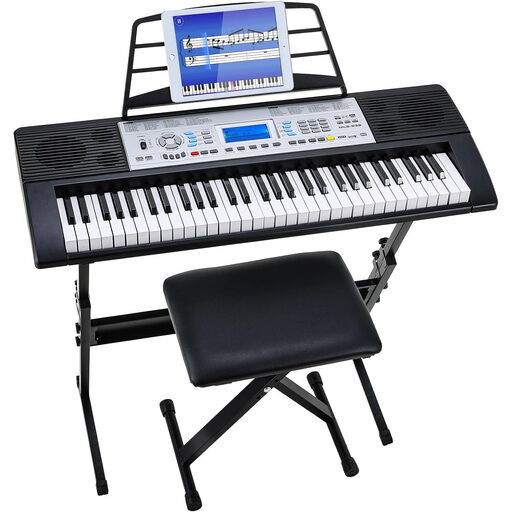 No image available
A 61-key keyboard for practising chord shapes and changes on your own; the set name lists a stand and stool.
The product description lists a three-level learning mode and two built-in speakers.
You can use accompaniment to practise changing chords in time, but play the full chord shapes yourself if that’s your learning goal. Korg also describes a one-finger accompaniment control option for the EK-50; that’s a different way to practise.
A headphone socket lets you practise without sound from the speakers, but it doesn’t guarantee that the sound of the keys or other noise will be inaudible. Local council rules may apply to noise affecting neighbours; the Dutch Government also recommends agreeing things with one another.
Check what comes in the box with the exact model and which headphone plug will fit. Medeli lists a mains adaptor included with the MK110; that doesn’t tell you what is supplied with other models or sets.
When you buy online from a business, you’re often entitled to a 14-day cooling-off period, but the type of purchase and any exceptions matter. The product must also match the sales agreement; if it’s faulty, you can contact the seller. The Dutch Government states that the Netherlands has no fixed statutory guarantee period.
This depends on the rules that apply to the specific product. The European Commission states that CE marking is mandatory when specific harmonised EU rules require it, so check the information for the keyboard and its power supply.