Start with a keyboard that lets you play the chords and transitions in your own parts. Then decide whether you need a metronome or accompaniment, the right studio connections and a portable design. A standalone keyboard can work without a computer, whereas a MIDI controller needs a compatible computer and audio set-up.
Who is this guide for?
Practising chord changes and timing
You want to play transitions yourself and repeat them at a steady tempo. Key range, touch sensitivity and a metronome are worth considering; Yamaha and Korg describe these practice features for the models mentioned.
Connecting to the studio equipment
You want to play along through the equipment available during rehearsals. Compare the outputs on the exact version with the studio's inputs; Yamaha and Korg list connections for the models mentioned.
Taking your keyboard to other practice spaces
You move your instrument around and want to know whether its size, weight and power supply suit your plans. Casio and Korg provide these details for the models and versions mentioned.
What should you consider?
| What matters |
What to look for when buying |
Who is this important for? |
| Chord shapes and changes |
Play a few representative transitions and check the key range, touch response and metronome on the exact version. |
I want to practise chord shapes and transitions accurately in time, not just try out sounds; around 36% of consumers prioritise chord technique. |
| Connecting to the studio |
Check which inputs the studio has and compare them with the outputs on the exact keyboard being offered. Don't assume every audio connection will be compatible. |
If I want to play through the available equipment during rehearsals, the connections need to work with that set-up; around 29% of consumers give studio connectivity their highest priority. |
| Transport, space and power |
Measure the space available and compare the dimensions and weight. Also check the power options and what is included with that version. |
I take my keyboard between practice spaces and want to know whether it will fit and can be powered there; around 21% of consumers prioritise transport and set-up space. |
| Practising without a computer |
Check whether the instrument produces sound on its own or what computer, software and audio set-up you will need. |
If I want to practise straight away without a computer, I need an instrument that works independently; an estimated 14% of consumers choose standalone use as their main requirement. |
Common buying mistakes
-
Confusing a MIDI controller with a standalone keyboard
MIDI control data does not contain sound. Novation says the Launchkey needs a computer with compatible software to produce sounds.
Choose this option only if you want to use the computer, software and audio set-up it requires.
-
Assuming every audio connection will work with the studio
A studio input and a keyboard output need to be compatible; different connections don't automatically mean you can connect them directly.
Compare the connections on the exact version with the studio's available inputs, and check which cable you need.
-
Judging portability without considering the full set-up
Korg lists the EK-50 as weighing 7.5 kg without its music rest or batteries. These can therefore make a difference to transport and use.
Measure the space available and check the weight, power supply and included parts of the version you're considering.
Brands to consider
Yamaha
Yamaha describes the PSR-E383 as a 61-key keyboard and the PSR-EW320 as a 76-key model.
- According to Yamaha, the PSR-E383 has touch sensitivity and automatic accompaniment styles.
- Check that the range and connections on your chosen version suit your parts and the studio. More built-in sounds don't prove that chord changes will be easier.
Casio
Casio describes the CT-S300 as a compact keyboard for players who want to move their instrument around.
- Casio lists touch response and battery operation for the CT-S300.
- According to Casio, battery life can vary depending on the battery type and playing style. Don't assume that a portable design means its connections will suit a particular studio.
Korg
Korg describes the EK-50 as having touch-sensitive keys, accompaniment styles and separate audio outputs.
- Korg specifies L/MONO and R outputs and a supplied AC adapter for the EK-50.
- The stated weight is 7.5 kg without the music rest or batteries. Also check that the studio inputs and required cables are compatible with the outputs.
Roland
Roland describes the GO:KEYS 3 as a keyboard with chord progressions and automatic accompaniment.
- These features may be useful if you want to practise with accompaniment as well as chord shapes.
- Roland's description of the sounds and accompaniment doesn't prove that this model teaches chord changes more effectively. Check the connections on the exact version.
Novation
The Launchkey 61 is a MIDI controller for a rehearsal studio with a compatible computer and software set-up.
- This option may suit you if you want to use your existing computer and audio set-up.
- According to Novation, MIDI contains no sound; the sound software for the Launchkey 61 runs on a computer. So this is not a keyboard that produces sound on its own.
Joybuy products
These Joybuy products are 61-key keyboards for anyone who wants to practise chord changes on the instrument. Check which features, connections and accessories are included with each version.
 No image available
61-key electronic keyboard with metronome
The product title mentions a metronome and speakers; check the full version to see whether it suits your practice routine and studio set-up.
61 keys; the product title mentions a MIDI controller function, recording function and music rest.
View on Joybuy
 No image available
Digital 61-key keyboard piano with bench
The product title mentions a stand and bench; check whether the set suits the space available in your rehearsal room.
The title lists 300 tones, 300 rhythms, a three-level learning mode and USB-MIDI.
View on Joybuy
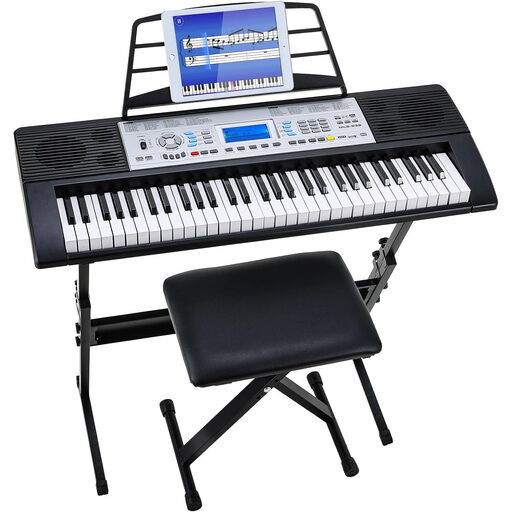 No image available
Digital 61-key keyboard set with stool
The product title mentions a stool and speakers; check what's included in the set and whether it will fit in your studio.
The title lists 500 sounds, a three-level learning mode and an LCD screen.
View on Joybuy
Frequently asked questions
Do you need built-in accompaniment to practise chord changes?
Not necessarily: first check whether a metronome is enough to help you repeat transitions to a steady beat. Accompaniment styles are useful if you also want to practise against a musical backing; Yamaha and Korg list this feature for the models mentioned.
Can you use a MIDI controller as a keyboard that produces sound without a computer?
Not with the Launchkey set-up described here: according to Novation, MIDI data contains no sound. Novation says the sound software for the Launchkey 61 runs on a computer.
What should you check before connecting your keyboard to the studio?
Compare the studio inputs with the outputs on the exact keyboard version and check which cables you need. Korg specifies separate L/MONO and R outputs for the EK-50; Yamaha lists a PHONES/OUTPUT connection for the PSR-EW320.
What should you look for when checking a keyboard's product safety?
According to Business.gov.nl, sellers must ensure that electrical and electronic equipment meets the applicable European requirements. Whether CE marking is required for a specific version depends on that version; this general requirement does not confirm that an individual product listing complies with it.


