If you mainly write at a fixed desk, choose a comfortable layout and a size that suits your workspace. If you move between writing spots, portability and the connection to your laptop or tablet matter more. A backlit keyboard won’t prevent glare on your screen: Arboportaal recommends positioning your line of sight parallel to the window when daylight is causing problems, and using a blind or other sunshade if needed. Before you buy, check the layout and connectivity of the exact model.
Which keyboard is right for you?
Writing long pieces
If you write long texts at a desk, look for a familiar layout and a keyboard that feels comfortable to use. CHERRY describes the STREAM KEYBOARD TKL as a wired model without a numeric keypad; check that the layout of the version you choose suits you.
Writing on the go
If you take your keyboard between writing spots, consider its size and how it connects to your laptop or tablet. Logitech says the Pebble Keys 2 K380s can switch between three devices, while Trust describes the Lyra as compact and designed for use with different devices.
Writing in daylight
When the light changes, backlit keys can help you see the keys, but they won’t prevent glare on your screen. For computer work, Arboportaal recommends positioning your line of sight parallel to the window.
What should you consider when choosing?
Compact and wireless
Choose this if: you move between writing spots or write on a laptop and tablet.
Bear in mind: the smaller typing area and the precise layout; also check that your device supports the connection you choose.
A roomier keyboard for a fixed spot
Choose this if: you usually write at one desk and value a larger main typing area more than portability.
Bear in mind: it takes up more space; with a wired model, you’ll also need a suitable port.
Adjust your workspace for daylight
Start here if: the window is mainly causing reflections on your screen.
Bear in mind: a different keyboard won’t eliminate screen glare; Arboportaal recommends positioning your line of sight parallel to the window and using a blind or other sunshade if needed.
| What to consider |
What to check before buying |
Who is it most important for? |
| Comfort and layout |
Compare the physical layout and key positions of the exact model; consider the size of the typing area. |
When I’m writing long paragraphs, I want a familiar layout and a typing area that stays comfortable to use. Around 36% of consumers give comfort and layout top priority when writing long texts. |
| Portability and workspace |
Check how it fits in your bag and think about how much space you have where you write. |
If I often move between places, I want a keyboard that’s easy to carry and comfortable to use on a small table. Around 27% of consumers prioritise portability and working in a small space. |
| Daylight and screen glare |
Consider your screen position separately from how visible the key labels are. |
When daylight falls on my screen, I want to be able to read my text; backlit keys won’t prevent that glare. Around 19% of consumers give visibility at their writing spot in bright daylight top priority. |
| Connectivity and device |
Check your device’s operating system, Bluetooth support or required USB port. |
If I switch between writing on a laptop and tablet, I want to know that the keyboard can connect to both. Around 18% of consumers prioritise device compatibility. |
Which buying mistakes can you avoid?
-
Choosing a backlit keyboard to solve screen glare
Backlighting illuminates the keys, while distracting daylight on your screen calls for an adjustment to your workspace.
First, assess your screen’s position in relation to the window and consider using a blind or other sunshade. Then decide whether backlit keys would be useful where you write.
-
Looking only at QWERTY
The physical shape and position of punctuation keys can vary between keyboard layouts. This is particularly noticeable if you do a lot of writing.
Check images and specifications for the exact model, and compare its layout with the one on your current keyboard.
-
Confusing a USB receiver with Bluetooth
A connection will only work if it’s compatible with what your laptop or tablet supports.
Check the connection options for the model you’ve chosen and the ports available on your device. A USB receiver may require a suitable USB port or adapter.
Keyboard brands worth comparing
Logitech
The ranges mentioned include everything from a keyboard for a fixed writing spot to compact models you can take with you.
- Logitech lists adaptive backlighting for the MX Keys S and the ability to switch between three devices for the Pebble Keys 2 K380s.
- These features apply to the models mentioned; check the layout of the version you choose.
CHERRY
The STREAM KEYBOARD TKL is a wired model without a numeric keypad, designed for use at a desk.
- CHERRY says its main typing area has the same layout as the larger STREAM KEYBOARD.
- CHERRY describes the keystrokes as quiet; this is the manufacturer’s description, not an independent comparison. The cable limits freedom of movement.
Trust
Trust describes the Lyra as a compact wireless keyboard for use with different devices and in different writing spots.
- Trust mentions low-profile scissor-switch keys and support for several operating systems.
- Check the exact model, connection and layout before making your choice.
Keychron
The B1 Pro described here is a compact option to take with you or use in a smaller writing space.
- Keychron lists a 75% layout, a weight of 425 g and support for Bluetooth, 2.4 GHz and wired use for the B1 Pro.
- According to Keychron, the version mentioned doesn’t have backlighting. Check the layout and availability of the version you’re considering.
Keyboards at Joybuy
These models suit compact typing on the go or use at a fixed workstation; check that each version has the layout and connection you need for your device.
 No image available
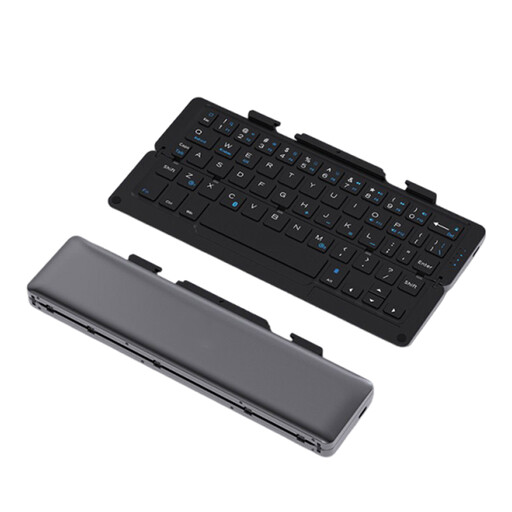
NAXSIR foldable Bluetooth keyboard, rechargeable, with magnetic stand
A compact choice for writing in different places or on a mobile device.
The product name mentions a magnetic stand, an aluminium case and a grey finish.
View at Joybuy
 No image available
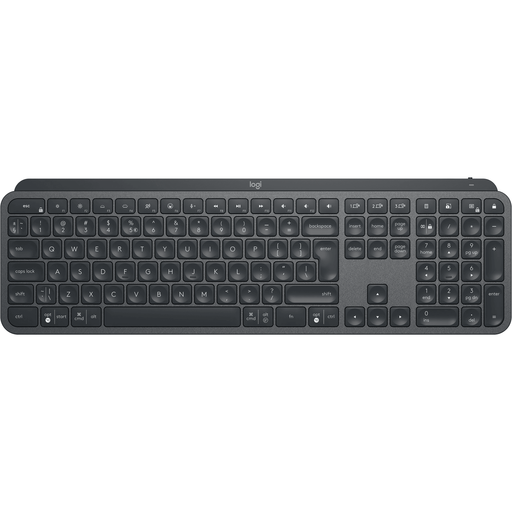
Logitech MX Keys for Business, QWERTY US
An option if you’re looking for a Logitech keyboard for a fixed writing spot and specifically want a US layout.
The product name specifies QWERTY US; check that the layout suits your punctuation and key-position preferences.
View at Joybuy
 No image available
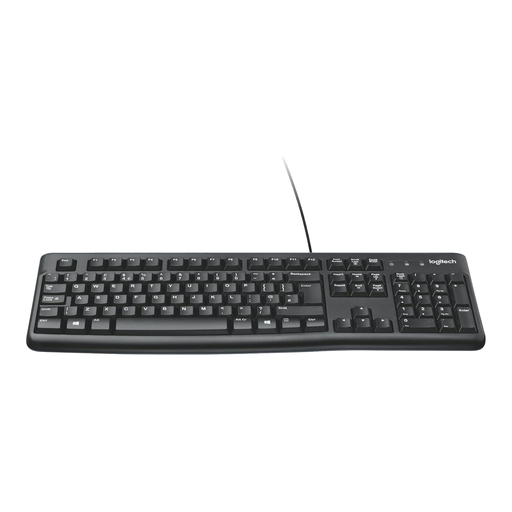
Logitech K120 wired keyboard, black
A wired option for a fixed computer setup, if your device has a suitable USB port.
The product name specifies a wired connection, so you’ll need a suitable port for the cable.
View at Joybuy
 No image available
Ajazz AK820 Pro, 75%, QWERTY US, Flying Fish Switch
A compact option if you want the choice of wired and wireless connections in a smaller writing space.
The product name lists Bluetooth, 2.4 GHz and wired use, as well as RGB lighting. Check that the US layout suits you.
View at Joybuy
 No image available
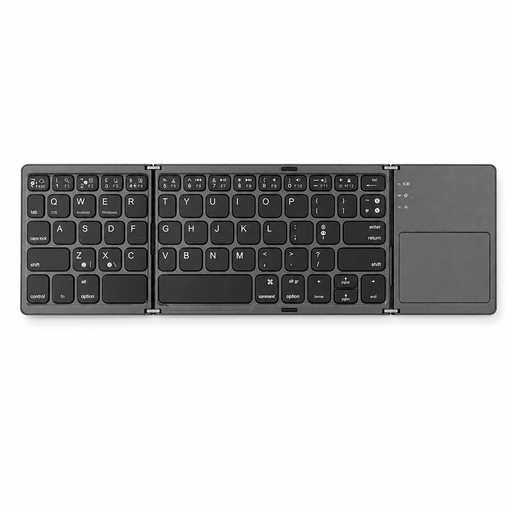
Voxis B033 foldable Bluetooth keyboard with touchpad
An option for typing on the go with a tablet, smartphone or computer if you’d also like an integrated touchpad.
The product name mentions a foldable design and Bluetooth connectivity; check that your device supports the connection.
View at Joybuy
Frequently asked questions
Will backlit keys help if the sun is reflecting on your screen?
No, backlit keys won’t eliminate screen glare. Logitech describes the MX Keys S as having backlit keys; for distracting reflections, Arboportaal recommends positioning your line of sight parallel to the window and using a blind or other sunshade if needed.
Can you use the same compact keyboard with your laptop and tablet?
Yes, if the version you choose and both devices support the same type of connection. Logitech says the Pebble Keys 2 K380s can switch between three devices and is compatible with Windows, macOS and iPadOS, among others; also check the keyboard layout of the version you’re considering.
What should you look for when taking a wireless keyboard with you?
Check how the model connects and how it’s powered. Logitech says the Keys-To-Go 2 has a built-in cover that protects the keys while you’re travelling; follow the instructions for pairing and care for the version you choose.
What are your rights if you buy online and the typing feel isn’t right for you?
For an ordinary online purchase, ACM ConsuWijzer says you generally have a statutory cooling-off period of up to 14 days after delivery; check which exceptions and returns terms apply to your purchase. If a product breaks during normal use sooner than you could reasonably expect, you also have statutory guarantee rights against the seller.
Should an employee who writes on a laptop for long periods be able to use a separate keyboard?
For the working situation described by Arboportaal, if you spend more than two hours a day working with a screen, the screen and keyboard must be usable separately. For laptop use, the employee must be able to use a separate screen or keyboard; this doesn’t mean every individual buyer has to purchase a particular keyboard.


