If you only want to make the text on your screen larger, adjust your display settings first: larger letters on a keyboard won’t enlarge the text on screen. Also choose a keyboard with clear, high-contrast key legends if you find the keys difficult to distinguish; a full-size layout with a numeric keypad if you enter lots of dates; or a compact model if saving desk space matters more. Always check the exact key layout and compatibility with your computer.
Who is this relevant for?
Typist who struggles to see the keys
When copying travel notes, they want to distinguish letters, numbers and punctuation more easily, so they compare the size and contrast of the key legends. The Hulpmiddelenwijzer highlights large characters and good contrast as points to consider when adapting a keyboard.
Indexer entering lots of dates
They regularly enter dates or numbers and weigh up having a numeric keypad and familiar layout against the extra space a full-size keyboard takes up. Optelec and Logickeyboard describe models they have reviewed that include a numeric keypad.
Diary editor working in different places
They move between workspaces or devices and want a keyboard that fits easily into the available space without losing sight of the layout. Logickeyboard describes a compact Bluetooth version with 78 keys.
What should you look for when choosing?
Full-size large-print keyboard
Choose this if: you find key legends difficult to distinguish and often enter dates or numbers. Optelec describes a ZoomText model with high-contrast characters and a numeric keypad.
Bear in mind: the desk space it needs, and your preferred colour combination and key layout. Larger letters on the keys won’t enlarge the text on your screen.
Compact large-print keyboard
Choose this if: you want easy-to-read key legends and have limited desk space or often move between locations. According to the manufacturer, the Logickeyboard Windows mini reviewed here has Bluetooth and 78 keys.
Bear in mind: this mini model does not have a separate numeric keypad. Also check the language version and Bluetooth compatibility of your device.
Backlit productivity keyboard
Choose this if: you can read standard key legends comfortably and are mainly looking for adjustable backlighting or programmable features. Logitech lists these features for the MX Keys S.
Bear in mind: backlighting doesn’t confirm that a version has large-print legends; check the exact keys and any software requirements.
Keyboard with larger characters and fewer keys
Choose this if: you want to find keys easily and a conventional full-size layout is less important to you. Clevy describes the Keyboard 3 as having larger characters, colour coding and 67 keys.
Bear in mind: a non-standard layout may feel less familiar if you often use a numeric keypad or specific shortcut keys.
| What to consider |
What to look for |
Who is this important for? |
| Readability of key legends |
Check the letters, numbers, symbols, contrast and exact layout version. |
When I’m typing place names and dates, I want to distinguish the right characters quickly and choose a contrast that works for my eyesight. Around 36% of consumers give readable key legends top priority. |
| Entering dates and numbers |
Check whether the layout includes a numeric keypad, arrow keys and the punctuation you need. |
If I enter lots of dates and reference numbers, a familiar layout may matter more to me than a smaller keyboard. Around 29% of consumers prioritise entering dates and numbers quickly. |
| On-screen text and extended typing |
Assess key readability separately from your display settings, and check whether programmable features have any software requirements. |
When processing diaries, I want to type comfortably and read the text on my screen; larger letters on the keys don’t change what’s displayed on screen. Around 21% of consumers prioritise this combination. |
| Portability and desk space |
Compare the dimensions, connection, battery type, operating system and layout of the version you’re considering. |
If I work in different places, a compact model can save space, even if that means having fewer keys. Around 14% of consumers give portability and limited desk space top priority. |
Common buying mistakes
-
Confusing larger key legends with screen magnification
Larger legends on the keys won’t change the text size on your screen. If the on-screen text is what you find difficult to read, a large-print keyboard alone won’t solve the problem.
Adjust your display first, then decide whether you also need more readable key legends.
-
Assuming every compact model is suitable for entering lots of numbers
The Logickeyboard mini reviewed here has 78 keys and no separate numeric keypad, while the full-size models reviewed do include one.
Compare the keys on the exact version with the dates, numbers and punctuation you usually enter.
-
Overlooking the language or device version
Logickeyboard offers separate language versions and models for different operating systems.
Before buying, check the full model name, language layout and whether the version is compatible with your computer.
-
Mistaking an older Clevy Keyboard 2 for the currently supported version
Clevy states that the Keyboard 2 product line is no longer supported.
Check the model number and the support you need before choosing an older version.
Relevant brands to consider
Optelec / ZoomText
Optelec describes a full-size large-print keyboard for anyone looking for high-contrast legends and, potentially, controls for ZoomText or Fusion.
- According to Optelec, the model reviewed has a numeric keypad and USB connection, and is available in two contrast versions.
- The special shortcut keys are mainly useful with the software mentioned; the keys don’t enlarge text on screen.
Logickeyboard
The Large Print models reviewed include a full-size, wired Windows version and a compact Bluetooth version.
- The manufacturer lists a numeric keypad for the full-size Windows version reviewed and 78 keys for the Windows mini.
- The mini has no separate numeric keypad. Check the language version and operating system for the version you choose.
Clevy
The Keyboard 3 is an option if larger characters, colour coding and a simpler key layout matter to you.
- Clevy lists USB, Bluetooth and 67 keys for the Keyboard 3.
- The non-standard layout may feel less familiar if you need a conventional numeric keypad or certain shortcut keys.
Logitech
The MX Keys S is a general-purpose productivity keyboard for anyone who can read the existing legends and is looking for adjustable backlighting or workflow features.
- Logitech lists adjustable backlighting and Smart Actions via Logi Options+.
- The product information reviewed doesn’t confirm large-print legends, so don’t assume it’s a substitute for a specialist large-print keyboard without checking.
Keyboards at Joybuy
This selection ranges from compact models to a QWERTY model with a numeric keypad. If you need larger key legends, check the readability of the legends and the layout of the exact version.
 No image available
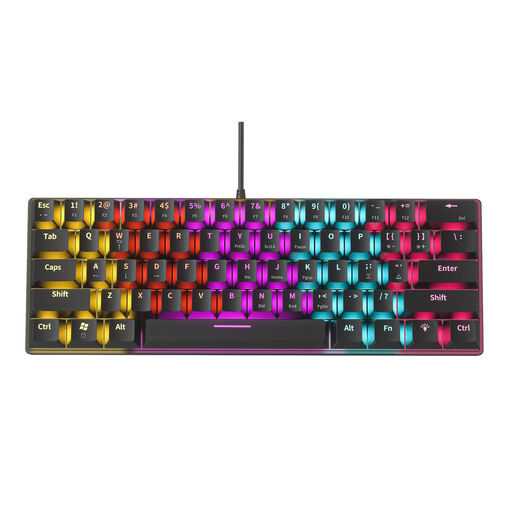
NAXSIR Mini Mechanical Keyboard, 61 Keys, 12 RGB Lighting Effects, 04-49486816
The mini layout may suit you if you’re looking for a compact keyboard; check that the key layout works for the dates and characters you enter.
61 keys; 12 RGB lighting effects.
View at Joybuy
 No image available
Wired Keyboard with Numeric Keypad, QWERTY Layout, Black
A numeric keypad may be useful if you regularly enter dates and numbers while indexing.
Full-size; QWERTY layout; wired and plug-and-play according to the product name.
View at Joybuy
 No image available
AULA F75 75% Layout Wireless Gaming Keyboard, QWERTY US Layout
The 75% layout is a compact option; check that the available keys suit the way you enter dates and travel notes.
Wireless; 75% layout; US QWERTY; RGB lighting; PBT keycaps.
View at Joybuy
 No image available
Ajazz AK820 Pro 75% Mechanical Tri-Mode Keyboard, QWERTY US layout
If you’re considering a more compact layout, compare the US QWERTY keys with the punctuation and input keys you need for your index.
75% layout; three connection modes; wired connection, Bluetooth and 2.4G according to the product name; TFT display; RGB lighting; Flying Fish Switch Purple.
View at Joybuy
 No image available
Razer Huntsman Mini Keyboard (Purple Switch), US Qwerty Layout
This mini model may suit you if you’re specifically looking for a compact layout; check that you can find the keys you need easily.
Purple Switch; US QWERTY layout.
View at Joybuy
Frequently asked questions
Will a large-print keyboard also enlarge the text in my travel index?
No. Larger letters on the keyboard won’t enlarge text on screen. In Windows, you can adjust the text size or scaling separately; Windows Magnifier is also a separate screen feature.
Do I need ZoomText to connect the ZoomText keyboard?
Optelec lists a USB connection and describes the special shortcut keys as controls for ZoomText and Fusion. These keys are therefore most relevant if you use the associated software. Check compatibility with your computer.
What should I check when buying a compact Bluetooth large-print keyboard?
Check whether you’re choosing the Windows or Mac version, the language version and your device’s Bluetooth compatibility. According to the manufacturer, the Logickeyboard Windows mini reviewed here uses two AAA batteries.
What consumer rights apply to an online purchase in the Netherlands?
For online purchases from a business, you usually have 14 days to change your mind, according to the Dutch government. You’re also entitled to a product that is fit for purpose; in the Netherlands, there is no fixed statutory warranty period of two years.


