
Keyboard navigation tester
You move through checkout fields and controls manually using the keyboard. A practical key layout matters more than extra features.


First, choose a layout that gives you easy access to the keys you need for entering form details and navigating manually by keyboard. A compact keyboard leaves room beside it, while a full-size model with a numeric keypad may suit you if you enter lots of numbers. A split layout is another option for extended typing, but it may take some getting used to and uses more desk space. Set up your workstation to suit you, and alternate between sitting and standing: your keyboard alone won’t determine your posture.
You move through checkout fields and controls manually using the keyboard. A practical key layout matters more than extra features.
You enter data and test notes for extended periods at a sit-stand desk, and want to assess how the keyboard’s size and layout suit your workspace.
You repeatedly enter numerical test data and are weighing up a separate numeric keypad against the extra width.
A good fit if: you mainly work through forms and enter text, and want to leave room for your mouse beside the keyboard.
Trade-off: the compact models mentioned don’t have a separate numeric keypad.
A good fit if: you often enter prices, postcodes or other numbers during testing.
Trade-off: a physical numeric keypad takes up more space than a model without one.
A good fit if: you type for extended periods and want to try a different key layout.
Trade-off: the different layout may take some getting used to; the ergonomic benefits mentioned are claims made by the manufacturers.
| What to consider | What should you check? | Who is this relevant to? |
|---|---|---|
| Manual navigation | Check that your usual Tab, Shift+Tab and data-entry actions work with the exact key layout. | If you move through checkout fields and controls manually, you’ll want to be able to navigate in a familiar, practical way. Around 36% of consumers prioritise manual navigation. |
| Posture and space for your mouse | Compare the keyboard’s width and key layout with your desk, and assess them both sitting and standing. | If you type for extended periods at a sit-stand desk, consider how much room you have for your mouse beside the keyboard. Around 29% of consumers prioritise posture and mouse space. |
| Numeric keypad | Consider whether your tests often involve entering numbers separately, and whether the model has a physical numeric keypad. | A separate keypad can be useful when you enter numbers repeatedly, even if it takes up more desk space. Around 21% of consumers prioritise number entry. |
| Connectivity and devices | Check the connections on your test devices and which connection or receiver the model you choose uses. | If you switch between different test devices, you’ll want to make sure the connection is compatible. Around 14% of consumers prioritise switching between devices. |
The word ‘compact’ doesn’t tell you whether the navigation and data-entry keys you need for testing are easy to reach.
Compare an image and the layout of the exact model with the manual test steps you usually follow.
A keypad can be useful if you enter lots of numbers, but it takes up space that you could otherwise use for your mouse beside the keyboard.
Let the amount of number entry in your tests determine whether you need a keypad, then compare the keyboard’s width.
Your posture also depends on your setup, how far you have to reach and whether you alternate between sitting and standing.
Assess the keyboard at both desk heights, and change your posture regularly.
The S-board 840 is a compact, wired option for anyone who wants to keep their mouse closer and doesn’t need a separate numeric keypad.
The ERGO K860 has a split key layout, while the MX Keys S is a conventional wireless keyboard.
The Keyra is a full-size, split wireless keyboard for anyone who wants to combine that layout with using multiple devices.
The wired STREAM KEYBOARD TKL has a conventional main key layout without a separate numeric keypad.
The PERIBOARD-512 is a split model with a wired USB-A connection.
These product options are aimed at checkout testing where a numeric keypad, a compact layout or a USB connection may be useful.
 Image unavailable
Worth considering if you regularly enter numbers during testing.
The product name specifies a wired connection, QWERTY layout and numeric keypad.
 Image unavailable
An option to consider if you enter lots of numbers during checkout testing and want a numeric keypad.
The product name specifies Touch ID and a numeric keypad.
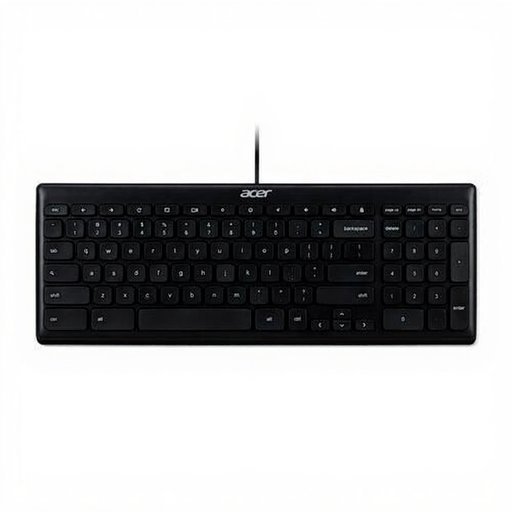 Image unavailable
Worth considering for a dedicated testing setup if the listed USB connection and key layout are compatible with your computer.
The product name specifies USB, QWERTY US International and black.
 Image unavailable
An option for anyone who enters lots of numbers during checkout testing and wants a Dutch model.
The product name specifies a numeric keypad, white keys and compatibility with Mac models with Apple silicon.
 Image unavailable
This model is included as a more compact option; check the exact key layout and make sure it suits your testing steps.
The product title specifies that this model is for Mac models with Apple silicon.
No. The W3C guidelines don’t require a particular switch mechanism or a programmable model. Test the controls and focus order manually using the keys needed for the interface; a programmed macro isn’t a substitute for that check.
Consider how far you have to reach and adjust your furniture to suit the posture you work in. Arboportaal advises alternating between sitting and standing; standing all the time isn’t automatically better.
Check whether your computer has the required USB-A port, Bluetooth support or receiver. Follow the instructions for the exact model when cleaning it or checking its power supply, as wired and wireless models differ.
No. ACM ConsuWijzer explains that the legal guarantee depends on what you could reasonably expect from the product and may last longer than a seller’s stated guarantee. Contact the seller if there’s a fault.
According to Arboportaal, when an employee works at a screen for more than 2 hours a day, the screen and keyboard must not be attached to each other. In that case, laptop users must be able to use a separate screen or keyboard; this requirement doesn’t automatically apply to every reader.