A keyboard is a sensible choice for playing card games on a big screen only if both your device and the specific game support keyboard controls. A wireless model can be practical from the sofa, while a wired keyboard may be all you need if you’re close to your PC. Focus on range, the keys you need and noise, rather than advertised speed features alone.
Who is a keyboard for card games on a big screen suitable for?
Card player on the TV
You play from the sofa on a PC connected to a big screen and don’t want a cable trailing across the floor. Check both the connection and the controls available in the specific game. PlayStation warns that not all devices are compatible with PS5.
Considerate player
You play in a shared space and prefer quieter keys and a practical size to features mainly designed for fast input. SteelSeries describes the Apex 3 TKL’s switches as quiet.
PC player close to the screen
You can use a cable and want suitable keys and straightforward controls, without paying for wireless features you don’t need in this set-up.
What should you look for?
First, check that your device and the card game support keyboard controls. Then consider how far you’ll be from the screen and which layout you’ll need while playing.
| What to consider |
What to look for |
Who is this important for? |
| Device and game compatibility |
Check the exact game, the device you’ll play on and its supported input methods. On a console, device and game support may differ. |
If I want to play with a keyboard, I first need to know whether both my device and the card game accept keyboard input. Around 36% of consumers prioritise compatibility. |
| Connection from the sofa |
Measure the distance in your own set-up and check the available connection, whether you need a receiver and how the keyboard is powered. |
When I’m on the sofa, I want to play without an awkwardly long cable. Around 29% of consumers say range from their seat is their top priority. |
| Quiet keys and ease of use |
Check the switch type on the exact variant and, if possible, try the feel and sound of the keys for yourself. |
In a shared space, I want to play without loud keystrokes disturbing others. That’s why around 21% of consumers prioritise quieter keys. |
| Size and key layout |
Compare the keys used by your game with the full layout and language variant of the model on offer. |
On a small table, I want to save space without losing a key I need. Around 14% of consumers prioritise a compact size and the right key layout. |
Common pitfalls
-
Assuming ‘works with the console’ means ‘works in my card game’
A device may recognise a keyboard even if the specific game doesn’t offer keyboard controls.
Before buying, check both the connection and the input options for the exact game.
-
Choosing a small keyboard without checking the layout
Compact sizes may leave out keys you need for controls or key combinations.
Compare your game’s controls with the model’s layout and language variant.
-
Prioritising fast-input features over where you play
An advertised speed feature doesn’t, by itself, prove that a keyboard is better for a card game. CORSAIR notes that not every game needs a dedicated gaming keyboard.
First consider range, controls, noise and the keys you need. Then decide whether any extra features would be useful for you.
Brands to consider
Logitech G
The G915 X LIGHTSPEED TKL is a wireless, low-profile TKL model; the G213 is a wired alternative.
- Logitech says the G915 X LIGHTSPEED TKL has three connection modes. The G213 has media controls and an integrated palm rest.
- The G915 X LIGHTSPEED TKL has no number pad, while the G213 is wired. Neither feature confirms support in a specific card game.
Razer
The BlackWidow V4 Tenkeyless HyperSpeed is a wireless mechanical TKL option for anyone who wants to switch between devices.
- Razer lists 2.4 GHz wireless and Bluetooth connectivity, with the ability to switch between three devices.
- Check the exact variant, layout and support from your device. Its advertised fast response is not, by itself, a proven advantage for card games.
SteelSeries
The Apex 3 TKL is a compact option; the Apex Pro range has different features for adjustable switches.
- SteelSeries describes the Apex 3 TKL’s switches as quiet and lists media controls.
- Features found on other Apex models, such as magnetic switches, don’t automatically apply to the Apex 3 TKL.
HyperX
The Alloy Core RGB is a membrane keyboard for anyone looking for a keystroke that the manufacturer describes as quiet.
- HyperX lists quiet keys and anti-ghosting for this model.
- Anti-ghosting doesn’t, by itself, confirm an advantage for the card game you want to play. Also check the country and language variant on offer.
CORSAIR
The range includes the compact K65 PRO MINI and the wired K70 RGB TKL.
- These models differ in size and the keys they include. CORSAIR itself notes that not every game needs a dedicated gaming keyboard.
- Comparing sizes isn’t an independent performance test. Check which keys your game requires.
Joybuy products for wireless gaming on a big screen
These keyboards are suited to a seating position where wireless use and a compact layout may come in handy. Before buying, check that your device and the specific card game support keyboard controls.
 Image unavailable
AULA F75 Pro 75% — US layout
May suit a seating position where you want to play wirelessly; the product name doesn’t confirm that a specific card game supports keyboard controls.
75% layout; Bluetooth, 2.4 GHz wireless and wired use; US layout.
View at Joybuy
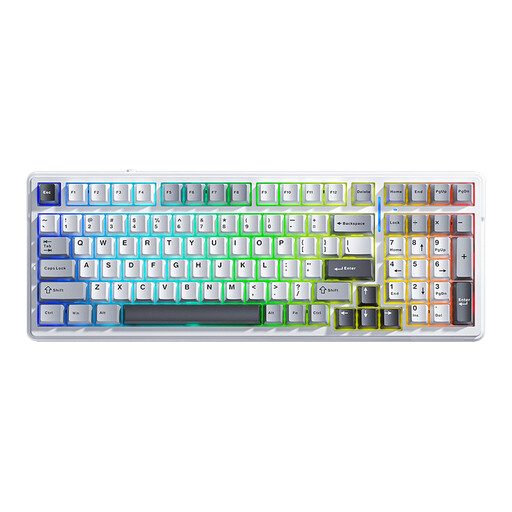 Image unavailable
AULA F99 — 99 keys, US layout
May suit you if you want to play wirelessly and prefer a 99-key layout; check that your device and game support it.
Bluetooth, 2.4 GHz wireless and wired use; QWERTY US layout.
View at Joybuy
 Image unavailable
AULA F75 — 75% layout, PBT keycaps
May suit a limited gaming space where wireless use is preferable; check which keys your game requires.
75% layout; three wireless modes; PBT keycaps; QWERTY US layout.
View at Joybuy
 Image unavailable
AJAZZ AK980 V2 — 98% layout
May suit you if you want to play wirelessly and prefer a more spacious key layout; game controls depend on your device and the card game.
98% layout; Bluetooth, 2.4 GHz wireless and wired use; volume knob; TFT display; 10,000 mAh battery.
View at Joybuy
 Image unavailable
AJAZZ AK820 MAX — 75%, US layout
May suit a smaller gaming space if you’re looking for a compact layout with arrow keys; check which keys your game needs.
75% layout with arrow keys; tri-mode connectivity; volume knob; 8,000 mAh battery; US QWERTY layout.
View at Joybuy
Frequently asked questions
Does every gaming keyboard work with a card game on PS5 or Xbox?
No, you can’t assume that just because it’s called a gaming keyboard. PlayStation says that not all devices are compatible with PS5, while Xbox lists keyboard and mouse controls for selected games and apps. So check the controls available in the specific card game too.
Do I need a gaming keyboard for a card game?
Not necessarily: a dedicated gaming keyboard is only worth considering if its controls and features suit the way you play. CORSAIR itself notes that not every game needs one. First, check which input methods the game supports and which keys you’ll use.
What should I look for in a compact layout?
Check that the layout you choose includes all the keys your card game uses. TKL models don’t have a number pad; compare the language variant and key positions before you decide.
What cooling-off period and guarantee apply to an online purchase in the Netherlands?
According to the Dutch government, consumers who buy online from a business usually have 14 days to change their mind, although exceptions may apply. The Netherlands has no fixed statutory guarantee period: you’re entitled to a product that works as it should. Check the terms and any applicable exceptions for your purchase.


