
Vandaag of morgen in huis

Kwaliteit gegarandeerd

Welkomstaanbiedingen ontgrendelen: GRATIS bezorging | Tot 80% korting | Gratis 30 dagen JoyPlus-proefperiode
Download de app
A new keyboard may seem like a straightforward purchase. However, the wrong layout, limited compatibility and disappointing noise levels can quickly become frustrating. A wireless keyboard may be convenient on a tidy desk, for example, but it does not always work with every device. And a mechanical keyboard that is suitable for gaming is not automatically comfortable to use in a shared home office.
Use these practical checks to compare models based on the features that really matter in everyday use.
In the Netherlands, you will come across both QWERTY keyboards and AZERTY models. A US International QWERTY layout may look similar to a Dutch layout, but the position of symbols such as @, ", € and the question mark can differ. An AZERTY keyboard is mainly intended for users who are accustomed to the Belgian or French layout.
So do not just check the letters shown in the product photo. Also look at:
A wireless keyboard can work via Bluetooth or a 2.4GHz USB receiver. A USB receiver is often straightforward: plug it in and start typing. However, you will need a spare USB port. Bluetooth is more practical for tablets, smartphones and laptops with few ports, but pairing and device support require extra attention.
Some models combine both options. The Trust Vaiya, for example, works with a USB receiver and several Bluetooth channels. This is useful if you switch between a laptop, tablet and phone.
Terms such as “quiet”, “ergonomic” or “long lifespan” are only useful when supported by technical details. A membrane or scissor keyboard is generally built differently from a mechanical keyboard. “Water-resistant” also usually does not mean that you can clean the keyboard under a running tap. The Acer is described as having a water-resistant design, while the safety information also advises avoiding liquids.
Also pay attention to the power source. A battery-powered model needs replacement batteries and must be inserted correctly. A rechargeable keyboard, on the other hand, needs a charging cable and may be less practical temporarily if the battery runs flat.
A full-size keyboard usually has a numeric keypad. This is useful for spreadsheets, administration and frequent number entry. A compact 75% or 60% model saves space, but often omits the numeric keypad and some function keys.
The dimensions also matter for an office setup. Measure the available space, including room for your mouse. A keyboard with a numeric keypad is often around 42 to 44 centimetres wide, while compact gaming models are considerably narrower.
Choose a USB keyboard if you want a wired connection and plug-and-play installation. The Acer has a 1.45-metre cable and, according to the product specification, is compatible with certain Windows systems. Check older computers to make sure they have a suitable USB port.
A Bluetooth keyboard is better suited to mobile devices and a flexible desk setup. Always check the requirements for the specific product. According to the product information, the Apple Magic Keyboard models with Touch ID are intended for Macs with Apple Silicon. The Apple Magic Keyboard for iPad Pro is designed for specific iPad Pro models and features a Smart Connector, Bluetooth, backlighting and an integrated trackpad.
A quiet keyboard is a sensible choice for video calls, libraries and shared workspaces. Bear in mind that “quiet” does not mean completely silent. The way you type and the surface on which the keyboard sits also affect the noise level.
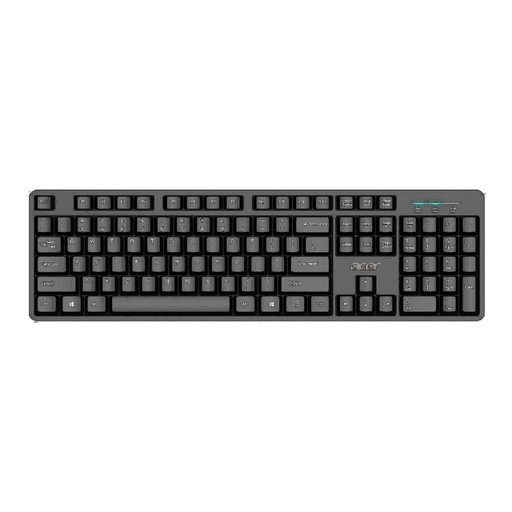
Why it suits this profile: A full-size USB keyboard for working from home, administration and general computer use without Bluetooth pairing.
The wired USB connection eliminates uncertainty about wireless pairing. However, check that the US International layout suits your typing habits.
105 keys, a numeric keypad, a 1.45-metre cable and, according to the product information, a lifespan of up to 5 million keystrokes.
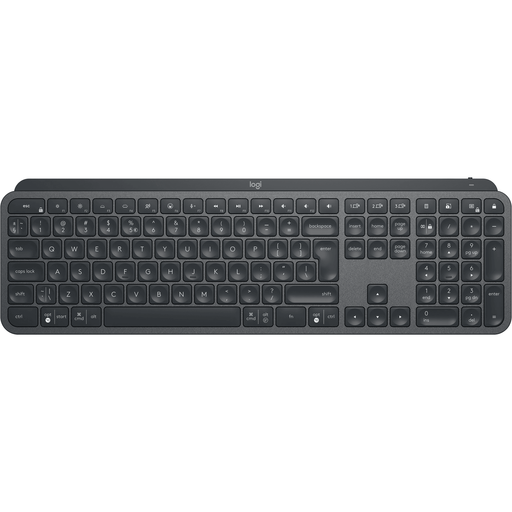
Why it suits this profile: Designed for office professionals who use multiple devices and value backlighting, numeric input and a stable key feel.
The product specification lists both Bluetooth and wireless Logi Bolt connectivity. This gives you a choice between using a receiver and connecting directly.
Full-size layout with numpad, backlighting, Easy-Switch for up to three devices and a rechargeable battery according to the product information.
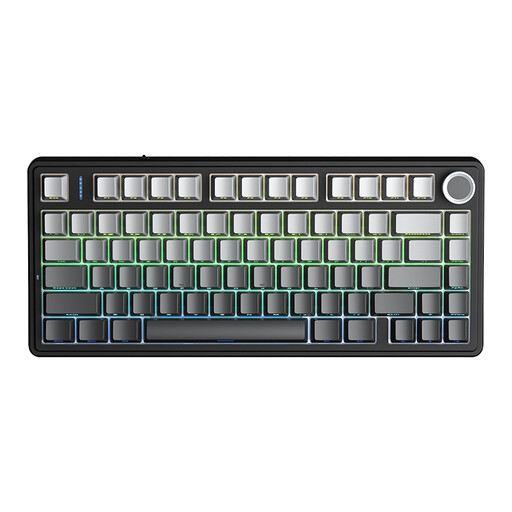
Why it suits this profile: A compact mechanical gaming keyboard for users who want to save space and need several connection options.
The 75% layout makes the size clear. There is no numeric keypad, so this model is less suitable for intensive spreadsheet work.
According to the product information, USB, Bluetooth and 2.4GHz are available, along with hot-swappable functionality and RGB lighting.
We have put together a complete, up-to-date list of products that fully meet these strict selection criteria and the applicable European safety regulations.
A USB keyboard uses a cable and often works as soon as you plug it in. A Bluetooth keyboard has no cable while you type, but it must be paired first and needs power from batteries or a rechargeable battery. USB is straightforward for a desktop, while Bluetooth is often more flexible for a tablet or laptop.
This depends on the key mechanism, usage and maintenance. Manufacturers sometimes specify a number of keystrokes, such as 5 or 10 million. According to the brand’s own information, such a figure mainly indicates the intended mechanical lifespan; it does not predict when a particular keyboard will fail for you. Keep the model dry, remove dust carefully and do not force the keys.
When working from home, focus mainly on layout, noise level, numeric keypad and connectivity. A quiet membrane or scissor keyboard is often a good choice for a shared space. If you switch between several devices, consider Bluetooth or a model with multiple connection channels. Always check compatibility with your computer, Mac, Windows laptop, iPad or other devices before buying.
