
Vandaag of morgen in huis

Kwaliteit gegarandeerd

Welkomstaanbiedingen ontgrendelen: GRATIS bezorging | Tot 80% korting | Gratis 30 dagen JoyPlus-proefperiode
Download de app
A new keyboard seems like a simple purchase, until you find that the layout doesn’t suit you, the connection keeps dropping or it’s too noisy for a shared workspace. For people working from home, gamers, programmers and multitaskers, three common purchasing pitfalls are worth keeping in mind.
The first is choosing “wireless” without checking the connection. A wireless keyboard can work via a USB receiver, Bluetooth or both. A tablet, for example, may not support a USB-A receiver without an adapter. The second pitfall is choosing the wrong QWERTY layout. A US QWERTY keyboard may have different characters and a different Enter key from the layout you’re used to. The third is mistaking a compact size for a complete workstation: a 60% keyboard takes up little space, but often lacks arrow keys, a function row and a numeric keypad.
Before you buy, check whether you need a QWERTY keyboard or a QWERTZ model. The range includes several models with a US QWERTY or ANSI layout. This isn’t necessarily the same as a Dutch physical layout. Your Windows or macOS software settings also determine how characters are entered.
Pay particular attention to:
If you enter lots of numbers, for example for accounts or data analysis, a full-size keyboard or a keyboard with a numeric keypad is usually a better choice.
A USB keyboard usually works as soon as you plug in the cable. It’s handy for a desktop PC and means you don’t need to worry about batteries. A wireless keyboard using 2.4 GHz RF typically comes with a nano receiver, so check that your computer has a spare USB port.
A Bluetooth keyboard is more convenient for laptops, tablets and smartphones, as long as your device supports Bluetooth. A multi-device keyboard can switch between several devices. According to the product information, the Trust Vaiya supports one USB receiver and three Bluetooth channels. The HP 725 works with two Bluetooth connections and one 2.4 GHz connection.
Be aware of the differences between:
A mechanical keyboard uses individual switches. The feel, noise level and force needed to press a key vary depending on the switch. For an optical linear switch, such as the one in the Razer Huntsman Mini, the product information lists an actuation force of 45 grams and an actuation distance of 1.2 mm. These figures can be checked, but they don’t tell you everything about personal preference.
A membrane or scissor-switch keyboard is often lower-profile and quieter. This makes it a better fit for an office, library or shared home. An RGB keyboard adds lighting, but on wireless models this often increases power consumption. So check:
An adjustable foot lets you change the angle, but it doesn’t automatically make a keyboard ergonomic. The Lenovo 4x30H56874, for example, is described as ergonomically designed, although its specifications say it isn’t specifically ergonomic. So also consider the height, your wrist position and the space available on your desk.
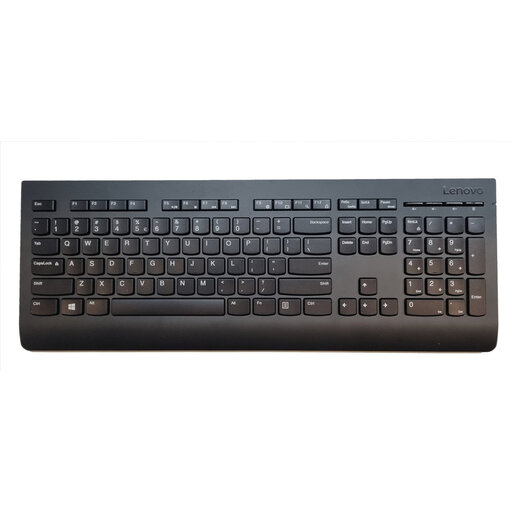
Why it suits this profile: This full-size wireless keyboard is designed for general use at home or in the office and connects via a nano receiver.
The layout, full-size format and numeric keypad are clearly specified. The RF connection is plug and play.
Stated wireless range of 10 metres, spill-resistant casing and support for Windows, macOS and Chrome OS.
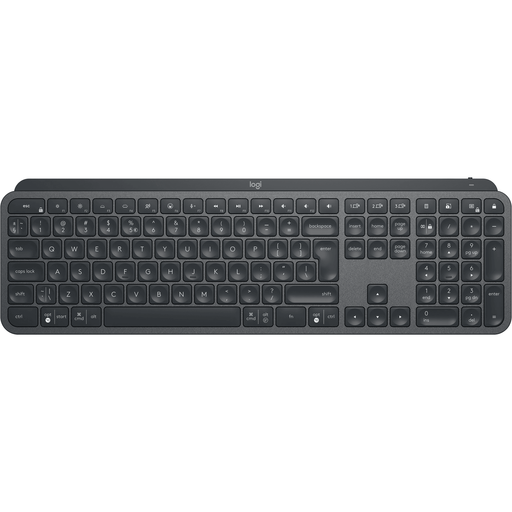
Why it suits this profile: The combination of wireless Logi Bolt technology, Bluetooth and Easy-Switch is a good fit for programmers, creatives and business users with multiple devices.
The product information lists the connections, supported operating systems and US QWERTY layout. This lets you check in advance whether it’s right for your workspace.
Full-size format with a numeric keypad, automatic backlighting and the ability to switch between up to three devices.
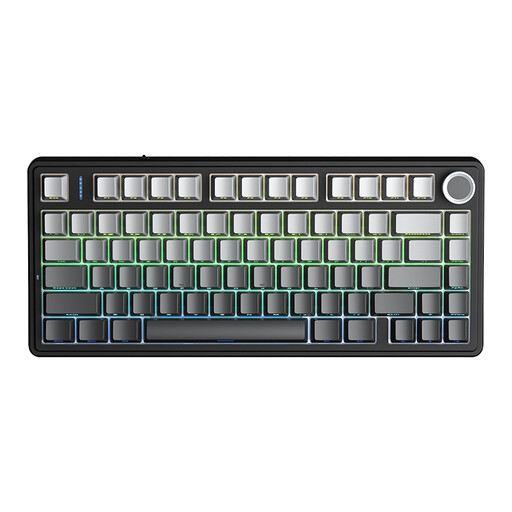
Why it suits this profile: This compact mechanical gaming keyboard combines a 75% layout with Bluetooth, 2.4 GHz and USB connectivity.
The 75% layout keeps the arrow keys while saving space. Hot-swap support lets you replace switches without soldering.
4000mAh battery, RGB lighting, programmable keys and support for up to five paired devices, according to the product description.
We’ve put together a complete, up-to-date list of products that meet these strict selection criteria and comply with current European safety regulations.
A Bluetooth keyboard connects directly to a compatible device. A USB keyboard uses a cable or a USB receiver. Bluetooth is handy for tablets and phones; USB or RF is often simpler for a desktop computer. Always check which ports are available and whether your operating system supports the connection.
Its lifespan depends on the type of switch, how it’s used and maintained, and whether it’s exposed to dust or liquid. Manufacturers sometimes state a key lifespan, such as 10 million keystrokes or more. This is a technical specification, not a guarantee of how long the keyboard will last in use. Keep your keyboard dry, remove dust carefully and replace the batteries as instructed in the manual.
A keyboard with backlighting generally uses more power than a model without it. Some manufacturers state battery life under specific conditions, for example with the backlight off or with limited use. According to Trust’s product information, the Vaiya’s built-in battery lasts up to six months, while the HP 725 has a stated battery life of two months. When buying, check that these figures suit the way you’ll use it and whether you can charge it while typing.
