
Vandaag of morgen in huis

Kwaliteit gegarandeerd

Welkomstaanbiedingen ontgrendelen: GRATIS bezorging | Tot 80% korting | Gratis 30 dagen JoyPlus-proefperiode
Download de app
Buying a keyboard seems straightforward, until you realise the layout is wrong, the keys are too loud or a compact model is missing important keys. Working from home, gaming, programming and office work also each have different requirements. Marketing terms such as “ultra-fast”, “ergonomic” and “premium” only mean something when you can match them to verifiable specifications.
An AZERTY keyboard has a different arrangement of letters and punctuation marks from a QWERTY keyboard. Belgian AZERTY models are not automatically the same as a Dutch layout. So check more than just the product title: look at the stated language and layout, and check an image of the keys.
A QWERTY US International model can work perfectly well with Windows or macOS, but special characters such as @, " and accents may be in different places from those you’re used to.
A 60% compact keyboard saves space, but usually leaves out the numeric keypad, function row and dedicated arrow keys. That can be handy for gamers with limited desk space, but less suitable for spreadsheets or administrative work.
A TKL model, short for TenKeyLess, omits the numeric keypad but usually keeps the function keys and arrow keys. A 75% model often offers a similar layout in a smaller size. So check the number of keys rather than relying on the size label alone.
A wireless keyboard can connect via Bluetooth, a 2.4GHz receiver or both. Bluetooth is handy for laptops, tablets and phones. A USB receiver can be useful with a desktop, but it does take up a USB port.
Also check whether the model uses a rechargeable battery or standard batteries. A Bluetooth keyboard with multiple connection profiles is useful if you switch between devices. A wired USB keyboard, on the other hand, avoids charging and connection issues.
First, choose between AZERTY and QWERTY. Then check that the keyboard is compatible with your operating system. A keyboard for Windows may also work with macOS, but some function keys may behave differently.
For Apple users, a keyboard for Mac with Mac-specific keys is the most predictable choice. If you’re looking at a Surface or tablet keyboard, check the exact device model and connection too. A magnetic Smart Connect model won’t necessarily work with other tablets.
A membrane keyboard uses a rubber contact layer and is often relatively quiet. A scissor switch, like the one used in many laptop keyboards, has low-profile keys with a short travel distance. This works well for office tasks and shared spaces.
A mechanical keyboard uses individual switches. Linear switches generally feel smooth and consistent, while clicky switches can make a clearly audible click. Optical and magnetic switches are technical variations; focus on the stated actuation distance, switch type and software support.
A full-size keyboard usually includes a numeric keypad, making it suitable for financial administration, spreadsheets and data entry. A compact or 60% model leaves more room for your mouse, but often requires key combinations for navigation.
Also check for:
An RGB keyboard can be useful for visibility and personalisation, but RGB lighting often reduces battery life on wireless models. According to Logitech’s product description, the MX Keys for Business can work for up to around five months without backlighting. This is a stated product specification, not a guarantee for every use case.
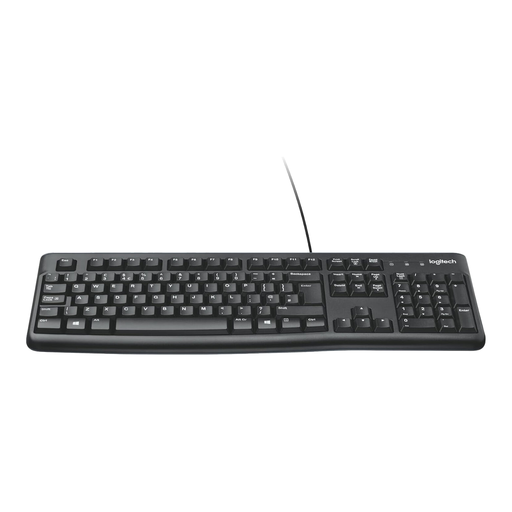
Why it suits this profile: This full-size USB keyboard is designed for straightforward everyday use at home or in the office. Its QWERTY layout, numeric keypad and cable make setup simple.
There’s no battery to charge or software to install. Just check beforehand that the QWERTY layout suits the way you type.
USB connection, full-size design, membrane keys and numeric keypad.
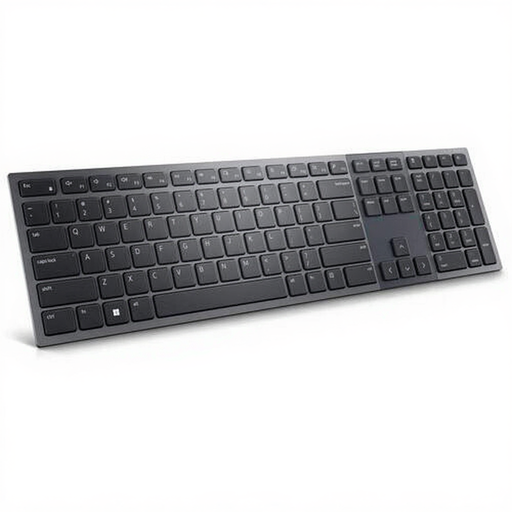
Why it suits this profile: Designed for a professional desk and hybrid working, this wireless model features a Belgian AZERTY layout, numeric keypad and a choice of RF or Bluetooth 5.1 connection.
The connection options and layout are clearly specified. Check that the Belgian AZERTY layout matches the key layout you want.
Scissor-switch keys, rechargeable 3,000 mAh battery, white backlighting and numeric keypad.
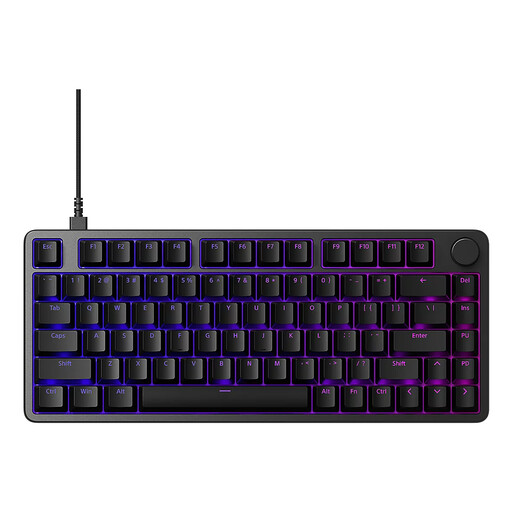
Why it suits this profile: This 75% gaming keyboard combines a compact design with a USB-C cable, RGB lighting and customisable features through INZONE Hub.
The specifications state the 75% size, 81 keys and USB-C connection. According to Sony’s product description, Rapid Trigger and 8,000 Hz are designed for fast input; the practical effect depends on your PC, software and game.
Magnetic switches, aluminium case, RGB lighting and compatibility with Windows and macOS.
We’ve put together a complete, up-to-date list of products that meet these strict selection criteria and the applicable European safety regulations.
For office work, a full-size model with quiet membrane or scissor-switch keys is often a practical choice. A numeric keypad is useful for figures and spreadsheets. Choose a wireless model if you want a tidy desk, or a USB keyboard if a reliable wired connection matters more.
Its lifespan depends on how you use it, as well as dust, moisture and the quality of the switches. Mechanical and optical models sometimes state a number of keystrokes, but this is a product specification based on particular conditions. Clean your keyboard regularly with a soft, dry cloth and keep liquids away from the electronics.
Not necessarily. Mechanical switches provide more tactile feedback, but they can be louder and take some getting used to. For a shared workspace, a quiet membrane or scissor-switch model is often more practical. Gamers and frequent typists may value being able to choose between linear, tactile, clicky, optical or magnetic switches.
