
Vandaag of morgen in huis

Kwaliteit gegarandeerd

Welkomstaanbiedingen ontgrendelen: GRATIS bezorging | Tot 80% korting | Gratis 30 dagen JoyPlus-proefperiode
Download de app
A keyboard seems like a straightforward purchase until you have to choose between a mechanical keyboard, a quiet membrane model, a wireless version or a compact keyboard without a numeric keypad. Marketing terms such as “ultra-fast”, “ergonomic” and “waterproof” do not always tell you what you actually need in practice.
As a Joybuy Product Recommendation Officer, I filter the most important product specifications based on practical usefulness. This helps you avoid paying for features you will not use, or choosing a layout that is not right for your PC, Mac or workspace.
A 60% keyboard usually has 61 keys and omits the numeric keypad, dedicated arrow keys and function row, among other things. This saves space, but you will often need to use the Fn key for functions that are directly available on a full-size keyboard.
A 75% keyboard is a compromise: more compact than a standard model, but with more navigation keys. For many homeworkers and programmers, this is more practical than a 60% model.
A US QWERTY keyboard has a different layout from some Dutch or international variants. Pay particular attention to the position of punctuation marks, the Enter key and the markings on the keycaps. Also check that your operating system is set to the correct keyboard layout.
A keyboard may technically work with Windows and Mac, but that does not automatically mean that all shortcuts, symbols and function keys work in the same way.
Some affordable models use membrane keys with a mechanical feel. This is not the same as a mechanical keyboard with individual switches. If you are looking for a clear click, linear actuation or replaceable switches, check the specifications carefully.
“Quiet” is not a fixed sound standard either. A low-profile design and membrane keys may sound quieter than clicky mechanical switches, but the noise level also depends on the surface beneath the keyboard and how you type.
Choose the size based on how you use your keyboard every day:
Measure your desk beforehand. A full-size keyboard is generally around 43 to 45 centimetres wide, while compact models can be around 29 to 33 centimetres wide.
On a mechanical keyboard, the switches determine the feel and sound:
A hot-swappable model allows you to replace compatible switches later. Always check whether the board supports 3- or 5-pin switches and whether the switches you want will physically fit.
A wired keyboard connects via USB and does not need a battery. This is practical for a fixed PC or gaming setup. A Bluetooth keyboard is more convenient for laptops, tablets and multiple devices, but requires pairing and charging or batteries.
Some wireless models combine Bluetooth with a 2.4GHz receiver. Check how many devices can actually be paired at the same time. According to the product information, the Trust Vaiya supports one USB receiver and three Bluetooth channels. This is relevant if you switch between a laptop, tablet and smartphone.
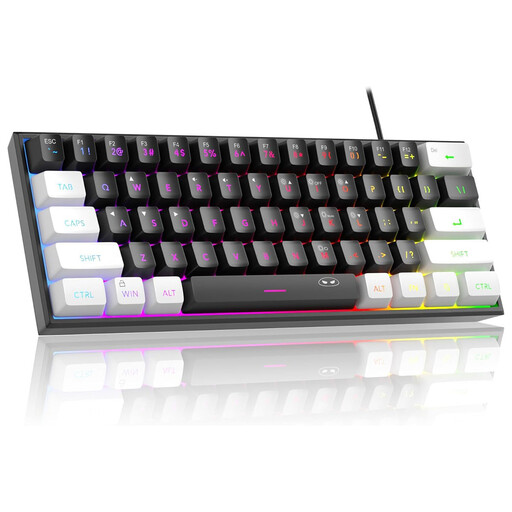
Why it suits this profile: This compact wired keyboard offers RGB lighting, 61 keys and a US QWERTY layout for a relatively straightforward gaming or home setup.
The product information explicitly states that these are membrane keys with a mechanical feel. So do not expect individual mechanical switches. The circuit board is listed as IPX4-certified; the connection itself is not waterproof.
60% size, USB connection, RGB backlighting and compatibility with Windows and Mac OS according to the product description.
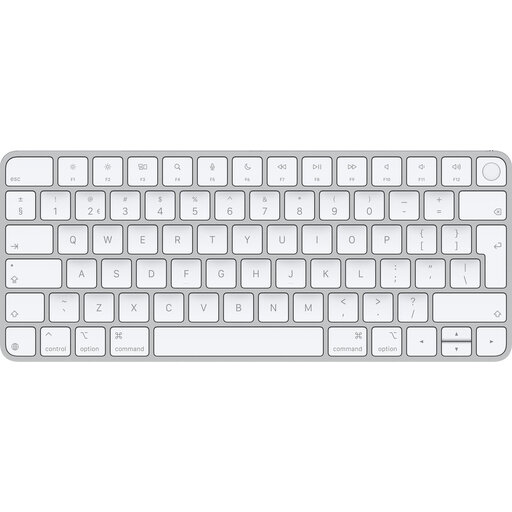
Why it suits this profile: A good choice for Mac users who want a low-profile keyboard without a cable and use Touch ID on a Mac with Apple Silicon.
Compatibility is clearly limited to macOS 11.4 or later with Apple Silicon for Touch ID. This prevents you from expecting the feature to work on just any Windows PC.
Bluetooth, a rechargeable battery, a QWERTY layout and a weight of 243 grams according to the product specifications.
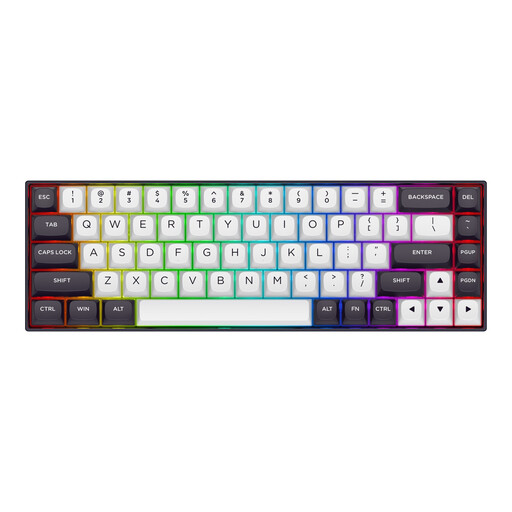
Why it suits this profile: Designed for users looking for a compact gaming keyboard with magnetic switches and adjustable actuation.
The specifications mention Hall Effect magnetic switches, an adjustable actuation range of 0.2 to 4.0 mm and Rapid Trigger. These features are particularly relevant to competitive gaming, but are not necessarily needed for office work.
68 keys, aluminium top plate, RGB lighting, detachable USB-C cable and support for Windows and macOS according to the product information.
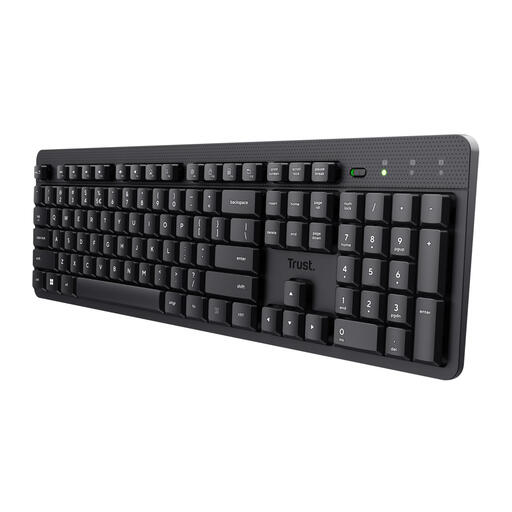
Why it suits this profile: A full-size wireless keyboard for office work, video calls and working from home, where a numeric keypad and soft key feel are important.
The product information clearly states that it has membrane keys and a USB receiver. Do not expect Bluetooth, RGB or mechanical switches. The splash-resistant design is not fully waterproof.
104 keys, numeric keypad, US QWERTY layout, wireless connection and compatibility with Windows, macOS and ChromeOS.
We have put together a complete, up-to-date list of products that fully meet these strict selection criteria and the applicable European safety regulations.
That depends on the type of switch and the working environment. Clicky switches make more noise, while linear or quiet switches can sound less pronounced. For a shared space, low-profile membrane or scissor keys are often more practical.
Lifespan varies depending on the type, intensity of use, dirt and moisture. Manufacturers sometimes state a specific number of keystrokes, but this remains a product specification under certain conditions. Cleaning regularly, avoiding spills and not putting strain on the cable or USB port can help reduce wear.
A Bluetooth keyboard generally uses little energy, but battery life depends on battery capacity, lighting and usage. A model without lighting may work for longer than an RGB keyboard. Check whether the keyboard is rechargeable or uses replaceable batteries, and whether you can continue typing while it is charging.
