
Vandaag of morgen in huis

Kwaliteit gegarandeerd

Welkomstaanbiedingen ontgrendelen: GRATIS bezorging | Tot 80% korting | Gratis 30 dagen JoyPlus-proefperiode
Download de app
A wireless keyboard keeps your desk tidy and often works with multiple devices. But it’s not wise to choose one based solely on its appearance, RGB lighting or an impressive battery-life claim. The wrong layout, a missing receiver or an unsuitable connection can make everyday use unnecessarily difficult.
In this guide, you’ll find out what to look for and which types are suited to working from home, gaming, programming, studying or using on the go.
Many models on the market have a US QWERTY keyboard. The Enter and Shift keys, as well as characters such as @, " and €, may be in different positions from the ones you’re used to. That doesn’t have to be a problem, but check your PC’s language settings beforehand and make sure the physical key layout suits your work.
For many Dutch users, the keyboard layout matters more than its appearance. Programmers may benefit from a US layout, while anyone who types Dutch text every day may need more time to get used to it.
A Bluetooth keyboard is handy for laptops, tablets and smartphones, but not every desktop PC has Bluetooth. A model with a 2,4GHz USB receiver usually works via an available USB port. A tri-mode keyboard typically combines Bluetooth, 2,4GHz and USB-C cable use.
Also check how many devices you can actually pair. Some models support one Bluetooth connection, while others combine multiple channels with a USB receiver.
Claimed battery life often depends on whether the backlighting is on, the connection method and how frequently you use the keyboard. A keyboard with RGB lighting may have a different battery life from one used with the lighting switched off. So check:
A large battery is handy, but if you plan to take the keyboard with you, check its weight and dimensions too.
A full-size keyboard usually has a number pad. This is handy for administration, spreadsheets and bookkeeping, but takes up more desk space. A compact keyboard in 60%, 75%, 80% or 96% layouts omits the number pad or some navigation keys.
A 75% model usually retains the arrow keys and function row, while being narrower than a full-size keyboard. This can give you more room for your mouse when gaming. For mobile use, a foldable model is more practical.
A mechanical keyboard has individual switches beneath its keys. The type of switch affects how the keys feel, how much noise they make and how much pressure they need. Linear switches generally feel smooth and consistent; tactile or clicky versions offer more noticeable feedback and may make more noise.
Scissor keys, like those on many laptop keyboards, are low-profile and often quiet. Membrane keyboards are usually straightforward and well suited to general office work. None of these options is automatically right for everyone: choose based on noise level, feel and maintenance.
Before buying, check that the model works with Windows, macOS, iOS and Android if you switch between devices. Also check the receiver’s connector. USB-A won’t fit every modern laptop or tablet without an adapter.
For gaming and desktop use, 2,4GHz can be practical. Bluetooth is handy for tablets and smartphones. USB-C gives you a wired fallback if the battery runs out or you want a stable connection.
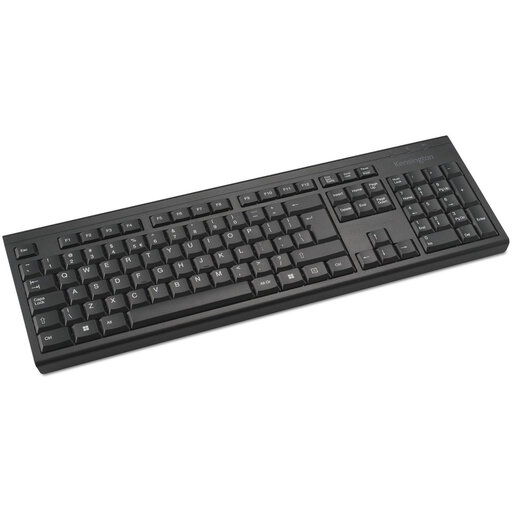
Why it suits this profile: A full-size membrane keyboard for everyday office and home use, with a number pad and support for Windows and macOS.
The product details list a 2,4GHz connection, a range of 10 metres and LED indicators for the battery, Num Lock and Caps Lock.
Full-size layout, number pad, spill-resistant membrane construction and AES-128 encryption, according to the product description.
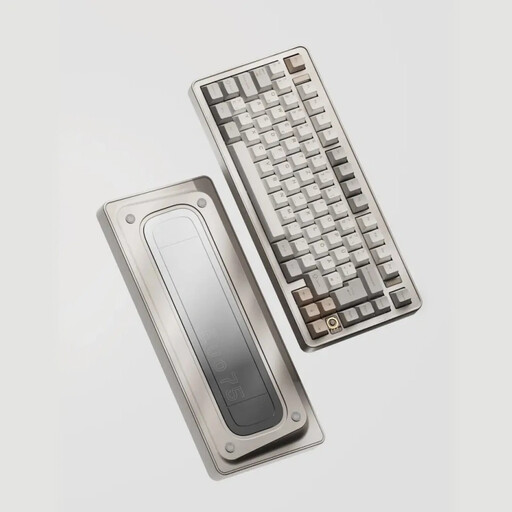
Why it suits this profile: Designed for users looking for a 75% mechanical keyboard with an aluminium case and customisable switches.
The specifications list 2,4GHz, Bluetooth and USB-C, so you’re not limited to a single connection method.
80 keys, hot-swappable support for 3- and 5-pin switches, an aluminium case and a stated battery capacity of 8000 mAh.
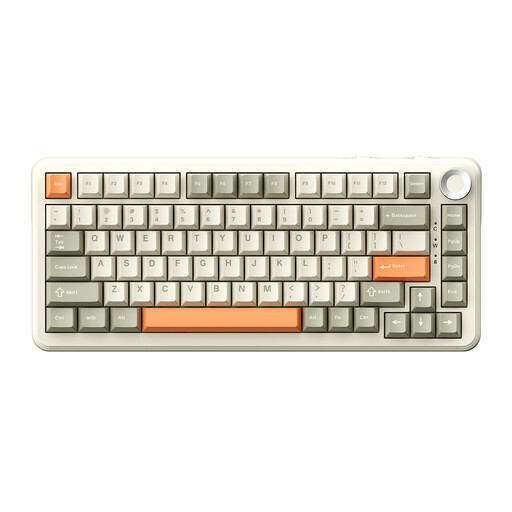
Why it suits this profile: For gamers, programmers and creative users who want compact dimensions, RGB and multiple connection options.
The product information lists tri-mode use, USB-C, Bluetooth and 2,4GHz. That means there’s a wired option if wireless isn’t suitable.
75% layout with 82 keys, hot-swappable switches, RGB lighting, a volume knob and a stated battery capacity of 8000 mAh.
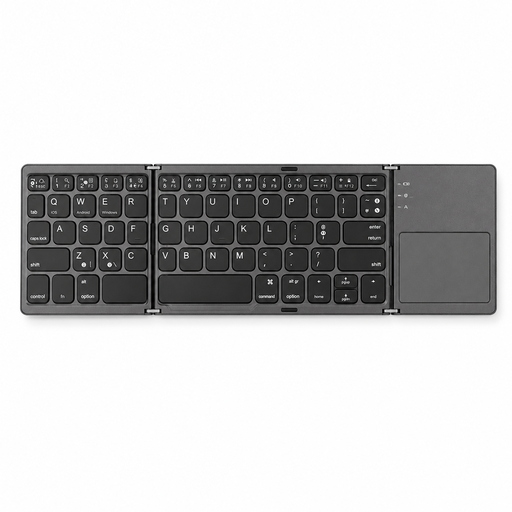
Why it suits this profile: A portable keyboard for anyone who switches between typing on a tablet, smartphone or computer.
The product details list support for iOS, Android and Windows, as well as a foldable design. However, check compatibility with your specific device beforehand.
63 keys, touchpad, Bluetooth connection, a working range of less than 15 metres and folded dimensions of 152 × 97 × 12 mm.
We’ve put together a complete, up-to-date list of products that meet these strict selection criteria and the applicable European safety regulations.
Not automatically. Check whether your laptop supports Bluetooth or comes with a suitable USB receiver. Also check the operating system and physical keyboard layout. For tablets and smartphones, Bluetooth is usually the most practical option.
It varies by model and how you use it. RGB lighting, high brightness and frequent use can all affect battery life. Check whether the manufacturer gives the battery life with or without the lighting on. A model with USB-C and wired use remains usable while charging, if the specifications support this.
It can be, but pay attention to the switch type and noise level. Linear or silent switches may be more practical in a shared workspace than clicky switches. If quiet typing is your priority, you could also consider a scissor or membrane keyboard. The right choice depends on the feel, layout and connection you want.
