Start by choosing a keyboard that gives you easy access to the punctuation, arrow keys and navigation keys you use in your writing software. Then compare the space it leaves for your mouse, how the keys feel and sound, and whether you need a cable or a connection to multiple devices. A compact, standard or ergonomic model won’t automatically suit every home editor.
Who is this for?
Text editor with lots of revisions
You often move text around, check headings and use punctuation and keyboard shortcuts. Look at the key layout and how easily you can reach the navigation keys. Microsoft Support explains how to manage input layouts in Windows.
Home worker who spends long hours at a desk
During longer sessions, consider the position of your hands and mouse, as well as your workstation setup and how you vary your tasks. Arboportaal recommends changing your posture and activity during screen work, and taking micro-breaks.
Editor working in a shared space
You’ll want to consider how the sound of typing affects you and others. Compare the feel and sound of the exact model: CHERRY describes the STREAM KEYBOARD as quiet, but this manufacturer’s description does not automatically apply to other keyboards.
What should you look for?
Compact keyboard
Best for: editing mainly running text and keeping space beside the keyboard for your mouse.
Trade-off: check that the navigation keys you use are easy to reach and that the physical layout matches your input settings.
Low-profile standard keyboard
Best for: a familiar layout and low-profile keys, for example in a shared space.
Trade-off: a full-size keyboard takes up more desk space; claims about quiet typing apply to specific models.
Wave-shaped or split keyboard
Best for: when the position of your hands and forearms is a priority and you want to assess a different shape.
Trade-off: shape and adjustability vary by model; an ergonomic design does not guarantee that it will reduce or prevent discomfort.
| What to consider |
What should you check? |
Who is this important for? |
| Text navigation and layout |
Check the physical layout, arrow and navigation keys, and compare them with the input layout and keyboard shortcuts in your writing software. |
If I want quick access to headings, punctuation and text while editing, I’ll choose a layout where those keys are easy to find. Around 36% of consumers put text navigation first. |
| Posture and space for your mouse |
Compare the keyboard’s width, height, wrist rest and adjustability with your desk and hand position. Also consider screen placement and breaks. |
During longer editing sessions, I want to take the position of my hands and mouse into account. Around 29% of consumers put posture first. |
| Key sound and feel |
Check the mechanism used in the exact model and, where possible, look for a sound demonstration of that same version. |
If I work in or near a shared space, I want to know how loud the keys sound. Around 21% of consumers put quiet keys first. |
| Connectivity and devices |
Check whether the model uses Bluetooth, a receiver or a cable, and which operating systems and connections are compatible with your devices. |
When I edit my review on different devices, I want to know how to connect the keyboard or switch between devices. Around 14% of consumers put switching between devices first. |
Common buying mistakes
-
Assuming ‘QWERTY’ fully describes the layout
Different country variants may have different key legends. The Windows input layout may also differ from the markings on the keys.
Check the exact variant and an image of the keys. Compare them with your selected input layout, especially for punctuation you use often.
An unsuitable layout may take extra time to get used to, or lead you to choose a different version.
-
Assuming an ergonomic shape will prevent discomfort
A manufacturer’s comfort claim does not prove that the shape will suit your hands or your overall workstation.
Assess the shape and hand position for yourself, and also consider your screen, desk, mouse position and breaks.
-
Confusing a manufacturer’s warranty with all your legal rights
According to the Dutch Government, manufacturer and seller warranties are in addition to the legal protection you have if a product is faulty.
Check what extra rights an additional warranty provides. If a product is faulty, contact the seller.
An additional warranty may cost money without giving you any extra rights.
Brands to consider
Logitech
The MX Keys S is a wireless option that lets you switch between devices; the Wave Keys has a wave-shaped design and wrist rest.
- Logitech specifies that the MX Keys S can switch between up to three devices.
- The comfort description for the Wave Keys is a manufacturer’s claim, not proof that the model will ease individual discomfort. Check the layout of the version you choose, too.
CHERRY
The wired STREAM KEYBOARD is designed for a fixed workstation; the STREAM KEYBOARD ULTIMATE is a separate option with multiple connections.
- CHERRY describes the STREAM KEYBOARD’s SX scissor mechanism as quiet. The brand lists four connection channels for the ULTIMATE.
- The ULTIMATE’s four channels are not a feature of the wired STREAM KEYBOARD.
R-Go Tools
The Compact Break is a compact model with a break indicator; the Split Break is a separate, two-part model.
- According to R-Go Tools, the Break indicator is controlled by software.
- The manufacturer presents these models as an aid to a good working posture, not as a replacement for a suitable workstation or regular breaks.
Kensington
According to Kensington, the Pro Fit Ergo Wireless Keyboard has a split design with adjustable reverse tilt.
- Kensington lists Bluetooth 4.0 LE and a 2.4GHz receiver, and recommends this model for medium to large hands.
- You’ll need to assess the fit for yourself; comfort and sound claims come from the manufacturer.
Keychron
According to Keychron, the B6 Pro ISO is a slim, full-size keyboard with Bluetooth, 2.4GHz and wired connectivity.
- Keychron lists several ISO variants, including UK and German versions.
- The ISO designation does not confirm that the key legends match the Dutch layout you want. Check the exact variant.
Keyboards at Joybuy
This selection includes compact and full-size keyboards for text editing, with different layouts and wired or wireless connections.
 No image available
AULA F75 PRO 75% Mechanical Wireless Keyboard, QWERTY US Layout, Tri-Mode (Wired/Bluetooth/2.4G) – Gradient Purple/Star Vector Switch
A compact option if you want to free up desk space while keeping the arrow keys.
75% layout with 81 keys and arrow keys; US QWERTY. Bluetooth, 2.4GHz or wired USB.
View at Joybuy
 No image available
HP 725 Multi-Device Rechargeable Wireless Keyboard
A full-size keyboard to consider if you’re looking for a low-profile design and connections to multiple devices.
Full-size 100% layout with programmable keys. Bluetooth and a 2.4GHz receiver; the product details list two Bluetooth connections and one receiver connection.
View at Joybuy
 No image available
Trust Vaiya Wireless Keyboard, Full-Size, Scissor Keys, QWERTY US
A low-profile option with scissor keys if you’re looking for a full-size keyboard with connections to multiple devices.
Full-size layout with number pad and US QWERTY. Bluetooth and receiver; the product details list connections to up to four devices.
View at Joybuy
 No image available
Apple Magic Keyboard, Dutch QWERTY, Black
An option to consider if you’re looking for a Dutch QWERTY layout and keys for navigating documents.
Bluetooth, rechargeable battery and number pad; the product details also list arrow keys and document navigation keys.
View at Joybuy
 No image available
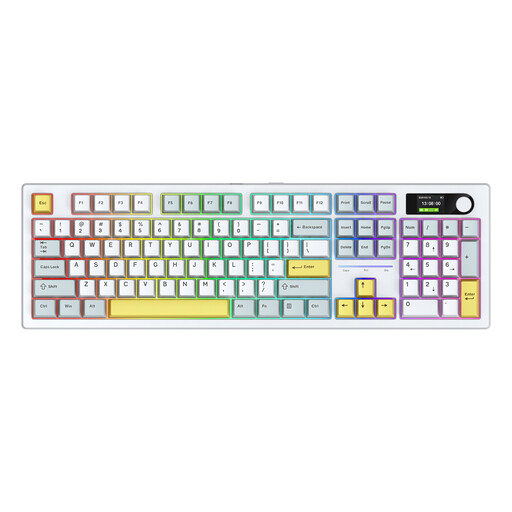
Siukie ACH105 Alice Keyboard, 104 Keys, Blue and White
An Alice-layout keyboard to consider if you want to compare a spacious setup with more compact models.
104 keys, hot-swappable switches and number pad. Wired USB, Bluetooth or 2.4GHz.
View at Joybuy
Frequently asked questions
Do I need a number pad to edit a book review?
Not necessarily if you mainly work with running text. RTINGS says a number pad is most useful for spreadsheets and data entry; a more compact keyboard can leave you with more desk space. Just check that the navigation keys you use are still within easy reach.
What can I do if the punctuation doesn’t match the key legends?
Check both the keyboard’s physical layout and the selected Windows input layout. Microsoft Support explains how to manage and change input layouts; changing a software setting won’t alter the markings on the keys.
Is an ergonomic keyboard enough for long editing sessions?
No. A keyboard’s shape doesn’t replace assessing your whole workstation and working habits. Arboportaal recommends varying your posture and tasks, as well as taking micro-breaks. It also describes workstation requirements for employees who spend more than 2 hours a day working with a screen; this requirement does not apply simply because you work from home.
What about returns and warranties when buying online in the Netherlands?
According to the Dutch Government, when you buy from a business at a distance, you’ll often have a 14-day cooling-off period, with some exceptions. You’re also entitled to a product that works properly. The Dutch Government says there is no fixed statutory warranty period of two years in the Netherlands; if a product is faulty, the seller must provide an appropriate solution.


