If you want to practise chords and rhythms without a computer, choose a standalone keyboard with touch-sensitive keys and accompaniment. If you play with others through a mixer, check the audio outputs on the exact model. For piano playing or recording in software, a digital piano or MIDI controller may be a better fit, with different space and equipment requirements.
Who is this suitable for?
Beginners practising blues chords on their own
If you want to practise and hear chords, rhythms and short phrases without a laptop, Yamaha lists lesson functions and accompaniment for the PSR-E383. Casio highlights rhythm patterns and automatic accompaniment on the CT-S400.
Keyboard players connecting to a mixer in a practice space
If you play with others, you’ll want to match the keyboard’s outputs to the available sound system. Korg specifies separate audio outputs for the EK-50.
Players who prioritise piano playing or music software
If you’re looking for a larger keyboard or mainly want to play progressions in music software, Yamaha specifies 88 keys for the P-145, while Arturia positions the KeyLab Essential 61 mk3 as a MIDI controller with DAW integration.
What should you look for when choosing?
First decide whether you want to play independently or use a computer. Then check that the connections suit the mixer, and that the keyboard and available space work for the way you practise.
| What to consider |
What should you check? |
Who should give this more weight? |
| Practising without a computer |
Check whether the model has touch-sensitive keys and the rhythm or accompaniment features you want. Yamaha lists these features for the PSR-E383; Casio lists 200 rhythm patterns for the CT-S400. |
If I want to repeat chords and phrases on my own without a laptop, I look for rhythm and accompaniment built into the instrument. Around 36% of consumers say independent practice is their main reason for buying. |
| Connecting to a mixer |
Ask which inputs are available in the practice space and compare them with the outputs on your chosen model. Korg specifies separate 6,3mm L/MONO and R outputs for the EK-50, as well as a 3,5mm headphone socket. |
If I play with others, I want to know in advance how my keyboard will connect to the sound system. Around 29% of consumers prioritise this connection for playing with others. |
| Keyboard and playing space |
Try the feel of the keys if possible, and compare the range with the music you practise. Yamaha specifies 76 touch-sensitive keys for the PSR-EW320 and 88 GHC keys for the P-145; the P-145 is 1.326 mm wide. |
If I mainly play piano music or want more range for my hands, the keyboard and the space available for the instrument both matter. Around 21% of consumers give piano keys and playing range top priority. |
| Recording in software |
Check whether you want to use a computer, suitable software and audio playback equipment. Arturia describes the KeyLab Essential 61 mk3 as a MIDI controller with DAW integration; Yamaha lists a USB audio/MIDI interface for the PSR-E383. |
If I want to record progressions in music software, I look for a setup that works for that, rather than just a standalone keyboard. Around 14% of consumers prioritise recording in software. |
Common buying mistakes
-
Mistaking a headphone socket for a mixer output
A headphone socket and separate audio outputs are not the same thing. Korg specifies these as separate connections on the EK-50.
Compare the outputs on the exact instrument with the inputs available in the practice space, and check which cables you’ll need.
-
Choosing a MIDI controller to practise without any other equipment
The Arturia KeyLab Essential 61 mk3 is a MIDI controller with software integration. It does not offer the same standalone playing experience as a keyboard with built-in sounds.
Decide in advance whether you want to play with a computer and software. For independent practice, choose an instrument with built-in sounds.
-
Comparing only the number of keys
A wider range, a different key action and automatic accompaniment suit different practice needs. For example, Yamaha specifies 76 keys for the PSR-EW320 and 88 GHC keys for the P-145.
Try your own chord shapes and phrases on the keyboard you’re considering, and measure the space where you plan to set it up.
Brands to consider
Yamaha
The PSR-E383 is a standalone practice keyboard; the PSR-EW320 has 76 keys, while the P-145 is a digital piano.
- Yamaha says the PSR-E383 combines touch sensitivity, accompaniment and lesson functions.
- Compare the connections and space required for each model; features of the PSR-E383 do not automatically apply to the P-145.
Casio
The Casiotone CT-S400 is a standalone keyboard with rhythm patterns and automatic accompaniment.
- Casio lists 200 rhythm patterns and 600 sounds for this model.
- Check that the CT-S400’s outputs are compatible with the mixer in your practice space.
Korg
The EK-50 combines automatic accompaniment with separately specified audio outputs.
- Korg specifies 61 touch-sensitive keys and 6,3 mm OUTPUT L/MONO and R connections.
- The stated weight is 7,5 kg, so bear transport in mind if you take the instrument with you often.
Roland
The GO:KEYS 3 is a standalone keyboard for experimenting with chord progressions and accompaniment.
- Roland lists a 61-key keyboard and the ability to create your own chord sequences.
- Check that the connections on the version you choose suit the equipment in your practice space.
Arturia
The KeyLab Essential 61 mk3 is a MIDI controller for a workflow using a computer and music software.
- Arturia lists 61 touch-sensitive keys and integration with DAW software.
- This setup is not intended for standalone practice without a computer and external audio playback equipment.
Keyboards on Joybuy
These Joybuy products are 61-key instruments with different built-in practice or sound features. Compare the connections listed with those available in your practice space, and check the CE marking on the specific product. The Dutch Government states that electrical appliances placed on the market in the EU must carry a CE marking.
 No image available
MLS-931 digital piano keyboard, 61 keys, black
A good fit if you’re looking for an instrument with rhythms and built-in speakers for independent practice.
The product name lists weighted keys, 300 sounds, 300 rhythms, USB-MIDI and a headphone socket.
Joybuy
 No image available
Electronic keyboard, 61 keys, black, with recording function
An option if you’re looking for a 61-key keyboard with built-in speakers and practice features.
The product name lists a recording function, metronome and music stand.
Joybuy
 No image available
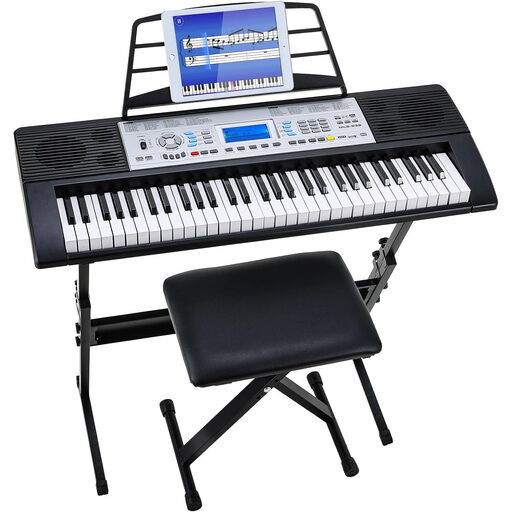
Digital keyboard set, 61 keys, with stand and stool
A good fit if you’re looking for a keyboard with a stand and stool for your practice setup.
The product name lists 500 sounds, a three-level lesson programme, dual speakers and an LCD screen.
Joybuy
Frequently asked questions
How do I connect a keyboard to the mixer in a practice space?
First, compare the mixer inputs with the outputs on the exact keyboard. Korg specifies two 6,3mm audio outputs for the EK-50, L/MONO and R. Then check which cables the space requires.
Can I practise straight away with a MIDI controller, without a computer?
Not as a standalone setup: the Arturia KeyLab Essential 61 mk3 is a MIDI controller designed for software integration. To hear it play, you’ll need a suitable sound source and audio playback equipment. If you want to practise independently, a keyboard with built-in sounds is a better fit.
What should I check when my online keyboard arrives?
Check that the instrument and included accessories match your order, then carefully test the functions you need. According to ACM ConsuWijzer, online purchases generally come with a statutory cooling-off period of up to 14 days after delivery, with some exceptions. Your statutory guarantee is separate from any manufacturer’s warranty.
Which product marking is relevant for an electronic keyboard in the Netherlands?
According to the Dutch Government, electrical appliances placed on the market in the EU must carry a CE marking. Check the marking on the specific product; a brand name or image is no substitute for checking.


