
Bird-count data entry
You often enter figures and want to weigh up whether a built-in or separate numeric keypad would work best on your desk. Logitech describes the K120 as having a numeric keypad, while R-Go Tools offers a separate one.


If you regularly enter bird counts, a keyboard with an integrated numeric keypad is a practical starting point. If mouse space matters more, consider a compact keyboard with a separate, movable numeric keypad. Check the exact key layout and connection for the version you’ll use with the shared computer, too. A ‘quiet’ label doesn’t guarantee that your colleagues won’t hear you typing.
You often enter figures and want to weigh up whether a built-in or separate numeric keypad would work best on your desk. Logitech describes the K120 as having a numeric keypad, while R-Go Tools offers a separate one.
You type close to colleagues and want to take the noise of the exact keyboard version into account. RTINGS.com notes that the casing and its internal space can affect resonance.
You switch between the keyboard, mouse and on-screen data, and want to keep the mouse closer. TNO’s factsheet on working with display screens, via Arboportaal, discusses the benefit of a narrow keyboard for positioning the mouse.
A good fit if: you enter figures often and have room for a wider keyboard.
Trade-off: the numeric keypad sits right next to the rest of the keyboard, but may push the mouse further away.
A good fit if: you want to keep mouse space clear and only need a numeric keypad for entering figures. R-Go Tools presents the Compact Break and Numpad Break as components that can be used together.
Trade-off: the numeric keypad is a separate item that you can place wherever works best.
A good fit if: the shared computer has a suitable USB-A port and you want a wired connection.
Trade-off: you’ll need a cable, and should check that the physical key layout is right for the computer. In its factsheet, TNO notes that a narrow keyboard can help you position the mouse closer for many tasks.
| What to consider | What should you look for? | Who is this important for? |
|---|---|---|
| Entering figures | Check whether the keyboard has a built-in numeric keypad or whether you can position a separate one. | If I enter counts often, I want to process figures quickly without an awkward desk layout. Around 33% of consumers put entering figures first. |
| Typing noise | Look for a demonstration or measurement of the exact model, and check whether it covers keyboard noise, mouse noise or both. | When colleagues are working nearby, I want to reduce audible typing noise without relying on a product label alone. For around 27% of consumers, keeping things quiet for colleagues comes first. |
| Mouse space | Measure the available width and allow for the position of any separate numeric keypad. | If I want to use the mouse right next to the keyboard, having enough clear space matters to me. Around 20% of consumers give mouse space top priority. |
| Connection and layout | Check the available port or wireless connection, along with the physical layout of the exact version. | At a shared computer, I want the connection and the characters I type to work correctly for everyone. Around 20% of consumers put easy connection and a familiar key layout at the top of their list. |
Noise also depends on the specific version, so you can’t judge it from the model name alone. A claim about a keyboard and mouse combination also doesn’t automatically apply to other models.
Where possible, watch a demonstration or check a measurement of the exact version you’re considering. Make sure it refers to the keyboard, the mouse or both.
A numeric keypad is useful if you enter lots of figures, but a wider keyboard can reduce the space available between the keyboard and mouse. TNO’s factsheet explains that a narrow keyboard can make room to position the mouse closer for many tasks.
Consider how often you enter figures, then try out the positions of the keyboard, numeric keypad and mouse on your available desk space.
A separate numeric keypad takes up extra desk space. Allow room for it alongside the main keyboard and mouse.
Keyboard layouts can vary by version or country. HP describes the 150 Wired Keyboard version with code 664R5AA#ABB; CHERRY shows several country-specific layouts for the KC 6000 SLIM.
Before buying, compare the full version code, physical key layout and connection with the computer at your workstation.
According to Logitech, the K120 and MK295 have an integrated numeric keypad, but differ in their connections and overall configuration.
Worth considering if you want to pair a compact main keyboard with a separately positioned numeric keypad.
The HP 150 Wired Keyboard is a wired option if your desktop computer has a suitable USB-A port.
The KC 6000 SLIM is a slim, wired model for anyone looking for a full-size keyboard with a fixed USB-A connection.
This selection includes keyboards for entering figures at a shared desk, as well as wireless options for different connection needs. Check the layout, connection and type of numeric keypad for each model.
 Image unavailable
A wired option with a numeric keypad for anyone who often enters figures.
The product name specifies a mechanical keyboard, RGB lighting, a volume knob, hot-swappable switches and Beige Switch.
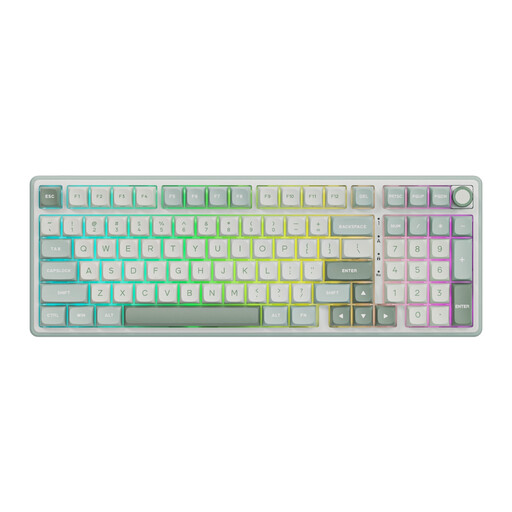 Image unavailable
A wired option with a numeric keypad for entering figures at a shared workstation.
The product name specifies a mechanical keyboard, RGB lighting, a volume knob, hot-swappable switches and Beige Switch.
 Image unavailable
A wireless option with a numeric keypad if you regularly enter counts.
The product information lists Bluetooth, a rechargeable battery and Touch ID. Check that this version is compatible with the computer you use.
 Image unavailable
A wireless option to consider if you switch between several devices at your workstation.
The product information lists Bluetooth, a 2.4GHz receiver, USB-C charging and a key for switching between devices.
 Image unavailable
A full-size keyboard with a numeric keypad for anyone entering lots of figures.
The product information lists a wireless USB receiver, low-profile keys and a US QWERTY layout. The model is described as having ‘Silent Keys’; if quietness matters, check the noise level of the exact version.
According to Arboportaal, for employees who work with a display screen for more than 2 hours a day, the screen and keyboard must not be attached to each other. This is a conditional workplace requirement, not a requirement for any particular keyboard model.
Check that the keyboard layout in the operating system matches the keyboard’s physical layout. R-Go Tools notes that an incorrectly set Windows layout can be one reason for different characters appearing when you type.
Follow the care instructions for the exact version. Joybuy’s instructions for the HP 150 say to disconnect the keyboard before cleaning it and to avoid spills; this guidance applies to that specific product.
According to the Dutch government, online purchases from a business generally come with a 14-day cooling-off period, although there are exceptions. You’re also entitled to a product that meets reasonable expectations and can generally contact the seller if there’s a fault. The Netherlands does not have a standard general legal guarantee period of two years.