
Practising in a shared home
You want to hear your arpeggios without turning up the speakers. So look for a headphone socket, a compatible plug and adjustable listening volume.


To play arpeggios yourself, first choose a range of keys that suits your exercises and a touch response you want to practise. Then check how you can listen quietly or through headphones. A built-in arpeggiator can play patterns, but it won’t replace practising the notes yourself; a larger piano keyboard offers a wider range and takes up more space.
You want to hear your arpeggios without turning up the speakers. So look for a headphone socket, a compatible plug and adjustable listening volume.
You play the notes yourself and need a suitable range of keys and touch response to practise with. An automatic arpeggiator is, at most, an extra for you.
Your exercises may call for a wider range or a weighted piano keyboard. So compare the action, how much space the instrument takes up and its headphone options.
Start with what you want to practise with your fingers and the range of your music. Then check that you can listen without using the speakers and that the connections you need will work with your set-up.
| What to consider | What should you check? | Who should give this more weight? |
|---|---|---|
| Listening quietly | Check the headphone output and whether the plug fits the exact version. Start with the volume turned down low. | If I’m practising in a shared home, I want to listen through compatible headphones and keep the volume low; around 36% of consumers say quiet listening is their top priority when buying. |
| Playing arpeggios yourself | Check whether the keys are touch-sensitive and whether an arpeggio function generates patterns or suits what you want to practise yourself. | If I want to improve my finger technique, I want to play the notes myself rather than just play back a pattern; around 29% of consumers put practising arpeggios by hand at the top of their list. |
| Range of keys and playing feel | Compare the range of your practice material with the number of keys. Also check the instrument’s action; the number of keys alone won’t tell you this. | If my pieces require a wide range or I want to practise on piano keys, I need to consider both the range and the action; around 21% of consumers give range or playing feel top priority. |
| Connections and accessories | Check the audio output and what’s included with the specific version or bundle. USB-MIDI is not the same as a headphone output. | If I want to practise without a computer, I need to know which connections and accessories I can use straight away; around 14% of consumers put a simple set-up first. |
An instrument can play a pattern, while your practice goal may be to play every note yourself.
First decide whether you want to hear patterns or work on your finger technique. Only then assess the extra feature.
The number of keys doesn’t tell you what action an instrument has. Korg describes the 88-key Liano as having a touch-sensitive LS keyboard; Roland lists a PHA-4 action for the FP-10.
As well as checking the number of keys, read the action specification for the exact model.
USB and a headphone output can be separate connections. If you’re using external equipment, the sound may not come directly from the keyboard.
Check where the sound comes from in your complete set-up and where to plug in your headphones.
Depending on your set-up, you may need extra audio equipment or a suitable adapter.
The PSR-E383 is an example of a 61-key keyboard for comparing touch sensitivity and built-in arpeggio types.
The CT-S300 is a compact option for players who value touch sensitivity.
The Liano is an example of an 88-key instrument with a headphone output; the number of keys alone doesn’t mean it has a hammer action.
The FP-10 is an example of an 88-key digital piano for comparing a specific piano action.
The ES120 is an example of an 88-key model for comparing a weighted keyboard and features for low-volume use.
This selection includes digital keyboards with 61 keys, for anyone practising within that range. For the instrument you choose, check that the headphone connection suits the way you want to listen quietly.
 No image available
Suitable for exercises that fit within a 61-key range.
The product name lists a headphone connection and USB-MIDI.
 No image available
The product name lists 61 keys, a MIDI controller function, recording function, speakers, metronome and music stand.
Check whether the specific version has a headphone connection that suits your set-up.
 No image available
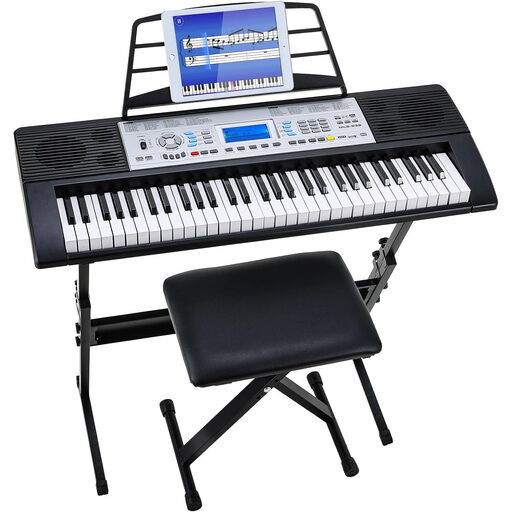
The product name lists 61 keys, a stand and a stool; check what’s included in the specific offer.
When assembling and using the keyboard, follow the guidance on adult supervision and making sure the stand is securely assembled. Keep the headphone volume moderate.
No, not if you want to learn to play the notes in sequence yourself: you can practise them by hand. Yamaha lists built-in arpeggio types for the PSR-E383, which you can use as an extra way to hear patterns.
First check that the headphone socket and plug are compatible with the version you’re considering. Start with the volume turned down low. VeiligheidNL recommends well-fitting headphones, so background noise is less likely to prompt you to turn the volume up.
That depends on the model and the bundle on sale. Korg lists an adapter, music rest and pedal switch as included in the Liano specifications; check whether the version you’re considering comes with the same accessories.
According to the Dutch Government, when buying at a distance you’ll usually have a 14-day cooling-off period, although there are exceptions. If a product is faulty, contact the seller to arrange a solution. The Netherlands does not have a set statutory warranty period of two years.