
Advert text indexer
You transcribe text and data from scans and want to keep them linked to the correct source. The KB describes Delpher newspapers as scans with OCR text and word coordinates.


Start by choosing a keyboard layout that lets you enter advert copy, punctuation and file names reliably. Then decide whether a number pad, compact design or customisable keys suit the way you work. A keyboard won’t link source files by itself: that depends on the indexing or spreadsheet software you use, as well as a valid file path.
You transcribe text and data from scans and want to keep them linked to the correct source. The KB describes Delpher newspapers as scans with OCR text and word coordinates.
You switch between source images, input fields and the mouse during longer data-entry sessions. Arboportaal highlights repetitive actions and static strain as factors to consider when working at a screen.
You repeat similar tasks and want to customise keys or shortcuts, provided your software supports this way of working. Microsoft Support explains how hyperlinks in Excel can point to a file or web address.
A good fit if: you regularly enter dates, page numbers or other strings of digits. The Logitech K120 is an example of a full-size keyboard with a number pad.
Consider: the number pad takes up space beside the letter keys. Check the physical layout and connection type of the version you’re considering.
A good fit if: you switch frequently between the keyboard and mouse and rarely enter long strings of numbers. The BakkerElkhuizen UltraBoard 950 V2 is a wired example without a traditional number pad.
Consider: check that the USB-C connection, included USB-A adapter and key layout suit your workspace.
A good fit if: you regularly repeat tasks supported by your software. Logitech lists Smart Actions for the MX Keys S, while Keychron mentions customisable keys for the K8 Pro.
Consider: check the software required, system compatibility and physical layout. A shortcut won’t check that a source reference is correct.
A good fit if: the position of your hands and arms is important during long data-entry sessions. Examples include the Logitech Wave Keys and R-Go Split Break.
Consider: the shape and key position vary between models, so check that you can type accurately on one. A different keyboard alone won’t address all the considerations involved in working at a screen for long periods.
| Consideration | What should you check? | Who does this matter to? |
|---|---|---|
| Characters and key layout | Compare the symbols printed on the keys with your selected input layout, and test the punctuation you use. | When I transcribe adverts and file names, I want the letters and punctuation to match what I expect. Around 28% of consumers prioritise accurate text entry. |
| Linking source files | Test the complete data-entry process, then open the saved link in your own application. | If I want to simplify repetitive tasks, my software also needs to open the link correctly. Around 22% of consumers give this workflow top priority. |
| Working posture | Assess your keyboard, mouse and screen together at your own workstation, and vary your tasks. | During long data-entry sessions, I want to assess my whole set-up rather than focus only on the keyboard’s shape. Around 22% of consumers prioritise working posture. |
| Number entry | Consider how often you enter strings of numbers and whether an integrated or separate number pad would suit you. | If I regularly enter dates or page numbers, I want those keys close to hand. Around 17% of consumers consider number entry their most important factor. |
| Connections and devices | Check the ports, connection and key layout of the exact version against your devices. | When I work across different devices, I want to know in advance whether the connection will suit my set-up. Around 11% of consumers give connection type the greatest weight. |
A shortcut can perform an action in your software, but a link will only work if the application and destination file are accessible. Microsoft Support explains the capabilities and limitations of Excel’s HYPERLINK function.
Test the complete entry and retrieval process in your own application before setting up shortcuts.
A compact keyboard can bring the mouse closer to the letter keys, while a full-size model can keep a number pad within easy reach.
Choose a design based on how often you enter strings of numbers and how often you use the mouse.
The characters you enter depend not only on what’s printed on the keys, but also on the selected input layout. Microsoft Support explains that changing the Windows display language can also affect the keyboard layout.
Check the exact version and test the punctuation you use before entering a large amount of text.
The examples below refer to specific product ranges. They are not an assessment of an entire brand or an indication of availability.
The ranges mentioned here include everything from a wired model with a number pad to keyboards with customisable functions or a contoured wireless design.
The UltraBoard 950 V2 is a compact, wired option for anyone who wants to position their mouse closer to the keyboard.
The K8 Pro is a TKL model for anyone who values customisable keys more than an integrated number pad.
The wired, split Split Break is an option for anyone who wants to adjust the position of the two keyboard halves.
This selection includes wired and wireless keyboards, models with programmable functions and versions with a number pad. Check each model’s layout and compatibility with your workspace.
 No image available
The wired version with a number pad suits anyone who regularly enters strings of numbers.
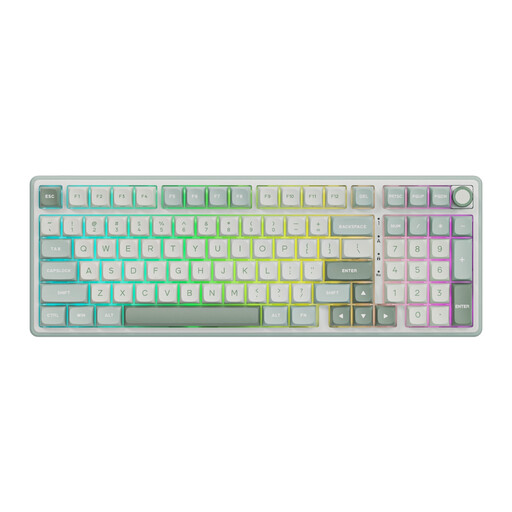
The product name specifies a mechanical keyboard with a number pad and hot-swappable Beige Switches in Sky Cyan.
 No image available
The product name describes a wireless keyboard for multiple devices. Check that its connection suits the devices you use for indexing.
The title specifies a rechargeable model.
 No image available
The product name specifies programmable functions and a wireless design, for anyone who wants to customise recurring actions.
A programmable key won’t link source files by itself; that still depends on your application.
 No image available
This keyboard and mouse set is for anyone looking for both input devices together. Check that the UK QWERTY layout suits the text you enter.
The product name specifies a full-size wireless set with a UK QWERTY layout.
 No image available
The Dutch version with a number pad suits anyone who works on a compatible Mac with Apple silicon and regularly enters numbers.
The product title specifies a Dutch version with white keys. Check compatibility with your Mac model.
No, the link is created in the application you use. Microsoft Support explains that a hyperlink in Excel can point to a file or URL; according to Microsoft, the HYPERLINK function in the web version is limited to web addresses. Test it in your own application and storage location.
Check that the symbols printed on the keys match your selected input layout, then test the punctuation you use. Microsoft Support explains how to manage the keyboard layout in Windows.
No, assess your entire workspace too, and break up data-entry tasks with other work or regular breaks. Arboportaal highlights repetitive actions and static posture as factors to consider. For employees who work at a screen for more than two hours a day, specific workplace requirements apply, including that the screen and keyboard must not be attached to each other.
No. According to the Dutch government, there is no fixed statutory warranty period in the Netherlands; the expected lifespan depends on the product and the circumstances. If a product is faulty, contact the retailer. An additional warranty does not replace your statutory rights.
Not without checking the terms for the specific collection. The KB states that some newspapers may still be protected by copyright or may contain sensitive personal data; this is separate from your choice of keyboard.