Who is this guide for?

Builder testing without a mouse

Wants to navigate buttons, menus, forms and the focus order using the keyboard while building the guide. A keyboard helps with testing, but it does not replace accessible web code. W3C describes keyboard operation as part of accessible web content.

User with limited hand motor control

May need keys that are easier to press individually when writing or testing, possibly with a suitable keyguard. Clevy describes its keyguard as an accessory for specific motor needs.

Heavy typist

Works on text or code for extended periods and may want to adjust the position of each hand. Kinesis describes adjustable halves on its Freestyle2 range; according to Arboportaal, the overall workstation setup also matters.

What should you consider when choosing?

Full-size keyboard

Choose this if: you want a familiar layout with navigation, function and number keys within easy reach for building and testing.

Bear in mind: a straight layout does not offer the independently adjustable halves of a split model.

Split ergonomic keyboard

Choose this if: you want to adjust the distance or angle between your hands during long typing sessions.

Bear in mind: you may need to adjust the keyboard and get used to it; an ergonomic keyboard is not a treatment and does not guarantee that discomfort will go away or be prevented.

Adapted keyboard or keyguard

Choose this if: more visible key markings or help with avoiding accidental keystrokes would suit the way you use a keyboard.

Bear in mind: according to the manufacturer, the Clevy Contrast Keyboard 3 has 67 keys and fewer function keys than a standard keyboard; the matching keyguard is sold separately.

Compact keyboard

Choose this if: you have a small workspace or prefer a compact wired model.

Bear in mind: check that the layout and any key combinations work for the development and testing tasks you need to do.

Consideration What to look for when buying Who is this important for?
Navigation and input Check that you can use the Tab, Shift, Enter, Escape, arrow and function keys you need. Then test the website separately without a mouse. If I want to review the guide without a mouse, I need to be able to use the navigation and input keys reliably. Around 31% of consumers prioritise keyboard navigation.
Pressing keys individually Try the key size and feel; check whether you need a suitable keyguard and whether the available keys meet your needs. If accidental keystrokes make typing difficult, I want to be able to press keys individually more easily. Around 31% of consumers prioritise this need.
Hand position during long typing sessions Check there is room for separate keyboard halves, if needed, and confirm the connection and layout of the exact model; consider the rest of your workstation too. When writing or coding for long periods, I want to assess whether the position of my hands works for me. Around 23% of consumers prioritise hand position.
Key visibility Check the contrast and language layout for yourself. Make sure the function keys work with the software you use. If key labels are difficult to read, I want to be able to find them more easily while I work. Around 15% of consumers prioritise visibility.

Pitfalls to avoid

  • Assuming a new keyboard will fix an inaccessible website

    Keyboard operation depends on the web content. Buttons, menus and forms must themselves be operable using a keyboard.

    Choose a keyboard that suits the way you use it, then test the guide separately without a mouse.

    If controls do not work, extra development and testing may be needed to fix them.

  • Choosing a specialist model without checking the key set

    An adapted layout may have fewer function keys. A matching keyguard may also be a separate accessory.

    Check the specific shortcuts and testing tasks you need, and make sure the layout supports them.

    Some setups may require a separate keyguard or a second keyboard.

  • Assuming ‘ergonomic’ means protection from discomfort

    A keyboard alone will not remove all the strain of working at a screen. Kinesis states that an ergonomic keyboard is not a medical treatment.

    Consider how adjustable it is and look at your whole workstation, without assuming a guaranteed health benefit.

Relevant brands

Logitech

The K120 is a full-size wired keyboard for text entry and manual keyboard testing.

  • Logitech lists USB, a number pad and a standard layout.
  • This model does not have independently adjustable halves or a specialist high-contrast layout.

Kinesis

The Freestyle2 range includes split keyboards; connections, layouts and accessories vary by model.

  • Kinesis describes independently positionable halves and several configurations.
  • According to Kinesis, an ergonomic keyboard is not a medical treatment and does not guarantee that discomfort will go away or be prevented.

Clevy

Clevy designed the Contrast Keyboard 3 for users who want clearer key markings; the matching Keyguard 3 is intended for specific motor needs.

  • Clevy lists contrasting keys and 67 keys on the Contrast Keyboard 3.
  • It has fewer function keys than a standard keyboard, and the keyguard is sold separately.

R-Go

The wired Compact Break is a compact option for a small or flexible workspace.

  • The Dutch product listing gives the wired model's width as 285 mm and lists a USB connection and ANSI US International QWERTY layout.
  • Check that the more compact layout suits your development software and testing tasks.

CHERRY

The KC 6000 SLIM is a full-size, low-profile keyboard; the country-specific version matters.

  • CHERRY lists a scissor mechanism, status indicators and USB-A as a hardware requirement.
  • The product page shows different country layouts and lists Windows as a system requirement. Check the exact model.

Keyboards at Joybuy

This selection includes wired keyboards in a range of layouts, from compact models to those with a number pad. Choose one with the keys you need to build and test the guide.

RK ROYAL KLUDGE R98 Pro wired mechanical keyboard with Beige Switch

RK ROYAL KLUDGE R98 Pro Wired Mechanical Keyboard, Beige Switch

The wired layout with a number pad could suit you if you want to use one while building and testing manually.

The product name lists 98 keys, a number pad and Beige Switch.

View at Joybuy

AJAZZ AK820 MAX Magnetic Axis wired mechanical keyboard

AJAZZ AK820 MAX Magnetic Axis Wired, 82 toetsen

The wired, more compact layout could suit you if you are looking for a smaller keyboard for building and testing.

The product name lists 82 keys and a wired connection; check that the layout works for you.

View at Joybuy

Logitech K120 wired keyboard, black

Logitech K120 Wired Keyboard - Black

This full-size wired model could suit you if you want a familiar layout and a number pad for input and navigation.

The product information lists USB, a number pad and a US International layout.

View at Joybuy
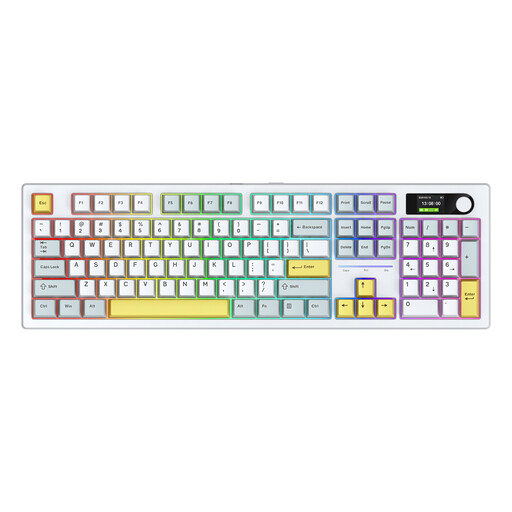
Siukie ACH105 mechanical keyboard with 104 keys and Alice layout

Siukie ACH105, 104 keys, Alice layout

The wired USB-C option could suit you if you are considering an Alice-layout keyboard for building and testing.

The product information lists 104 keys and several connection modes, including wired USB-C.

View at Joybuy

MageGee TS91 wired keyboard with 61 keys and US QWERTY layout

MageGee TS91, wired, 61 keys, US QWERTY

The compact layout could suit a small workspace, but check that it has the navigation and input keys you need.

The product name lists 61 keys and US QWERTY. This model does not have a number pad.

View at Joybuy

Frequently asked questions

Will a specialist keyboard automatically make my venue guide accessible?

No. You need to build and test the guide's controls themselves: links, buttons, forms and menus must be accessible and usable with a keyboard, with a logical focus order. W3C describes keyboard operation as a feature of web content.

How do I test the guide without a mouse?

Go through the guide without a mouse and check that you can move between interactive elements, activate them and leave menus or pop-ups. Simply connecting a keyboard is not an accessibility test.

Do I need software to connect a wired keyboard?

Logitech describes the K120 as a keyboard you can plug in via USB and start using. Before buying, check that your computer has a compatible port; other models or features may require a different setup.

Does the Clevy keyboard come with a matching keyguard?

No, Clevy says the matching Keyguard 3 is sold separately. Also check that the key set on the Contrast Keyboard 3 suits the tasks you need to carry out when developing and testing.

Does my Dutch venue guide have to be legally accessible?

That depends on the provider and the purpose of the guide. Accessibility requirements under the Besluit digitale toegankelijkheid overheid apply to websites and apps run by government bodies that fall within its scope, according to DigiToegankelijk. A guide that lets consumers enter into an agreement online may fall under the rules for e-commerce services, according to the Authority for Consumers and Markets (ACM). The scenario described alone does not determine whether either set of rules applies to this specific guide.
