
Vandaag of morgen in huis

Kwaliteit gegarandeerd

Welkomstaanbiedingen ontgrendelen: GRATIS bezorging | Tot 80% korting | Gratis 30 dagen JoyPlus-proefperiode
Download de app
A laptop lock seems simple: attach the cable to a fixed object, insert the lock into the laptop and turn the key. Yet many people buy a model that doesn't fit their laptop or work environment. With ultra-slim devices in particular, the wrong connection, a bulky lock head or a cable that blocks ports can quickly cause frustration.
If you're looking for a Kensington laptop lock with key, it's worth looking beyond just the brand or price. Pay close attention to the type of security slot, the dimensions of the lock and how it will be used day to day.
Not every laptop has the same connection. Traditional Kensington slots often use a standard security slot, while modern, slim laptops sometimes require a NanoSaver laptop lock. So first check the laptop manufacturer and the exact model.
A lock designed for a standard cut-out won't automatically fit a Nano connection. The wrong combination can lead to an unstable fit or a lock that can't be inserted at all.
With an ultra-slim laptop lock, it's not just the cable that matters. The thickness of the lock head also determines whether the laptop sits flat on the desk. A bulky head can lift the casing or block ports next to the security slot.
This is particularly awkward in meeting rooms, classrooms and hot-desking areas, where a laptop is regularly connected to a monitor, dock, mouse or charger.
A sturdy cable is useful, but physical laptop security only works well when the other end is attached to a fixed, suitable object. Wrapping a cable around a lightweight table leg or a loose piece of furniture offers little protection.
Also check how keys are managed. For an office, school or government organisation, it's practical to know how many keys are supplied and which key system is used.
The Kensington EQ Laptop Lock with Key uses a Nano security slot and is designed for laptops compatible with Kensington NanoSaver 2.0. This is an important distinction from a standard Kensington connection.
Look in your laptop's product information for terms like Nano Security Slot, NanoSaver or a similar description. If this isn't clearly stated, check the manufacturer's technical documentation before ordering a laptop cable lock.
According to the product specifications, the Kensington EQ has a stainless steel cable of 1.83 metres, often rounded to 1.8 metres. That length gives you room to attach the laptop to a desk frame, fixed cabinet or other suitable anchor point.
The cable has a diameter of 3.9 millimetres. A longer cable isn't always more convenient: excess length can get in the way on a desk. So measure the distance between the laptop and the fixed object beforehand.
A suitable lock should interfere with your normal workflow as little as possible. According to the product description, the slim NanoSaver 2.0 lock head doesn't block input or output ports and allows the laptop to lie flat.
This makes this type of laptop lock for the office also usable in environments where devices are frequently charged or connected to peripherals. The product specifications also mention a silver finish, two supplied keys and a 5-millimetre round key system.
The selection below distinguishes between physical security and additional tools. A Bluetooth tracker can help you find a device, but it doesn't replace a cable lock that secures a laptop to a fixed object.
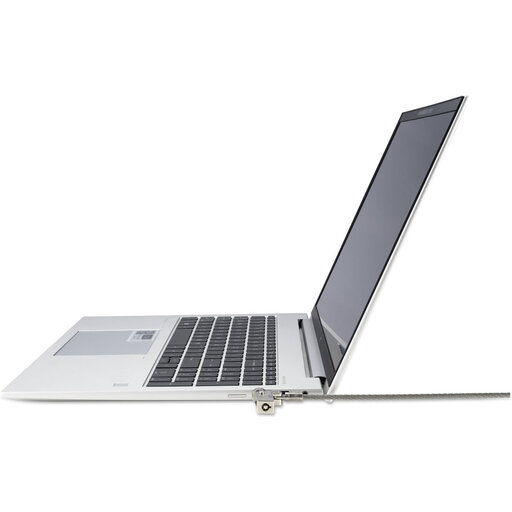
Why this fits the profile: This is a straightforward choice for anyone looking for physical laptop security with a key, without needing an extra app, subscription or battery.
The slim NanoSaver 2.0 lock head is designed for compatible ultra-slim laptops and, according to the product description, is engineered to keep ports clear.
Stainless steel cable of 1.83 metres, two keys and a silver-coloured housing.
Why this fits the profile: Ideal for users who want a neat, low-profile security solution at a fixed workstation.
The cable and lock housing are made from stainless steel according to the product specifications. Always check that your laptop has a Nano connection.
Low profile, free access to ports and a key mechanism with two supplied keys.
Why this fits the profile: A logical option for offices, schools and organisations that use multiple devices in fixed locations.
The 5 mm key system can make key management within an organisation more straightforward. Decide in advance who will look after the spare key.
Cable of 1.83 metres, NanoSaver connection and a design that keeps the laptop stable on the work surface.
A laptop lock is a deterrent physical security measure, not a guarantee that a device will never be taken. So combine it with a locked screen, strong account security and a fixed work procedure for when laptops are left unattended.
We've put together a full, up-to-date list of products that fully meet these strict selection criteria and comply with current European safety regulations.
No. A NanoSaver 2.0 lock is designed for laptops with a compatible Nano security slot. Check the laptop model and the manufacturer's information before ordering.
The lifespan depends on use, storage and how the cable and key are handled. Avoid sharp kinks, heavy pulling force and damp storage. Check regularly that the cable, lock head and key are working smoothly.
No. A tracker, such as an AirTag or SmartTag, can help you find a device or bag, but it doesn't secure the laptop to a fixed object. For physical security, you need a suitable laptop cable lock.
