Who is this choice for?

Racer with a small desk

Wants to race without permanently setting aside space for a wheel and pedals. So compare the size of a gamepad with the footprint of the complete wheel setup. For example, 8BitDo lists the dimensions of the Lite 2, while HORI’s wheel setup also includes pedals and suction cups.

Switch racer looking to upgrade

Plays on Switch or Switch 2 and wants to know in advance which controller and features work with the system. For example, Nintendo describes how Switch accessories work with Switch 2; also check the requirements for the exact model.

PC racer with limited desk space

Is looking for a gamepad for a Windows kart racing game and wants to know which connection is needed. For the Ultimate 2C Wireless on Windows, 8BitDo lists a 2.4GHz adapter or a wired connection; also check that the specific game supports controller input.

What should you look for when buying?

What to consider What should you check? Who is this important for?
Platform and game Compare your console or operating system and the exact game with the stated compatibility, connection and any system version requirements. If I want to race on a Switch or PC, I want to know first whether both the controller and the game work with my system. Around 36% of consumers put platform and game compatibility first.
Space on and around your desk Measure the space for your hands and, if you’re choosing a wheel setup, also allow room for the mount, cable and pedals. With limited desk space, I want to know whether the whole setup will fit, not just whether the wheel is called ‘mini’. Around 29% of consumers give available space top priority.
Steering style Decide whether you want to play with sticks, motion controls or a wheel, and check which features your game supports. If I prefer a particular way of steering, I want to check whether the game supports it and whether the controller has the controls I need. Around 21% of consumers prioritise steering style.
Extras you may need Check what’s in the box, which connections you need, and whether any accessories or extra warranty must be bought separately. If I want to avoid surprises with accessories or connections, I check what I need for my complete setup. Around 14% of consumers focus mainly on additional requirements and costs.

Common pitfalls

  • Assuming ‘wireless’ means ‘works with my console’

    A wireless connection alone doesn’t tell you which platforms a controller works with. For example, 8BitDo lists Windows and Android for the Ultimate 2C Wireless, while the Lite 2 is a different model with its own Switch requirements.

    Check the full model name, supported platform and relevant connection; don’t rely on a term such as ‘Bluetooth’ alone.

  • Assuming a ‘mini’ wheel needs hardly any space

    A wheel setup also takes up room for the pedals, cable and mount. HORI lists suction cups for mounting and pedals with the Racing Wheel Pro Mini.

    Measure both your desk and the floor space for the pedals before choosing a wheel setup.

  • Assuming older Joy-Con controllers are fully interchangeable with Joy-Con 2

    Nintendo says that older Joy-Con controllers can work wirelessly with Switch 2, but can’t be attached to the system or charged on it.

    Check which generation you have and how to charge it before treating your existing controllers as a complete replacement.

  • Confusing a paid warranty plan with your statutory rights

    The Dutch government distinguishes between statutory rights and an additional warranty you buy. If a product is faulty, the retailer is the point of contact for a solution.

    Compare the terms of an additional plan with your existing rights before paying for it.

Brands to consider

Nintendo

A natural option to compare if you’re looking for Nintendo features and support on Switch or Switch 2; models and features vary.

  • Nintendo lists motion controls, HD Rumble and NFC for the Switch Pro Controller.
  • According to Nintendo, on Switch 2 this older Pro Controller can’t wake the system from sleep using the HOME button. It isn’t a specific mini model.

8BitDo

The Lite 2 and Ultimate 2C Wireless are different models with different platform requirements.

  • 8BitDo lists dimensions of 120 × 65,95 × 35,45 mm and Switch support for the Lite 2; Switch 2 requires a specified minimum system version.
  • For the Ultimate 2C Wireless on Windows, 8BitDo lists 2,4 GHz via adapter or a cable. This information doesn’t confirm Switch support.

PowerA

The Nano Enhanced Wireless is a compact controller that PowerA describes as being for the original Switch family.

  • PowerA lists motion controls, a rechargeable battery and two mappable back buttons for this model.
  • PowerA doesn’t list HD Rumble, IR or amiibo NFC for this model. The product information doesn’t confirm Switch 2 compatibility for this version.

HORI

The Racing Wheel Pro Mini is the wheel-and-pedals option for anyone with enough space for the complete setup.

  • HORI lists support for Switch 2, Switch and Switch OLED, and describes a wired wheel with suction cups and pedals.
  • ‘Mini’ doesn’t save space for the pedals and cable. HORI says that a feature for Mario Kart 8 Deluxe doesn’t work in Mario Kart World.

Turtle Beach

The Rematch Wireless range offers wireless controllers with extra buttons, but they aren’t specifically mini gamepads.

  • Turtle Beach lists support for several Switch systems, a C button and mappable back buttons for the range.
  • The product page shows different designs. So check the version and features of the specific model.

Joybuy products

This selection includes gamepads for Switch systems, PC and mobile devices. Check that each model’s compatibility and connection suit your game and setup.

Turtle Beach Afterglow Wave Wireless Controller, transparent version

Turtle Beach Afterglow Wave Wireless Controller, Transparent

Suitable if you want to play wirelessly on a supported Switch system and are looking for programmable back buttons.

The product title lists Switch 2, Switch, Switch Lite and Switch OLED. The product information mentions Bluetooth, TMR sticks, a battery life of up to 40 hours, four RGB modes, a gyroscope and two adjustable back buttons.

View at Joybuy

KONIX Nintendo Switch JoyPad controller pair, blue and red

KONIX Nintendo Switch JoyPad Controller Pair, Blue and Red

A set of two controllers for anyone looking for a pair for Switch or Switch OLED and hoping to use them with Switch 2 as well.

The product title lists compatibility with Switch 2. The product information mentions Bluetooth, a gyroscope, vibration and a battery life of up to 8 hours.

View at Joybuy
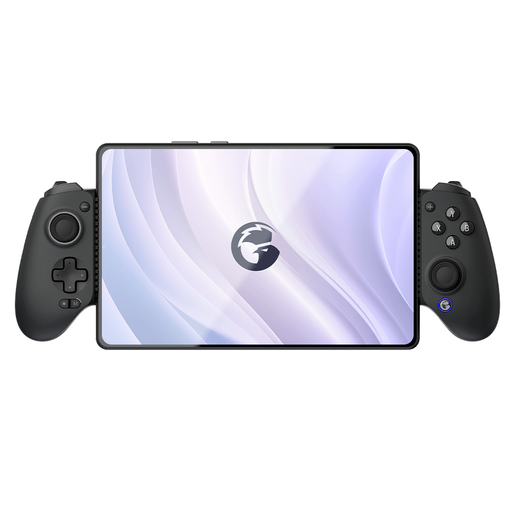
GameSir G8 Galileo Plus wireless mobile game controller

GameSir G8 Galileo Plus Wireless Mobile Controller

An option to compare if you want to play on a supported Switch or mobile platform and need a phone holder.

The product title lists Switch, iOS, Android, tablet and PC. The product information mentions an adjustable phone holder for devices up to 179 mm wide.

View at Joybuy
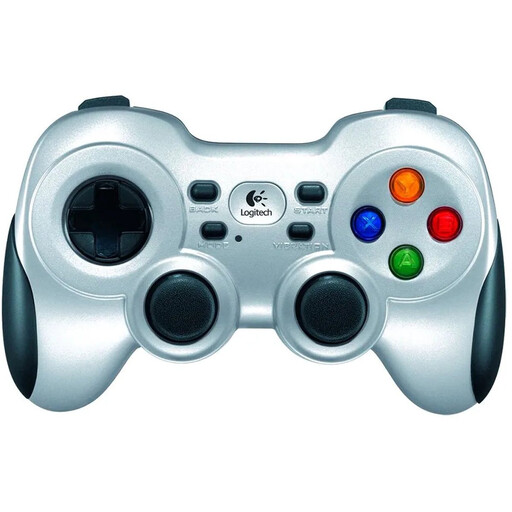
Logitech F710 wireless PC gaming controller, silver

Logitech F710 Wireless Gaming Controller for PC, Silver

Suitable if you’re looking for a wireless gamepad for a PC kart racing game; also check that the game supports controller input.

The product information mentions a 2,4GHz connection via the included nano receiver, a four-way D-pad and dual vibration motors.

View at Joybuy

BEITONG KP70 Haptic Feedback Elite Wireless Controller

BEITONG KP70 Haptic Feedback Elite Wireless Controller

An option to compare if you’re looking for one controller for the platforms listed in the product title.

The title lists PC, NS, NS2, iOS and Android. The product information mentions wired, wireless and Bluetooth connections, dimensions of approximately 156 × 107 × 63 mm and a weight of approximately 325 g.

View at Joybuy

Frequently asked questions

Do I need to buy a separate wheel for Mario Kart?

No, not for the steering methods Nintendo describes. Mario Kart World supports steering with a directional stick or motion controls; the separately available Joy-Con 2 steering wheel is for anyone who wants to hold a Joy-Con 2 like a wheel. For Mario Kart 8 Deluxe, Nintendo explains how to turn tilt controls on and off.

Can I pair my older Switch Pro Controller with Switch 2?

Yes, Nintendo says the Switch Pro Controller can be used wirelessly with Switch 2. Its HOME button can’t wake the system from sleep; Nintendo explains how to sync it while the system is on using the controller menu or the USB method.

How do I connect the 8BitDo Ultimate 2C Wireless to a Windows PC?

For Windows, 8BitDo lists the included 2,4GHz USB-A adapter or a wired connection. Also check that your kart racing game supports controller input.

Do I need an extra warranty plan?

Not necessarily. According to the Dutch government, the retailer must offer a solution if a product is faulty. So compare the terms of an extra warranty with your existing statutory rights before paying for it.

Which Dutch rules are relevant when I buy a controller online?

For online purchases from a business, the Dutch government says you usually have a 14-day cooling-off period, which the retailer must tell you about. The Dutch government also lists product safety rules for electrical equipment and, where applicable, CE requirements. Rules for radio equipment are also relevant to wireless devices with Bluetooth or a radio module. This doesn’t confirm that a specific item being sold complies with those rules.
